


Photo Laser Engraving: Materials, Machines & Complete Guide
 2026-02-19
WHAT ARE YOU LOOKING FOR?
Search Across Products, Blog Posts, Support Content, And Resources.

Photo Laser Engraving: Materials, Machines & Complete Guide
2026-02-19

Photo laser engraving turns a digital photograph into a permanent physical image on materials such as wood, acrylic, stone, glass, coated metal, and selected bare metals. The result can range from a warm portrait burned into wood to a frosted image on acrylic, a light-toned memorial photo on dark marble, or a high-contrast image marked onto metal.
The important point is that photo engraving does not work the same way on every material. Wood darkens under laser energy, clear acrylic develops a frosted appearance, dark stone often becomes lighter, and bare metal generally requires a fiber or MOPA laser rather than a conventional CO₂ laser.
This guide focuses on the bigger decisions: which materials work best, which laser source fits each material, how engraving quality changes from one surface to another, and which Thunder Laser platform makes sense for different photo engraving workflows. If you already have a photo and want to learn exactly how to prepare, dither, test, and engrave it, see our How to Laser Engrave a Photo guide.
Last reviewed: September 2026.

Photo engraving can create detailed, permanent images on a wide range of materials when the laser source and process are matched correctly.
Quick Answer: What Is the Best Setup for Photo Laser Engraving?
There is no single best laser or material for every photo engraving project. Choose the setup according to the surface and the visual result you want.
Photo laser engraving is a raster-based process that converts the tonal information in a digital image into thousands of small laser-processed points or lines. Those marks create the visual impression of highlights, shadows, texture, and depth when viewed together.
The laser does not always create physical depth in proportion to the darkness of every pixel. The final image can come from darkening, frosting, surface ablation, coating removal, color change, or another material reaction. This is why the same photograph looks very different when engraved onto maple, acrylic, slate, glass, or anodized aluminum.
Most photo engraving workflows use either grayscale processing or a dithering method that converts tonal information into a controlled pattern of dots. Image preparation is important, but it is only one part of the process. The material's response and laser wavelength ultimately determine what kind of visual contrast is possible.
The best material depends on the visual style, environment, durability, product size, and laser source available. A wedding portrait on wood needs a different process from a memorial photograph on marble or a serialized image on anodized aluminum.
| Material | Typical Photo Effect | Common Laser Direction | Good For | Main Consideration |
|---|---|---|---|---|
| Wood | Warm dark-toned image | CO₂ | Portraits, gifts, décor | Grain and natural color variation affect detail |
| Cast Acrylic | Bright frosted detail | CO₂ | Displays, awards, illuminated pieces | Background and engraving side influence visibility |
| Slate | Light mark on dark surface | CO₂ or suitable marking laser | Coasters, portraits, décor | Natural surface variation changes contrast |
| Marble / Granite | Light-toned permanent image | CO₂ | Memorials, plaques, architectural pieces | Mineral composition and polish affect tonal response |
| Glass | Frosted image | CO₂ or selected UV processes | Awards, panels, drinkware, memorials | Composition, stress, heat, and surface curvature matter |
| Anodized / Coated Metal | High-contrast image | CO₂ or fiber depending on coating/substrate | Plaques, labels, promotional pieces | Contrast comes from changing or removing the surface layer |
| Bare Metal | Permanent marked or engraved image | Fiber / MOPA | Metal cards, jewelry, industrial or premium products | Laser source and surface finish must match the metal |
The best photo engraving material depends on the required visual effect, laser wavelength, surface response, and final application.
Wood remains one of the most popular photo engraving materials because the laser creates a naturally warm, dark image that works especially well for portraits, family photographs, memorial pieces, and personalized gifts.
Light-colored, fine-grained woods usually make photo detail easier to read because the engraved mark has stronger contrast against the base color. Strong grain, knots, resin pockets, or dramatic natural color variation can compete with subtle facial tones.
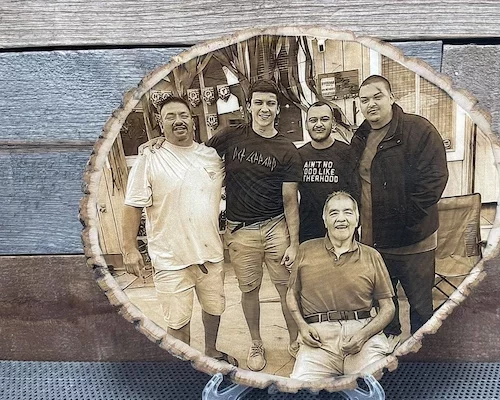
Wood creates a warm, organic photo engraving effect, but grain and natural surface variation become part of the final image.
Learn more in the Wood Laser Processing Guide.
Acrylic produces a cleaner and more contemporary photo effect than wood. Cast acrylic is particularly suitable for photo engraving because CO₂ laser processing can create a bright frosted contrast with fine tonal detail.
Clear acrylic is frequently used for illuminated photo panels, awards, memorial displays, and decorative blocks. Reverse engraving can keep the front surface smooth, while a dark backing or edge lighting can make the frosted photo much easier to see.
For acrylic type, engraving direction, photo preparation, and material-specific considerations, see the Acrylic Laser Processing Guide and Laser Engraving on Acrylic Guide.
Dark stone is especially effective for memorial and commemorative photographs because laser processing commonly creates a lighter mark against the dark substrate. The visual relationship is therefore the opposite of wood, where laser energy usually creates a darker result.
Slate is popular for coasters, signs, and decorative portraits. Polished black marble and dark granite are stronger choices when the goal is a formal memorial, headstone, plaque, or architectural piece. Natural mineral composition can vary across the surface, so testing is important even when two stone pieces look similar.
Explore the Stone, Slate & Marble Laser Guide for material-specific processing information.
Glass photo engraving creates a frosted surface image rather than the dark tonal effect seen on wood. It can work well for flat panels, memorial plaques, awards, drinkware, mirrors, and decorative products.
Glass composition, wall thickness, internal stress, coatings, and curvature can all affect the engraving. For curved drinkware, positioning and rotary setup become as important as image quality. Highly stressed or specialty glass should be tested carefully before production.
See the Glass Laser Engraving & Marking Guide for more detail.
“Photo engraving on metal” covers several different processes. Anodized aluminum and coated metal can produce high-contrast images when the surface layer is changed or removed. Bare stainless steel, aluminum, brass, and other metals usually require a fiber or MOPA laser when direct marking or engraving is the goal.
The best process depends on whether the desired image comes from coating removal, surface color change, shallow marking, or actual material removal. A CO₂ laser should not be treated as a universal bare-metal photo engraver.
For a broader comparison, see the Metal Laser Engraving & Marking Guide.
Laser wavelength should follow the material. A higher-power laser is not automatically better for photographs if its wavelength does not interact with the substrate in the right way.
| Laser Type | Typical Photo Materials | Main Strength | Main Limitation |
|---|---|---|---|
| RF CO₂ | Wood, acrylic, stone, glass, leather, coated materials | Detailed raster engraving on a broad range of non-metals | Not a direct bare-metal engraving solution |
| Q-Switched Fiber | Stainless steel, aluminum, brass, titanium, coated or anodized metal | Fast, precise permanent metal marking | Small marking field compared with gantry CO₂ systems |
| MOPA Fiber | Metals and selected plastics | More pulse control for refined metal marking and advanced effects | Not the primary laser for large wood or acrylic photo panels |
| UV | Selected glass, plastics, ceramics, electronics, heat-sensitive materials | Fine lower-heat marking | Different workflow from conventional large-format CO₂ photo engraving |
Start with the material and target effect, then select the laser source.
There is no single Thunder Laser model that is automatically best for every photograph. The correct machine depends on the material, image size, production volume, working area, and whether the business also needs cutting, bare-metal marking, or mixed-material production.
The Bolt Series is the first Thunder Laser family to consider when detailed RF CO₂ engraving is the priority. Current Bolt models offer 30W, 60W, and 80W RF CO₂ configurations with engraving speeds up to 2000 mm/s across progressively larger work areas.
This makes Bolt particularly suitable for photo products such as wood portraits, acrylic gifts, plaques, personalized pieces, and small-to-medium batch work where engraving performance matters more than maximum cutting power.
The Nova Plus Series is a better fit when photo engraving is combined with larger-format products, cutting, signage, or broader production needs. The series offers RF CO₂ configurations up to 120W and engraving speeds up to 1200 mm/s.
Its value is therefore not simply “more wattage.” It is the combination of RF engraving, larger work areas, and additional cutting headroom for businesses producing a wider mix of products.
The Titan Series moves photo engraving into a more industrial workflow. It combines RF CO₂ processing with engraving speeds up to 3000 mm/s, 8G acceleration, AC servo motion, and larger work areas for batch production or oversized pieces.
This becomes relevant for memorial production, large decorative panels, repeated batch jobs, or businesses where throughput and positioning efficiency matter as much as individual image quality.
For direct photo-style marking on bare metal, the Aurora Series is the more relevant Thunder Laser family. Aurora Fiber and Aurora Lite use 50W Q-switched fiber sources, while Aurora MOPA uses a 100W MOPA fiber source with additional pulse control.
These compact galvo systems are better suited to smaller metal products such as cards, plaques, jewelry, tags, tools, and premium customized items rather than large wood or acrylic photo panels.
The Titan Pro Series is relevant when one production environment needs both RF CO₂ processing for materials such as wood, acrylic, stone, and glass and MOPA fiber processing for metals. Current configurations combine RF CO₂ with a 100W MOPA source and support large-format industrial workflows.
This is a different buying decision from choosing a dedicated photo engraver. Its value comes from handling a much broader mixed-material production mix on one industrial platform.
Machine capability matters, but photo quality is a system-level result. A high-end laser cannot recover facial detail that was missing from the source image, and a perfectly prepared image can still engrave poorly if the material cannot reproduce the selected dot density.
| Factor | Why It Matters |
|---|---|
| Source Image | Determines whether important facial detail, highlights, shadows, and texture exist before engraving |
| Final Physical Size | Controls how much real space is available to reproduce eyes, hair, skin texture, and small details |
| Image Processing | Grayscale, dithering, tonal adjustment, inversion, and sharpening change how the photograph is translated into laser marks |
| Material Response | Each material creates a different spot size, contrast, texture, and color response |
| DPI / Line Interval | Controls dot or line density; excessive density can merge details instead of improving them |
| Speed and Power | Determine effective energy and influence contrast, burn, frosting, or surface change |
| Focus and Motion | Poor focus or motion alignment can soften fine details regardless of image quality |
High-quality photo engraving comes from matching the digital image, laser process, material, and physical output.
More DPI does not automatically produce a better photograph. The laser spot has a physical size, and every material changes around that spot when laser energy is applied. If engraving lines are packed closer together than the material can resolve, they begin to overlap.
The result can become darker, deeper, slower, or softer without gaining meaningful detail. This is why useful photo engraving resolution varies by material and process.
Thunder Laser's own projects show this difference. A wood photo engraving case used 300 DPI and Jarvis processing on a Bolt Pro, while a 2026 marble memorial project used a 600 DPI workflow after grayscale conversion, inversion, and material-specific testing. These are project references rather than universal values.
You can also use the Thunder Laser CO₂ Settings Library as a starting reference before running your own material test.
Real projects are useful because they show how strongly photo engraving changes from one material to another. Rather than treating one set of parameters as universal, compare the process choices behind each result.
In Thunder Laser's wood photo case study, the engraving was produced on a Bolt Pro using 300 DPI, Jarvis image processing, one-way fill, and material-specific speed and power settings. The project illustrates how image mode, DPI, motion direction, material, and laser parameters work together.
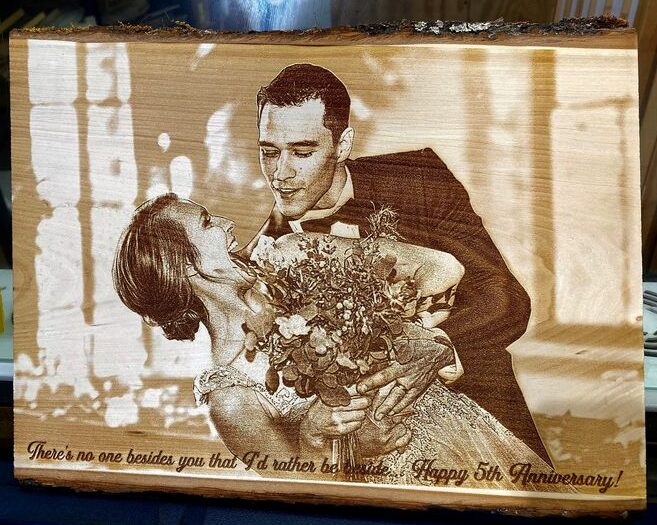
A wood photo engraving can preserve portrait detail while retaining the warm visual character of the material.
View the complete Laser Engraved Photos on Wood Case Study.
A 2026 Thunder Laser marble memorial project used a Titan Pro with a carefully prepared grayscale image, inversion, dithering, precise focus, material testing, and a 600 DPI workflow. The dark polished marble creates a very different tonal system from wood because the processed areas appear lighter against the surface.
This is a good example of why a photo engraving workflow should follow the material rather than forcing the same image and DPI settings onto every substrate.
Acrylic produces a bright frosted image, glass produces a more delicate frosted surface effect, and metal may rely on coating removal, surface marking, or fiber-laser interaction. The underlying photograph can be the same, but the laser technology and image polarity may need to change completely.
Browse more tested projects in the Thunder Laser Inspiration Library.
Photo engraving sits at the intersection of personalization, memorial work, décor, fine art, gifting, and branded production. The same basic technology can therefore serve very different customer groups depending on the chosen material and product format.
The commercial opportunity therefore depends less on “photo engraving” as one product category and more on how the technology is applied to a specific audience, material, and price point.
Start with the products you actually plan to make rather than choosing a machine from wattage or maximum DPI alone.
If you are comparing machines across a broader set of applications, see the Thunder Laser Machine Selection Guide.
Photo laser engraving is not one fixed process. It is a family of image-based engraving and marking workflows whose results depend strongly on material, laser wavelength, image size, surface response, and production requirements.
Wood and acrylic remain strong choices for personalized gifts and décor. Slate, marble, and granite are well suited to memorial and commemorative work. Glass creates an elegant frosted finish. Coated metal and bare metal require different laser strategies depending on how the contrast is created.
Choose the material and laser platform first, then optimize the photograph for that specific process. This approach is more reliable than starting with a generic DPI, power, or image preset and trying to force it onto every surface.
Not Sure Which Material or Laser Is Right for Your Photo Project?
Send Thunder Laser your material, photo, product size, and expected production volume. Our team can help test the application and identify a suitable machine and processing direction.
Request Material TestingTalk To Our Experts Now!
Please leave your contact information so that we can serve you better.
FAQS
FIND THE RIGHT LASER FOR YOUR NEXT PROJECT
Explore Thunder Laser solutions designed for different materials, workflows, and production needs.


 Stable & Consistent MachinesUnlimited ApplicationsRobust After-sales SupportFactory Direct Supply


