


Choose the Right RF Laser Power: 30W, 60W, 80W, 100W, 120W
 2025-09-29
WHAT ARE YOU LOOKING FOR?
Search Across Products, Blog Posts, Support Content, And Resources.

Choose the Right RF Laser Power: 30W, 60W, 80W, 100W, 120W
2025-09-29

If you are choosing a CO₂ laser, wattage is one of the first specifications you will notice. A 30W machine may be enough for detailed engraving and light cutting, while 60W or 80W gives a workshop more cutting headroom. Moving to 100W or 120W can make sense when thicker-material cutting, production speed, or demanding workloads become a regular part of the business.
But higher wattage is not automatically better. The right power depends on what you process, how much cutting versus engraving you do, your usual material thickness, required cycle time, working area, and production volume. A machine with more watts can still be the wrong choice if power is not the actual bottleneck in your workflow.
This guide explains how to compare 30W, 60W, 80W, 100W, and 120W RF CO₂ laser power and, more importantly, how to decide how much power you actually need. For related fundamentals, see How to Set the Right Laser Power for Cutting and Engraving.
Quick Answer: Choose CO₂ laser wattage according to the work that limits your production, not simply the highest number you can afford.
Laser wattage describes the rated power capacity of the laser source. In an RF CO₂ machine, higher available power gives the process more energy headroom, but that does not mean every job should be run at maximum power.
Power matters most when the process is energy-limited. Cutting is the clearest example: as material becomes thicker or the required production speed increases, additional available laser power can help maintain a useful cutting speed. Deep engraving or aggressive material removal can also benefit from greater available energy.
Wattage alone does not determine engraving detail, real-world production speed, edge quality, positioning efficiency, working area, or how many products fit into one batch. Those outcomes also depend on the laser source, beam characteristics, lens, motion system, acceleration, focus, air assist, material, artwork, and machine structure.
This is why a lower-wattage professional RF CO₂ system can still be the better choice for an engraving-heavy workflow, while a higher-power machine may be justified for cutting-heavy production.
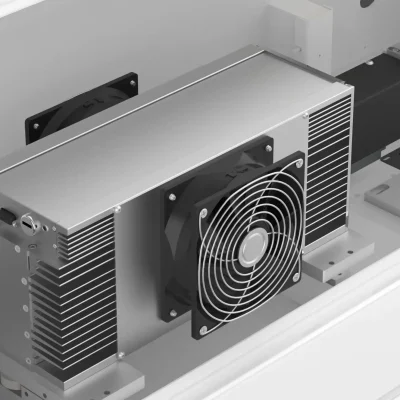
A sealed RF CO₂ laser source used for precise engraving and cutting workflows.
A laser may be able to penetrate a thick piece of material under a particular test condition, but that does not automatically mean the result is suitable for everyday production. A usable production cut needs to consider more than whether the beam reaches the bottom of the sheet.
A better cutting comparison records:
Thunder Laser therefore recommends treating published parameters as starting references and running a material test on your actual stock. You can compare current examples in the CO₂ Laser Settings Library.
The easiest way to choose wattage is to identify the job that puts the most pressure on your current or planned workflow. A personalization shop engraving coated products every day has a different power requirement from a signage company cutting acrylic sheets, even if both businesses use CO₂ lasers.
If most of your work is text, graphics, photos, personalization, custom gifts, small signs, leather products, coated items, or repeated small-to-medium engraving jobs, maximum cutting wattage may not be your main constraint.
In this situation, a 30W or 60W RF CO₂ platform can make more sense because engraving workflow, motion performance, detail, safety, and ease of daily operation may contribute more to productivity than unused cutting capacity.
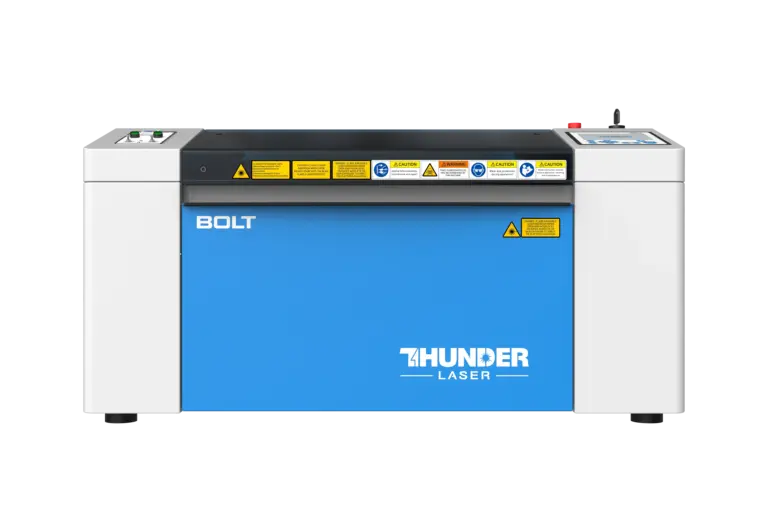
The Thunder Bolt Series is designed around professional RF CO₂ engraving and workshop production.

Detailed photo engraving demonstrates why lower wattage can still be highly effective for engraving-focused work.

A 30W RF CO₂ laser can still handle practical light cutting alongside detailed engraving.
Many small and growing businesses do not have a purely engraving-first or cutting-first workflow. They may engrave personalized products in the morning, cut acrylic signs in the afternoon, and switch to wood décor or prototypes for the next job.
This is where 60W–80W becomes an especially useful range. It gives the machine more cutting headroom without automatically pushing the buyer into a much larger industrial system. The practical advantage is flexibility: enough power for a wider cutting workload while still supporting detailed RF CO₂ engraving.
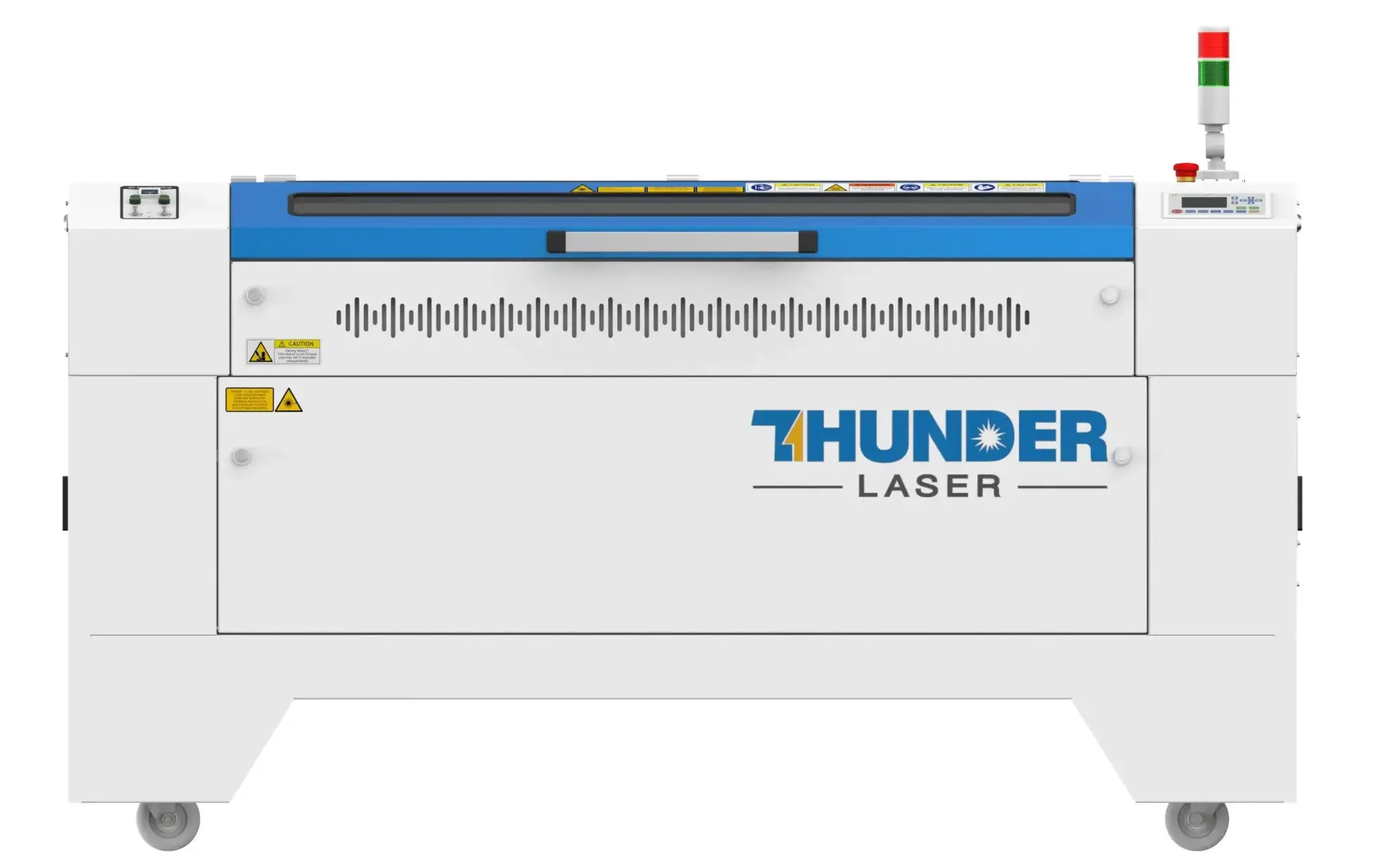
Nova Plus combines RF CO₂ engraving with larger-format cutting capability for mixed production.

RF CO₂ engraving on ABS shows that a mixed-use machine still needs to maintain detailed engraving performance.
Moving toward 80W, 100W, or 120W becomes more relevant when the business routinely loses time because lower-power cutting is too slow, requires too many passes, or cannot provide enough production margin for the materials being processed.
The important word is routinely. Buying 120W because one occasional project may require unusually demanding cutting is very different from running that workload every day. Higher power becomes easier to justify when it removes a recurring production bottleneck.

A thick-acrylic cutting demonstration is useful as test evidence, but production selection should also consider speed, repeatability and edge quality.
In high-volume production, the laser source is only one part of throughput. A larger work area can let you arrange more products per batch. Higher acceleration can reduce cycle time on repeated engraving. Pass-through structures can reduce material preparation. Cameras and positioning systems can shorten setup between jobs.
That means an industrial buyer should not ask only, “Do I need 100W or 120W?” A more useful question is, “What combination of power, bed size, motion performance and workflow gives me the required output per shift?”
| Power | Best When | Typical Workflow | Main Trade-Off |
|---|---|---|---|
| 30W | Fine engraving dominates and cutting demands are light | Personalization, photos, gifts, leather, wood and smaller products | Less cutting headroom as thickness and production demand increase |
| 60W | You regularly combine engraving with practical cutting | Small-business production, décor, signs, custom products and prototypes | Can become the cutting bottleneck as material demands increase |
| 80W | Cutting is frequent but detailed engraving still matters | Growing workshops, signage, larger projects and batch production | Higher investment may not create much value for engraving-only work |
| 100W | Higher cutting throughput or demanding material removal is routine | Production-oriented cutting, larger panels and demanding mixed work | Often unnecessary when engraving and light cutting remain the main workload |
| 120W | Cutting capacity and production throughput consistently justify maximum RF power | High-demand production and more difficult non-metal cutting workflows | Power alone does not justify the investment; machine workflow must also fit production |
Choose wattage by the recurring production bottleneck rather than assuming the highest available power is automatically the best choice.
The table compares general workflow roles, not universal cutting-thickness limits. Actual capability depends on material, machine, lens, air assist, speed, focus and acceptable finished quality.
Acrylic is often used to compare CO₂ laser power because it is a common production material and cutting performance changes noticeably as thickness increases. However, a single “maximum acrylic thickness” number is not enough to choose a machine.
If your shop uses the same acrylic thickness every day, compare how different wattages process that exact material. A higher-power machine may offer little business value if your current machine already cuts it fast enough for your order volume. On the other hand, a modest speed improvement can become economically important when the same cut repeats hundreds of times per shift.
A cut that reaches the bottom of the acrylic is not necessarily production-ready. Excessive heat, rough edges, inconsistent kerf, visible flaming, or an unacceptable surface finish can make a technically successful cut commercially unusable.
| Test Variable | What to Record | Why It Matters |
|---|---|---|
| Material | Type, source and thickness | Different stock can respond differently |
| Laser | Machine and rated wattage | Identifies the actual system being compared |
| Settings | Speed, power and number of passes | Shows the real cycle-time requirement |
| Optics | Lens and focus condition | Changes energy density and cutting behavior |
| Air Assist | Pressure or flow condition | Influences heat, debris removal and edge quality |
| Result | Edge quality, kerf, consistency and cycle time | Determines whether the test is actually production-ready |
A controlled cutting record is more useful for machine selection than a single maximum-thickness claim.
For tested starting parameters across different materials, visit the Thunder Laser CO₂ Settings Library and then validate the result on your own stock.
80W RF CO₂ laser cutting and engraving demonstration.
Higher wattage can provide more energy for deep engraving or material removal, but it does not automatically create finer engraving. For many raster engraving jobs, the real limit may be motion performance, beam quality, spot size, acceleration, artwork, or the material's usable processing window.
Fine text, photographs and detailed graphics depend heavily on precise beam control. A high-power source does not compensate for poor focus, unsuitable optics, unstable motion, or excessive energy being applied to a delicate engraving.
A machine may have enough laser power to run a job faster, but it also needs a motion system capable of moving and changing direction efficiently at that speed. Acceleration becomes especially important for small graphics, repeated text, and raster jobs where the head changes direction frequently.
The practical conclusion is simple: if engraving is your primary work, compare the entire engraving platform rather than ranking machines only by wattage.

High-resolution engraving depends on the complete laser and motion system, not wattage alone.
Wattage is most useful when comparing similar laser systems. A 60W RF CO₂ source and a 60W glass CO₂ source share the same nominal wattage, but the two technologies are designed around different source characteristics and cost structures.
RF CO₂ sources are particularly valuable for fast power modulation, consistent output, precise engraving control, and professional workflows where detail and repeated performance matter. Glass-tube CO₂ systems can offer a different power-to-cost equation and may make sense when high-power cutting economics are more important than RF engraving performance.
For a deeper technical explanation, read What Are the Advantages of an RF Laser Source?. If your workflow is strongly cutting-oriented, you can also compare Thunder Laser's Nova glass-tube CO₂ Series rather than assuming RF is the only possible direction.
Once you know approximately how much laser power your materials require, several other factors can become equally important. This is where two machines with similar wattage can fit very different buyers.
A machine that has enough power but cannot fit your standard product or batch layout will still limit production. Consider both the largest single part and how many repeated products you want to arrange in one job.
Maximum speed matters, but acceleration and machine architecture determine how effectively that speed can be used. This becomes especially important for engraving-heavy businesses and repeated batch jobs.
Pass-through access, cameras, autofocus, rotary setup, air assist and material handling can reduce non-laser time between jobs. When production volume increases, those minutes can matter as much as the seconds saved by additional wattage.
CO₂ wattage cannot solve every material requirement. If your production also requires direct bare-metal marking, the decision is no longer simply about choosing a larger CO₂ source. You may need a separate fiber system or an integrated dual-source production platform.

Titan Pro illustrates why machine selection can extend beyond CO₂ wattage when a production workflow also requires fiber processing.
For a broader product-selection framework, see How to Choose the Best Thunder Laser Machine for Your Business and the CO₂ Laser Material Compatibility Guide.
Once the required wattage range is clear, choose the Thunder Laser platform according to the workflow around that power. Three RF CO₂ series cover most common professional and production scenarios.
The Bolt Series is the first option to consider when professional engraving, personalization, safety, and small-to-medium workshop production are the main priorities and its available power and work area meet the job.
In other words, moving from 30W to 60W or 80W does not automatically mean leaving the Bolt workflow. If the Bolt's area and power still fit the application, it remains a strong choice for an engraving-heavy professional shop.
The Nova Plus Series becomes more relevant when your workflow requires larger processing areas, higher RF power options, or a broader balance between engraving and cutting.
Nova Plus should not be treated simply as “the 60W or 80W machine.” Its stronger reason for consideration is the combination of RF CO₂ processing, wider power choices and larger-format flexibility.
The Titan Series is the stronger direction when the real requirement is industrial throughput rather than simply more watts.

Titan is an industrial RF CO₂ platform where throughput, motion performance and production workflow matter alongside power.
If the material requirement expands beyond CO₂-compatible non-metals and you also need direct metal processing in the same industrial platform, that becomes a dual-laser decision rather than a wattage decision. The Titan Pro dual-laser platform combines RF CO₂ with MOPA fiber for that different workflow.
One of the easiest mistakes in machine selection is buying power for a theoretical future project while ignoring the jobs that actually generate revenue today. Extra wattage has value when it solves a measurable limitation. Otherwise, the money may be better spent on the right work area, workflow, accessories or machine platform.
If most revenue comes from detailed personalization, photos, text, graphics or repeated small products, evaluate whether engraving speed, acceleration, positioning or batch layout is the real bottleneck before paying for substantially more cutting power.
If almost all jobs use the same thin material and your existing power level already completes those cuts within an acceptable cycle time, a major wattage upgrade may deliver little practical return.
More power does not help when products do not fit on the bed or when the machine cannot arrange enough pieces in one batch. For many growing businesses, moving to a more appropriate format can increase output more than moving to a higher wattage in the same small workspace.
A useful way to justify an upgrade is to compare cycle time on the jobs you actually sell. If a higher-power machine meaningfully increases daily output, removes a recurring bottleneck, or lets you accept profitable work that the current setup cannot handle, the extra power has a clear business case.
A good power upgrade solves a recurring production problem. A poor power upgrade adds capacity that your normal workflow rarely uses.
If you are still comparing platforms, the Thunder Laser Machine FAQ covers common questions about the Bolt, Nova, Nova Plus, Titan and other product families.
Not Sure How Much CO₂ Laser Power You Need?
Tell Thunder Laser what materials, thicknesses, product sizes and production volumes you work with. Our team can help you compare the power range and machine platform that best fit your real workflow.
Talk to a Laser ExpertTalk To Our Experts Now!
Please leave your contact information so that we can serve you better.
FAQS
A 30W RF Tube CO₂ laser delivers more stable beam output, a smaller spot size, and higher precision than a 30W glass tube laser. This means it can produce finer engraving details and cleaner cuts on thin materials. Even with the same nominal power, RF Tube machines are generally faster, more consistent, and produce less charring than glass tube models. For a deeper comparison, see RF CO₂ vs. Glass CO₂ Laser.
Yes. A low-power RF Tube CO₂ laser, such as 30W to 50W, is usually enough for small-batch engraving on thin materials. It can provide high precision, clean details, and stable engraving quality. However, if you need large-batch engraving, faster throughput, or deeper engraving effects, a higher-power machine such as 60W or above may be more suitable. Choosing the right power helps maintain efficiency without sacrificing precision.
Yes. The difference is significant. A 30W RF Tube CO₂ laser is better suited for fine engraving, detailed marking, and thin material processing. A 60W RF Tube laser offers stronger cutting ability, faster engraving, and better versatility for both engraving and cutting. For users who mainly engrave small products, 30W can be enough. For small-to-medium businesses that handle more diverse projects, 60W is usually a more flexible choice.
For thin acrylic of 5mm or less, a 30W RF Tube laser can work well for precise cutting and engraving. For medium-thickness acrylic around 5mm to 8mm, a 60W machine usually provides cleaner and faster cuts. For thicker acrylic around 8mm to 15mm, a 100W or 100W+ RF Tube laser is more suitable for smoother and more efficient cutting. The best choice depends on acrylic thickness, required cutting speed, edge quality, and production volume. You can also check our CO₂ laser material settings for starting parameter references.
Choose 30W if your main work is fine engraving, small products, thin materials, and detailed personalization. Choose 50W to 60W if you need a balanced machine for both engraving and light-to-medium cutting. Choose 80W if you want stronger cutting performance and faster processing for thicker materials. Choose 100W to 120W if your workflow focuses on thicker acrylic, wood, production cutting, or higher-volume jobs. In general, lower power is better for fine detail, while higher power is better for cutting speed, thicker materials, and production efficiency. For machine selection support, see How to Choose Thunder Laser Machines.
FIND THE RIGHT LASER FOR YOUR NEXT PROJECT
Explore Thunder Laser solutions designed for different materials, workflows, and production needs.


 Stable & Consistent MachinesUnlimited ApplicationsRobust After-sales SupportFactory Direct Supply


