


How to Choose a Fiber Laser Cutting Machine: Buying Guide (2026)
 2026-09-15

Bolt Series
Professional High-Precision Laser Engraving Machine

Nova Series
Large Format Glass Tube Laser Cutting Machine

Nova Plus Series
Business-grade RF CO₂ Laser Cutter

Nova Pro Series
Professional Laser Cutting & Engraving System

Titan Series
Industrial-grade Laser System

Titan Pro Series
Industrial-grade Dual-laser System


WHAT ARE YOU LOOKING FOR?
Search Across Products, Blog Posts, Support Content, And Resources.

How to Choose a Fiber Laser Cutting Machine: Buying Guide (2026)
2026-09-15

Buying a fiber laser cutting machine is not simply a matter of choosing the highest laser power or the lowest price. The right machine needs to match the parts you produce, sheet sizes you use, regular material thicknesses, production volume, workflow, facility, and long-term support requirements.
This buying guide focuses on the decisions that actually matter before purchasing a fiber laser metal cutting machine—from choosing the right configuration and work area to testing real cutting performance, comparing suppliers, and reviewing quotations.
For detailed questions about materials, cutting thickness, laser power, or assist gas, refer to the dedicated guides linked throughout this article.
Quick Answer: Before choosing a fiber laser cutting machine, evaluate these nine areas:
The basic buying principle is simple:
Before comparing fiber laser cutting machines, define what the machine actually needs to produce. The right machine should match your regular workload, not just the thickest material or largest part you may cut occasionally.
Start by recording these requirements:
| Requirement | What to Define |
|---|---|
| Main Materials | Carbon steel, stainless steel, aluminum, brass, etc. |
| Regular Thickness | The thicknesses you cut most often |
| Occasional Maximum | The thickest material you may need to cut occasionally |
| Sheet Size | Standard sheet dimensions you normally purchase |
| Part Size | Typical and maximum finished-part dimensions |
| Production Volume | Prototype, short-run, batch, or continuous production |
| Edge Quality | Standard production edge or high cosmetic finish |
| Future Demand | Expected increase in volume, thickness, or part size |
Key production requirements to define before choosing a fiber laser cutting machine.
A common buying mistake is choosing a machine around an occasional job.
For example, if most of your work is:
then your machine should first be optimized for that workload.
Do not automatically choose a much larger or higher-power fiber laser simply because you may cut one unusually thick part several times a year.
A better rule is:
For detailed material, thickness, and power selection, use dedicated guides rather than relying only on a supplier's maximum cutting specification.
Once your production requirements are clear, the next step is deciding what type of fiber laser cutting machine configuration fits your workflow.
The main choices usually involve:
Choose based on the materials you actually expect to process.
| Configuration | Better Fit For |
|---|---|
| Sheet-only fiber laser | Flat sheet metal is the primary workload |
| Sheet-and-tube machine | Regular production includes both sheet and tube/profile cutting |
Sheet-only and sheet-and-tube fiber laser configurations suit different production requirements.
A sheet-and-tube machine can increase flexibility, but additional capability only creates value if you expect to use it regularly.
If tube cutting is only a possible future requirement, compare the additional cost and complexity against using a dedicated tube-cutting solution later.
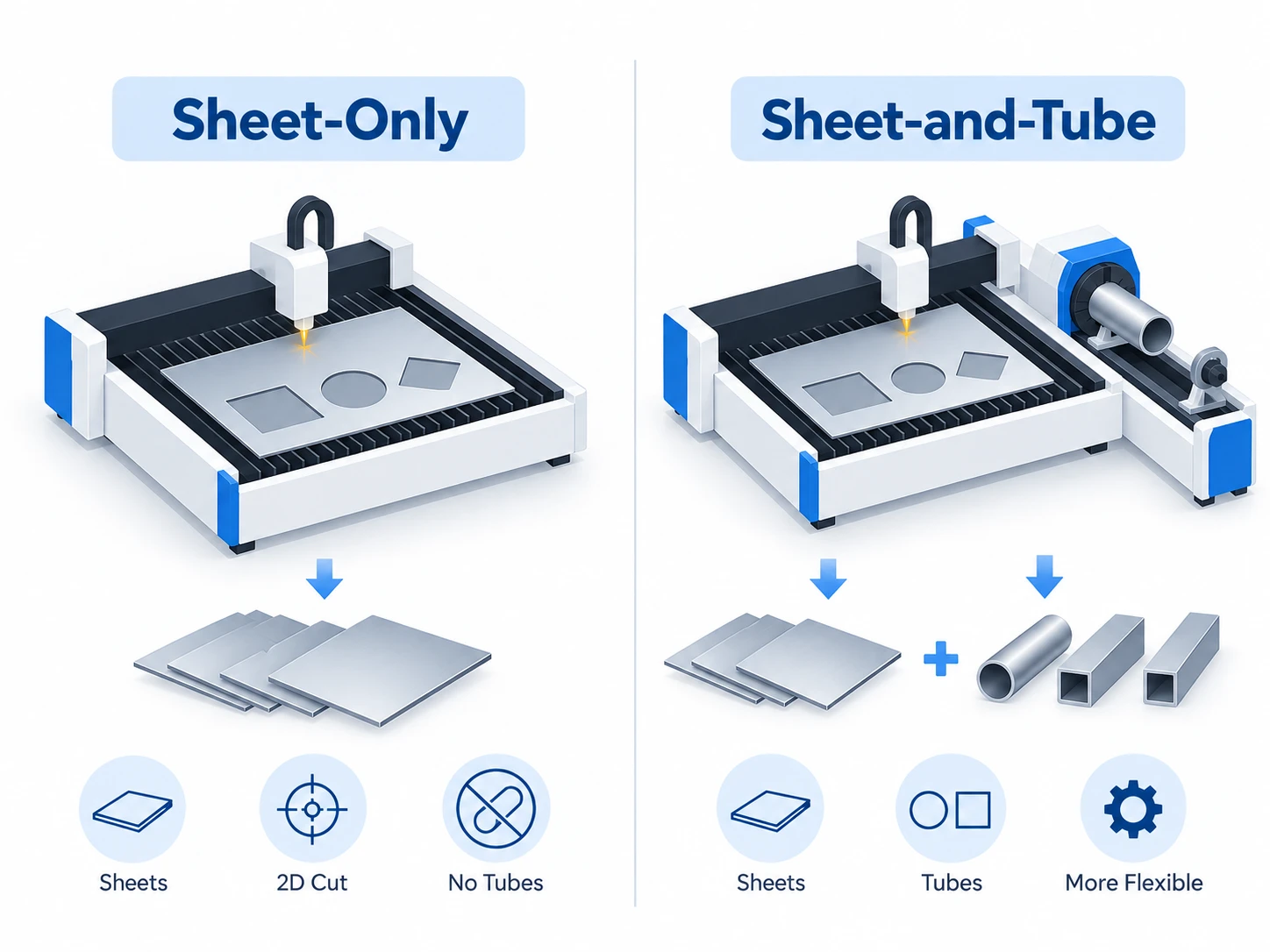
Comparison of sheet-only and sheet-and-tube fiber laser cutting machine configurations.
| Configuration | Main Advantage | Main Consideration |
|---|---|---|
| Open machine | Easier access and simpler loading | Laser exposure, sparks, and fume control require greater attention |
| Enclosed machine | Better control of laser exposure, sparks, and fumes | Usually requires more space and investment |
Open and enclosed fiber laser machines differ mainly in access, containment, safety, and installation requirements.
For workshops where operator safety, fume control, and a more contained production environment are priorities, an enclosed machine is generally the stronger configuration to consider.
Safety features and regulatory requirements should still be checked individually rather than assuming every enclosed machine provides the same level of protection.
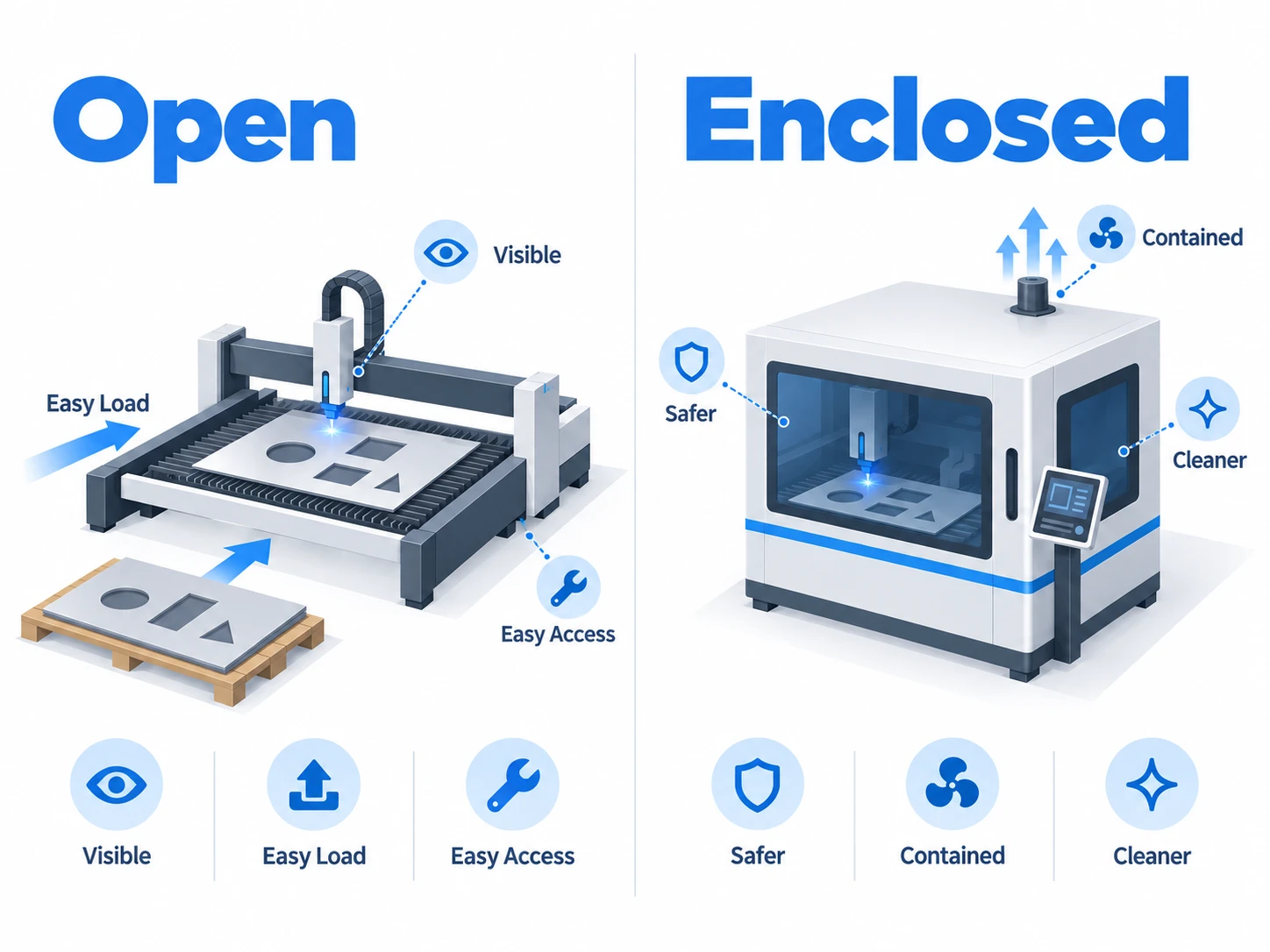
Comparison of open and enclosed fiber laser cutting machine configurations.
The main question is:
Does loading and unloading stop production?
Single table:
Exchange table:
An exchange table is most valuable when material handling time is already limiting machine utilization. It should not be treated as an automatic upgrade for every buyer.
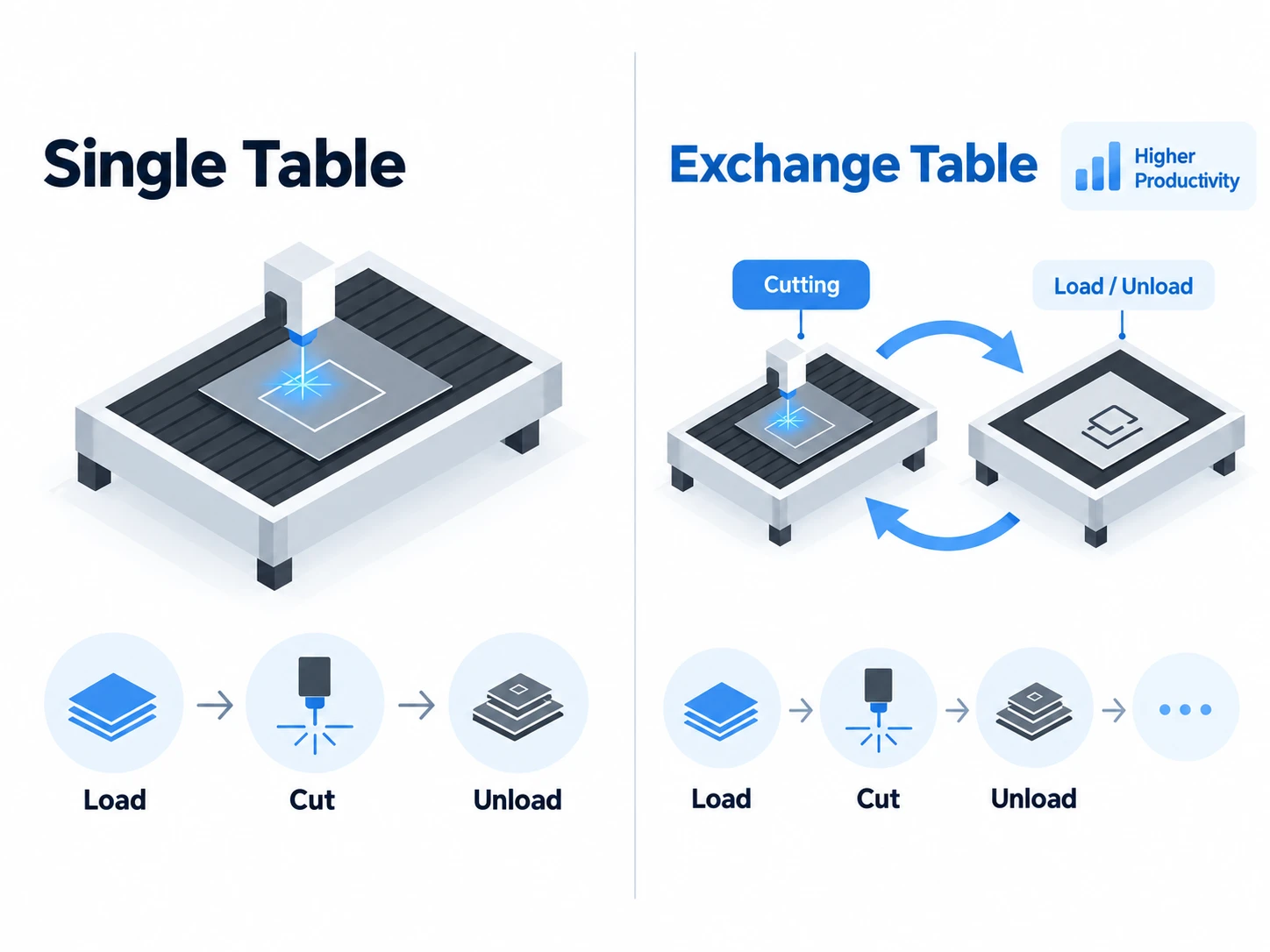
Comparison of single-table and exchange-table fiber laser cutting machine configurations.
Choose the work area around the sheet sizes you process regularly.
Consider:
A larger cutting bed is not automatically better. It may increase:
The practical goal is to choose the smallest work area that comfortably handles your normal production requirements and expected growth.
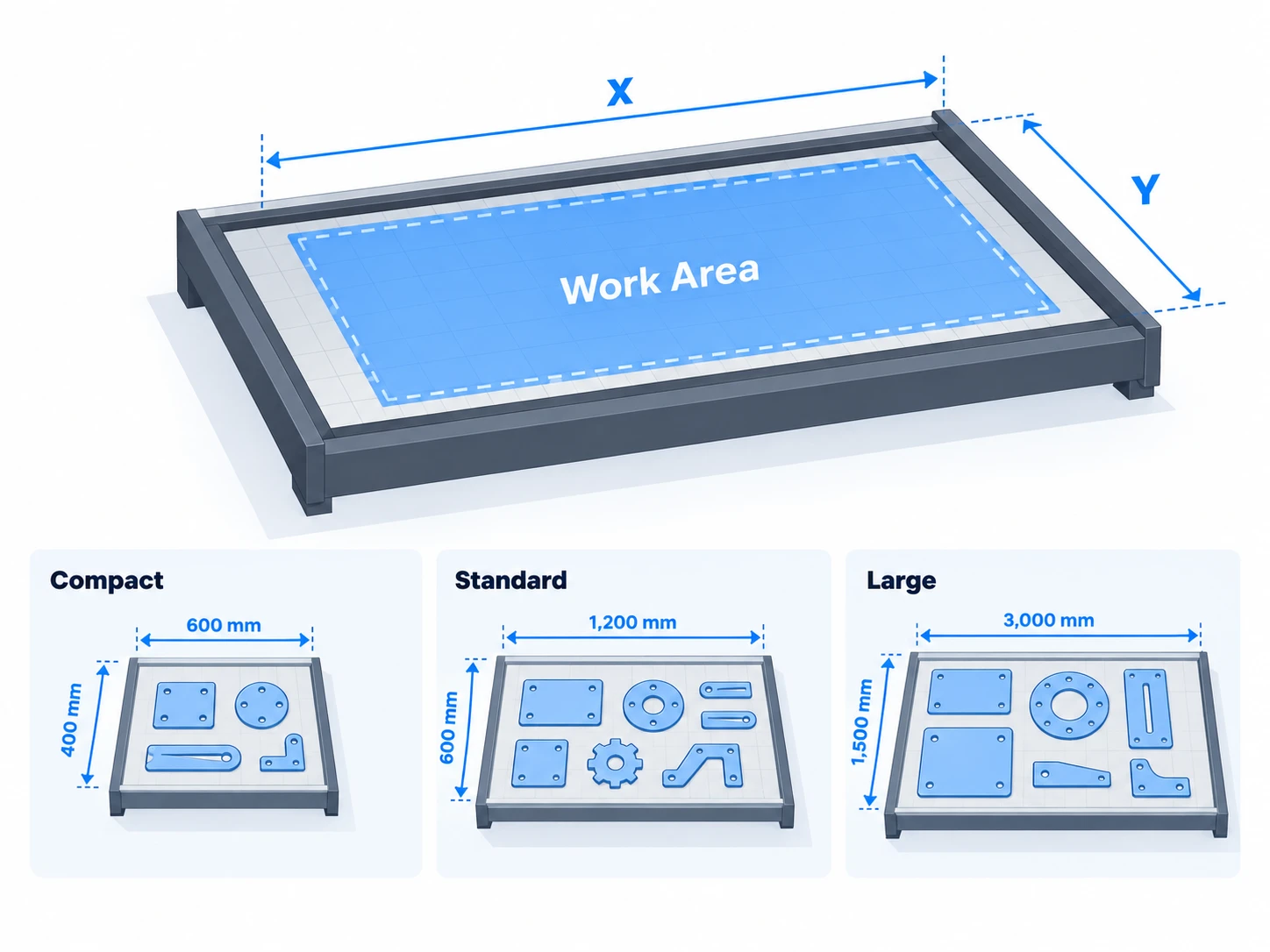
Fiber laser cutting machines with different work areas for different sheet sizes and production needs.
Laser power should also be selected around the materials and thicknesses you process most often.
Before choosing a power level, define:
Do not choose a machine simply because the specification says it can “cut up to X mm.”
Maximum cut-through thickness and practical production thickness are not always the same. A machine operating close to its maximum capability may cut more slowly or require more post-processing than a higher-power system handling the same material with greater margin.
For detailed power selection, refer to the dedicated Fiber Laser Cutting Thickness Guide and Fiber Laser Power Guide.
In short: choose the configuration that matches how you actually produce parts—not the machine with the longest feature list.
A fiber laser cutting machine should be judged by how well it handles your regular production work, not only by maximum cutting thickness or headline cutting speed.
Key performance areas include:
Focus first on the materials you process most often.
For example, if most of your production uses:
then these should matter more than whether the machine can occasionally cut a much thicker plate.
A machine that performs consistently on your everyday workload may be a better choice than one selected mainly for its maximum cutting specification.
When comparing cutting results, look beyond whether the laser can simply cut through the material.
Check:
| Cutting Result | What to Look For |
|---|---|
| Cut edge | Smoothness and consistency |
| Dross | Amount of material remaining under the cut |
| Burr | Whether additional deburring is required |
| Piercing | Clean, controlled pierce points |
| Small holes | Shape and edge quality |
| Corners | Excessive burning or deformation |
Key cutting-quality indicators to inspect when testing a fiber laser cutting machine.
Poor edge quality can increase grinding, deburring, or finishing work after cutting.
A single good sample does not show whether a machine can maintain the same result throughout production.
Consider:
For repeated production, consistency is often more important than one impressive demonstration cut.
Maximum cutting thickness answers only one question:
Can the machine cut through the material?
It does not necessarily tell you:
For buying decisions, focus more on practical production thickness than absolute maximum thickness.
For detailed thickness and power comparisons, refer to the dedicated Fiber Laser Cutting Thickness Guide and Fiber Laser Power Guide.
Good cutting performance does not automatically mean high production efficiency.
A machine may cut quickly while still losing significant time during:
The better question is not:
How fast can the laser move?
It is:
How efficiently can the machine turn raw sheet into finished parts?
Maximum cutting speed is only one part of production throughput.
Actual output also depends on:
For production environments, compare complete job time, not only maximum cutting speed.
Before paying for more automation, identify the real bottleneck.
| Bottleneck | Possible Solution |
|---|---|
| Long loading/unloading time | Exchange table or automated handling |
| Frequent sheet changes | Faster material handling |
| Poor material utilization | Better nesting software |
| Repeated job setup | Saved parameter libraries / job files |
| High operator involvement | Selected automation |
| Slow file preparation | Better CAD/CAM workflow |
Common production bottlenecks and workflow improvements for fiber laser cutting.
This keeps automation focused on measurable production problems.
More automation is not automatically better.
A practical starting point:
| Production Type | Automation to Consider |
|---|---|
| Prototype / occasional cutting | Manual workflow |
| Small-to-medium batches | Exchange table |
| Regular repeated production | Exchange table + selected automation |
| High-volume continuous production | Automated loading/unloading and material handling |
Different production volumes require different levels of fiber laser automation.
Automation becomes valuable when it reduces:
The right level depends on production volume, labor cost, available floor space, and workflow complexity.
Software should make daily production easier, not add unnecessary complexity.
Before buying, check:
A useful question is:
How many steps does the operator need to go from a CAD file to an actual cut?
A powerful machine with a difficult daily workflow can still reduce productivity.
When comparing machines, look at the full process:
The best machine is not necessarily the one with the highest nominal speed. It is the one that helps your team complete real production jobs efficiently and consistently.
Before ordering a fiber laser cutting machine, confirm that your facility can support the machine safely and reliably.
Key requirements usually include:
Confirm the machine's required:
Do not assume your existing electrical supply is suitable.
Also consider the power requirements of supporting equipment such as:
Any required electrical upgrades should be identified before installation.
Depending on your cutting applications, the machine may use:
Before purchasing, confirm:
The best setup depends on your materials, cutting volume, and required edge quality.
For detailed gas selection, refer to the dedicated Fiber Laser Cutting Assist Gas Guide.
Metal laser cutting produces fumes, particles, and process emissions that need to be controlled.
Check:
Fume extraction should be treated as part of the machine installation—not as an optional accessory added later.
Machine dimensions alone do not show how much space the installation really needs.
Plan for:
Also confirm:
A machine that technically fits in the building may still be difficult to operate efficiently if there is not enough space around it.
Safety features should be evaluated before price becomes the deciding factor.
Check for features such as:
Do not assume that two machines with similar power and work areas provide the same level of safety protection.
Before ordering, ask one practical question: Can our facility install, operate, maintain, and load this machine safely without major unexpected modifications?
A fiber laser cutting machine is a long-term production asset. Machine specifications matter, but so does the supplier's ability to install, support, and maintain the system after purchase.
Before choosing a supplier, evaluate these areas:
| Area | What to Confirm |
|---|---|
| Installation | Who installs and commissions the machine? |
| Training | Is operator and maintenance training included? |
| Technical Support | How can support be contacted? |
| Local Service | Is on-site service available in your region? |
| Warranty | What is covered, and for how long? |
| Spare Parts | Which parts are stocked and where? |
| Software Support | Are updates and troubleshooting included? |
| Response Process | What happens when the machine stops unexpectedly? |
Supplier support should be evaluated alongside machine specifications and purchase price.
Ask:
Installation responsibilities should be clearly defined before the machine arrives.
Training should cover more than simply starting the machine.
Useful training may include:
Also confirm whether training is:
Ask the supplier:
The important question is not simply whether support exists, but how quickly production can resume when a problem occurs.
Review the warranty carefully.
Confirm:
For spare parts, ask:
A machine can only produce when replacement parts and technical support are available when needed.
A lower purchase price may be less attractive if it comes with:
When comparing suppliers, consider both:
not just machine price.
For a production machine, uptime depends on both the equipment itself and the support system behind it.
Two fiber laser cutting machine quotations may show very different prices while actually including different machine configurations, accessories, services, and warranty terms.
Do not compare only the final number.
Start by checking whether you are comparing the same machine scope.
| Item | Supplier A | Supplier B | Supplier C |
|---|---|---|---|
| Laser Power | |||
| Work Area | |||
| Open / Enclosed | |||
| Single / Exchange Table | |||
| Laser Source | |||
| Cutting Head | |||
| Chiller | |||
| Fume Extraction | |||
| Air Compressor | |||
| Software / License | |||
| Installation | |||
| Operator Training | |||
| Warranty | |||
| Spare Parts / Starter Kit | |||
| Shipping | |||
| Total Delivered Cost |
Use a like-for-like quotation table to compare machine configuration, included equipment, services, and delivered cost.
Some quotations include a complete production setup, while others show mainly the base machine price.
Ask whether the quotation includes:
A lower quotation may simply exclude equipment or services you will need later.
Before comparing prices, make sure specifications are equivalent.
For example:
6 kW + enclosed machine + exchange table
should not be directly compared with:
6 kW + open machine + single table
even though both are described as “6 kW fiber laser cutting machines.”
Compare:
rather than:
Price comparisons should also include:
A cheaper machine can become more expensive if essential support or installation services are charged separately.
For a fair comparison, determine what each machine will cost to become ready for production at your facility.
A simple comparison is:
Detailed electricity, assist-gas, maintenance, and ROI analysis should be evaluated separately when calculating total ownership cost.
The key rule: never compare quotations until you know exactly what each supplier is—and is not—providing.
Once you have narrowed the options, validate the machine against your actual production requirements before making the final purchase decision.
A supplier demonstration should prove more than:
“The machine can cut metal.”
It should help answer:
“Can this machine produce my parts at the quality and consistency I need?”
Ask the supplier to perform a cutting test before purchase.
The test should reflect:
Avoid relying only on a supplier's standard demonstration sample.
Whenever possible, provide:
A useful test part may include:
This gives you a much clearer picture of how the machine will perform in your production environment.
Do not evaluate only one perfect finished part.
Ask whether the supplier can:
This helps reveal repeatability, consistency, and real workflow performance.
Use the requirements defined at the beginning of the buying process.
Check:
| Requirement | Result |
|---|---|
| Required material | Pass / Fail |
| Regular thickness | Pass / Fail |
| Edge quality | Pass / Fail |
| Dross / burr level | Pass / Fail |
| Dimensional accuracy | Pass / Fail |
| Small-hole quality | Pass / Fail |
| Repeatability | Pass / Fail |
| Production speed | Pass / Fail |
| Workflow suitability | Pass / Fail |
A practical pass-or-fail checklist for evaluating fiber laser cutting test results.
The goal is not to find the machine with the most impressive demo.
The goal is to confirm that the machine meets your production requirements.
Production
Machine
Facility
Supplier
Commercial
If these items are clear, you are no longer choosing a fiber laser cutting machine based mainly on specifications or price—you are choosing based on whether it can realistically support your production.
If your goal is to bring precision sheet-metal cutting in-house without moving directly into a large automated industrial cutting line, the Thunder AccuMetal Series is designed as a practical fiber laser cutting platform for prototypes, customized parts, short runs, and small-to-medium batch production.
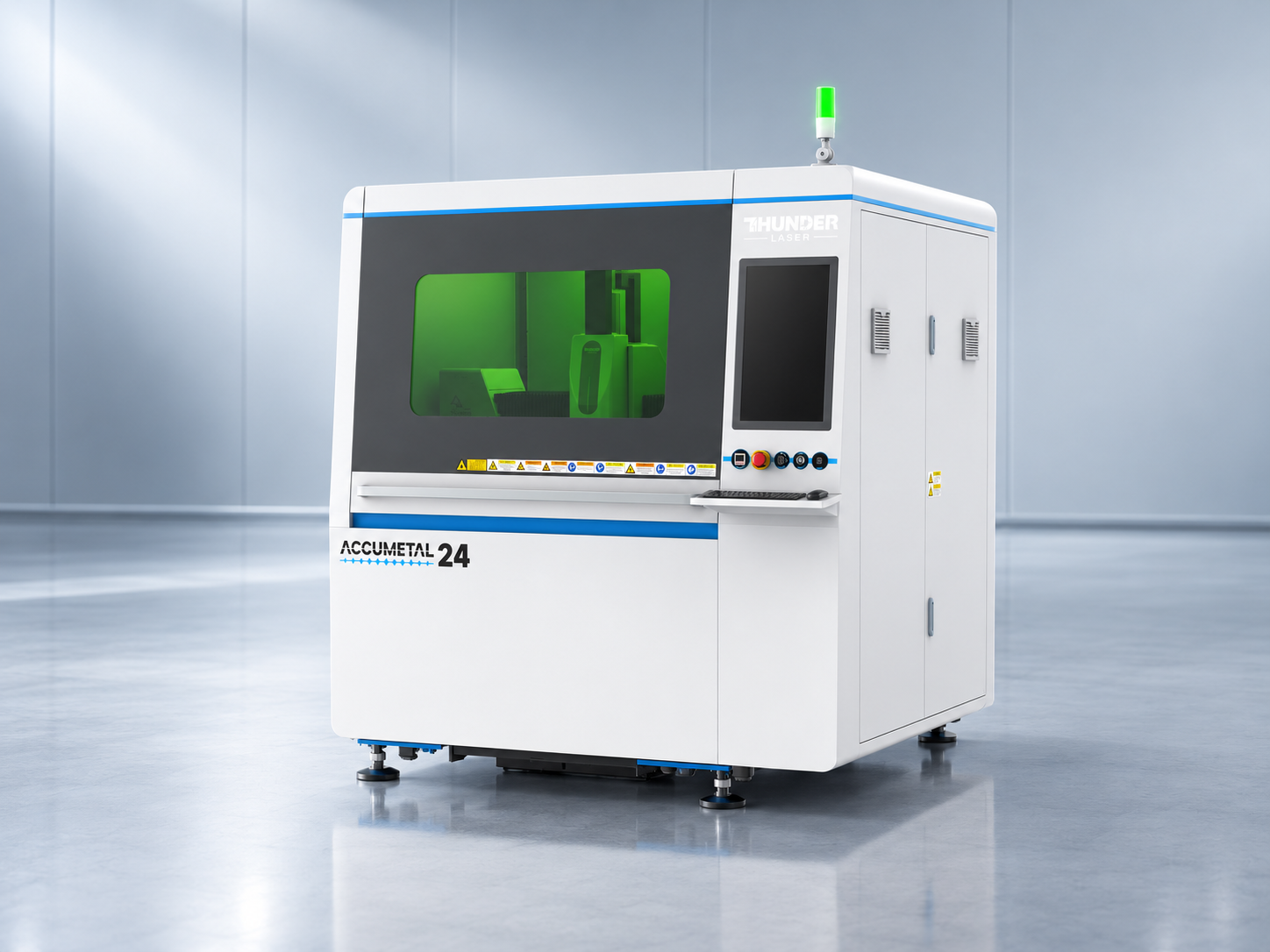
High-precision metal cutting machine Accumetal Series
The series currently includes AccuMetal 24 and AccuMetal 51, giving users two different working formats while maintaining the same 1500W fiber laser platform.
| Feature | AccuMetal 24 | AccuMetal 51 |
|---|---|---|
| Laser Source | 1500W Fiber Laser | 1500W Fiber Laser |
| Working Area | 610 × 610 mm (24 × 24 in) | 1300 × 1300 mm (51.2 × 51.2 in) |
| Positioning Accuracy | ±0.02 mm | ±0.02 mm |
| Maximum Speed | 500 mm/s | 500 mm/s |
| Maximum Acceleration | 2.0G | 1.8G |
| Maximum Table Load | 500 kg | 1000 kg |
| Cooling | Water Cooling | Water Cooling |
| Assist Gas | Air / Oxygen / Nitrogen | Air / Oxygen / Nitrogen |
| Pass-Through | Front & Rear, 180 mm Height | Front & Rear, 180 mm Height |
| Safety | CE, FDA Class 2 | CE, FDA Class 2 |
Comparison of the main specifications of Thunder AccuMetal 24 and AccuMetal 51.
AccuMetal may be worth considering if you need:
However, AccuMetal—or any fiber laser cutting machine—should only be selected after confirming that the specific configuration matches your:
Choosing the right fiber laser cutting machine comes down to one question: can the machine reliably support the work you actually need to produce? Instead of choosing by laser power, maximum cutting thickness, or purchase price alone, evaluate the complete picture—your materials and regular thicknesses, work area, cutting quality, production workflow, facility requirements, software, service support, and the real scope of the quotation.
Whenever possible, validate the machine with your own materials and production files before making the final decision. If you are looking for a practical way to bring precision metal cutting in-house, the Thunder AccuMetal Series is worth considering for prototype work, custom fabrication, and small-to-medium production.
Talk to a Thunder Laser expert about your materials, thicknesses, sheet sizes, and production goals, and let us help you identify the right AccuMetal configuration and arrange a cutting test before you buy.
Talk To Our Experts Now!
Please leave your contact information so that we can serve you better.
FAQS
When buying a fiber laser metal cutting machine, start with your regular materials, thicknesses, sheet sizes, production volume, and required edge quality. Then compare work area, laser power, cutting performance, software, automation, safety, supplier support, and total delivered cost. The right metal cutting machine should fit your normal production rather than simply offer the highest power or maximum cutting thickness.
Choose a metal cutting machine based on the parts you produce most often. Define your main metals, regular thickness range, standard sheet size, batch size, required cutting quality, and available floor space first. These requirements will determine whether you need a compact fiber laser metal cutting machine, a larger-format system, or a more automated production platform.
Laser power should be matched to your regular cutting thickness and production speed requirements, not only the thickest material you may cut occasionally. Higher power can improve cutting capability and throughput, but it also affects machine cost, infrastructure, and operating requirements. Use practical production thickness rather than maximum cut-through thickness as the main buying reference.
A 1500W fiber laser metal cutting machine can be well suited to many thin- and medium-sheet applications involving carbon steel, stainless steel, aluminum, and brass. Whether 1500W is sufficient depends on your regular material, thickness, required edge quality, and production volume. For heavier plate or high-throughput thick-metal production, a higher-power machine may be more appropriate.
Thunder AccuMetal is Thunder Laser's fiber laser metal cutting machine series designed for precision sheet-metal cutting and in-house production. The series includes AccuMetal 24 and AccuMetal 51, both using a 1500W fiber laser platform while offering different work areas for different part sizes and production requirements.
The main difference between AccuMetal 24 and AccuMetal 51 is the working area.
Both are 1500W fiber laser metal cutting machines with ±0.02 mm positioning accuracy and maximum motion speeds of 500 mm/s. AccuMetal 24 is better suited to compact precision production, while AccuMetal 51 provides more space for larger parts and batch layouts.
The Thunder AccuMetal fiber laser metal cutting machine is designed for common sheet metals including:
Actual cutting performance depends on the metal, thickness, assist gas, cutting parameters, and required edge quality.
For its 1500W fiber laser platform, published AccuMetal references list clean-cut capability up to approximately:
Maximum cut-through capability can be higher, but buyers should distinguish between maximum penetration and practical clean-cut production thickness when selecting a metal cutting machine.
Yes. Thunder AccuMetal supports Air, Oxygen, and Nitrogen as assist gases. This allows users to adjust the cutting process according to material, edge-quality requirements, and operating cost. Oxygen is commonly used for carbon steel, nitrogen for cleaner low-oxidation edges, and compressed air for suitable cost-sensitive metal cutting applications.
Yes, Thunder AccuMetal can be a strong option for businesses bringing metal cutting in-house, particularly for prototypes, custom metal parts, short production runs, and small-to-medium batch manufacturing. Its compact fiber laser metal cutting platform is designed to provide professional sheet-metal cutting capability without immediately moving into a much larger automated industrial system.
AccuMetal is designed for precision metal cutting, with published positioning accuracy of ±0.02 mm and a precision motion system built around servo drive, linear guides, and ball-screw motion. This makes the platform suitable for applications involving small holes, detailed contours, repeated features, and precision sheet-metal parts.
AccuMetal includes workflow functions designed to support fiber laser metal cutting, including features such as nesting, automatic edge finding, cutting-path optimization, shared-edge cutting, piercing control, obstacle avoidance, and micro-joint processing. These functions help reduce manual setup and improve material utilization and daily production workflow.
Yes. Before purchasing an AccuMetal metal cutting machine, provide your actual material, thickness, CAD file, and typical part whenever possible. A cutting test allows you to evaluate edge quality, dross, piercing, small features, accuracy, repeatability, and realistic production time using work that is relevant to your business.
Compare Thunder AccuMetal with other fiber laser metal cutting machines using the same criteria:
Do not compare machines based only on wattage or purchase price. The better metal cutting machine is the one that best matches your actual production requirements.
FIND THE RIGHT LASER FOR YOUR NEXT PROJECT
Explore Thunder Laser solutions designed for different materials, workflows, and production needs.

 Stable & Consistent MachinesUnlimited ApplicationsRobust After-sales SupportFactory Direct Supply


