


Is It Worth Investing in a Fiber Laser Engraver?
 25-01-21
WHAT ARE YOU LOOKING FOR?
Search Across Products, Blog Posts, Support Content, And Resources.

Is It Worth Investing in a Fiber Laser Engraver?
25-01-21

A fiber laser engraver can be a worthwhile investment when metal marking, deep engraving, jewelry personalization, product identification, or repeat production makes up a meaningful part of your work. It is especially useful for businesses that regularly process stainless steel, aluminum, brass, titanium, gold, silver, and other compatible metals.
However, a fiber laser is not automatically the right machine for every workshop. If most of your projects involve wood, acrylic, leather, paper, or fabric, a CO₂ laser may provide better value. The real decision depends on your materials, engraving depth, production volume, working area, total ownership cost, and how quickly the machine can generate enough additional profit to recover the investment.
Quick Answer: Is a Fiber Laser Engraver Worth It?
Yes, if you regularly engrave or mark metals and have enough production volume to justify the investment. A fiber laser may not be worth buying if metal work is only occasional, your primary materials are non-metals, or outsourcing remains more economical. Before buying, compare material compatibility, laser type, power, working area, total ownership cost, and estimated payback period.
A fiber laser engraver uses a solid-state laser source and optical fiber to generate a concentrated beam, typically around 1064 nm. This wavelength interacts efficiently with many metals, making fiber lasers particularly useful for permanent marking, surface engraving, deep engraving, serial numbers, QR codes, logos, and industrial identification.
Most desktop fiber marking systems use a galvo scanner rather than moving the entire laser head across the work area. The mirrors rapidly redirect the beam across a defined marking field, allowing fast processing of small and medium-sized products.
Fiber laser technology is most valuable when the application matches its strengths. For a broader comparison of laser wavelengths and material compatibility, see the laser wavelength guide.
Fiber lasers are primarily used for direct metal marking and engraving. Depending on the laser source, material, settings, and required depth, they can create fine surface marks, logos, identification codes, decorative engraving, deep recesses, black marks, and selected color effects.
| Application | Typical Materials | Typical Fiber Laser Work |
|---|---|---|
| Jewelry | Gold, Silver, Stainless Steel, Titanium | Names, Logos, Fine Patterns, Personalization |
| Industrial Identification | Steel, Aluminum, Brass | Serial Numbers, QR Codes, Data Matrix Codes, Traceability |
| Tools & Hardware | Steel, Coated Metals | Branding, Identification, Deep Engraving |
| Electronics | Aluminum, Selected Plastics, Coated Components | Logos, Product IDs, Serial Numbers, Component Marking |
| Personalized Products | Metal Cards, Tumblers, Pens, Tags, Jewelry Blanks | Names, Graphics, Monograms, Custom Designs |
| Automotive & Industrial Parts | Steel, Aluminum, Coated Metals | Part Identification, Traceability, Branding |
Typical fiber laser applications vary by material, alloy, coating, laser source, and required marking effect.
Fiber lasers are well suited to detailed personalization on compatible precious metals and jewelry components. They can create names, dates, monograms, logos, patterns, and fine decorative details without mechanical tools contacting the workpiece.
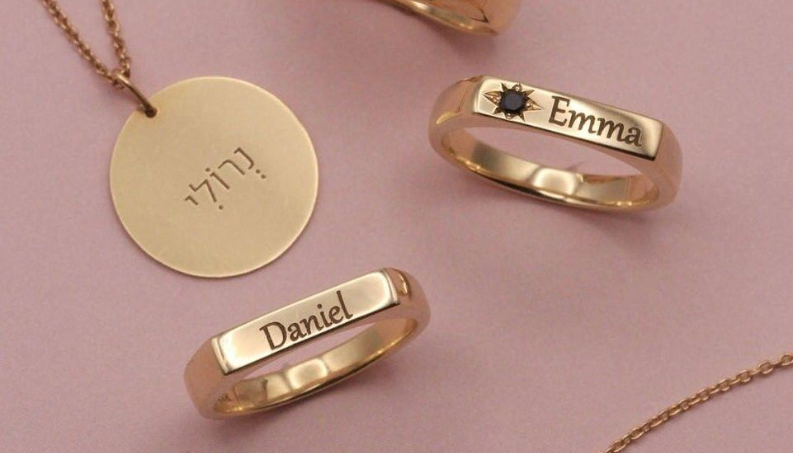
Fiber laser engraving can add fine personalized details to compatible jewelry and metal accessories.
Fiber lasers can create permanent identification and traceability marks on compatible medical instruments and components. Regulatory compliance depends on the device, material, validation process, marking requirements, and applicable standards rather than the laser process alone.
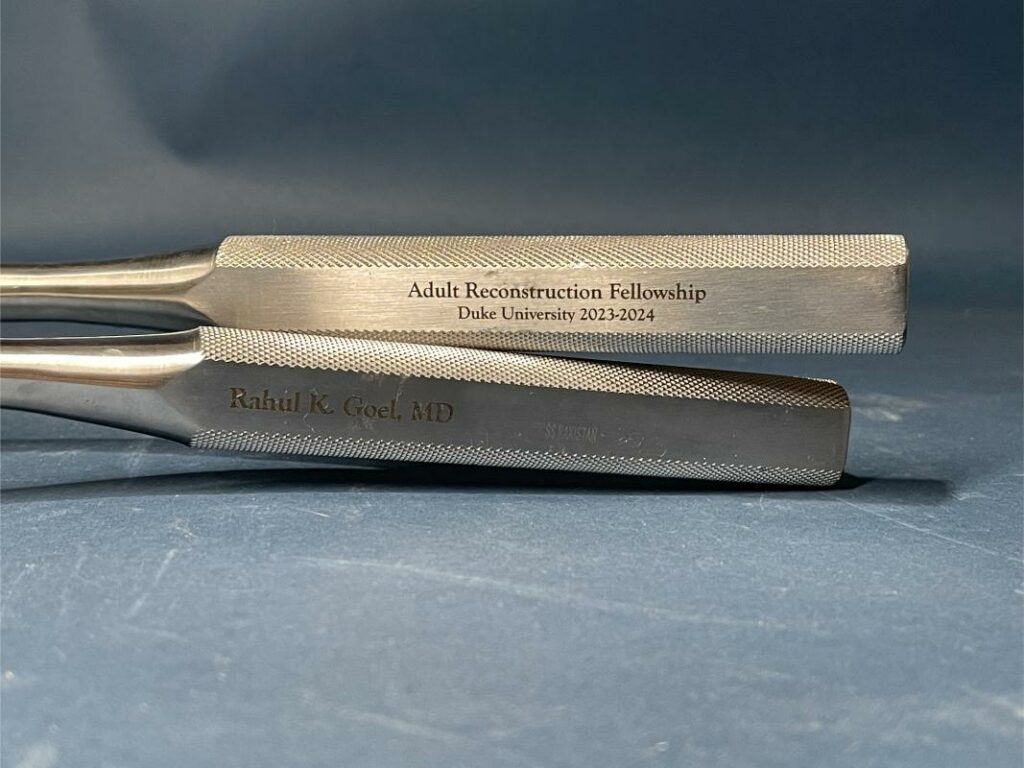
Permanent laser identification can support traceability on compatible precision tools and medical components.
Electronics manufacturers use laser marking for logos, serial numbers, QR codes, component IDs, and traceability information on compatible housings, metal parts, and selected engineering plastics.
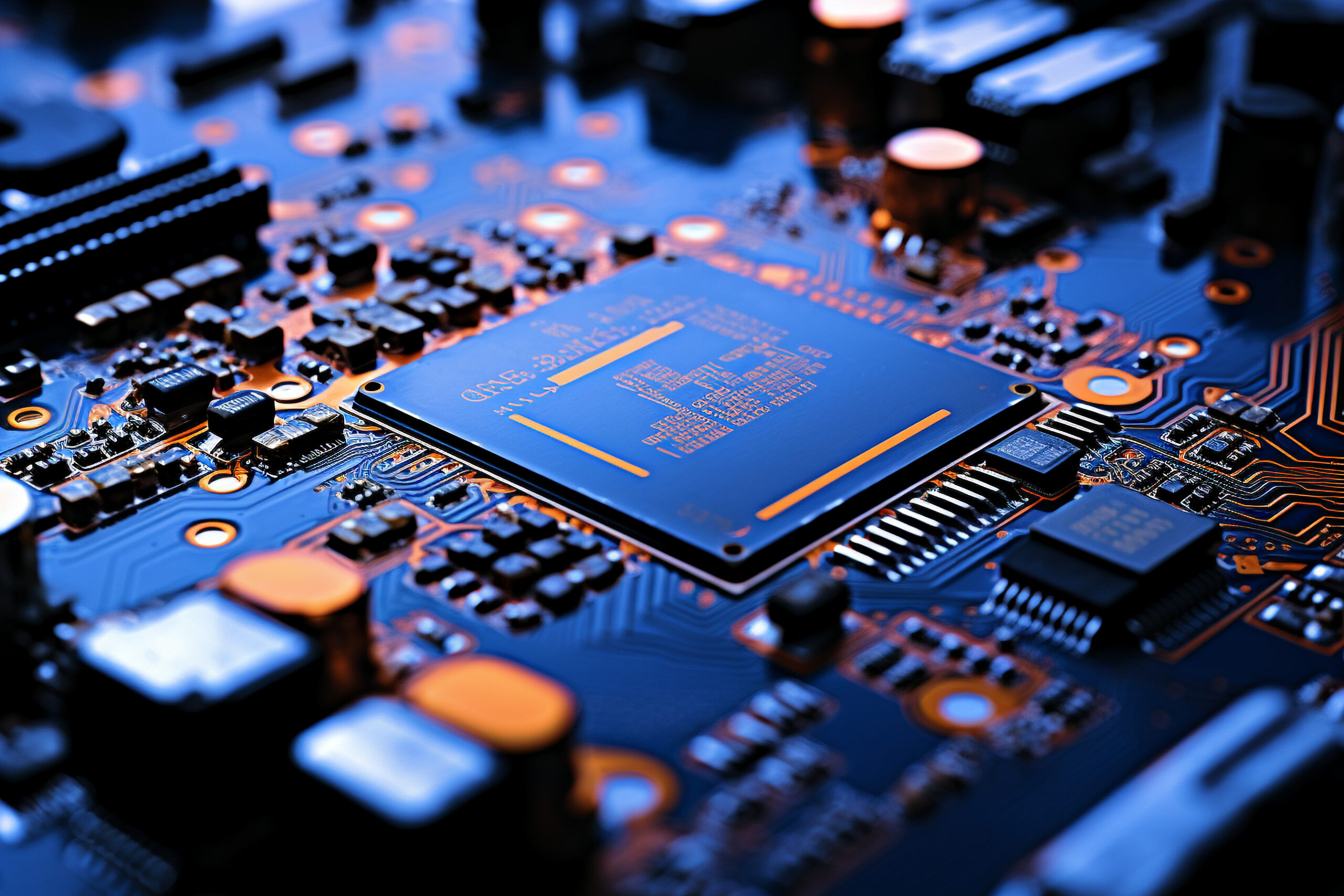
Fine laser marking supports branding and identification on compatible electronic products and components.
Fiber lasers are commonly used for permanent product identification, serial numbers, logos, Data Matrix codes, and traceability marks on compatible steel and aluminum components.
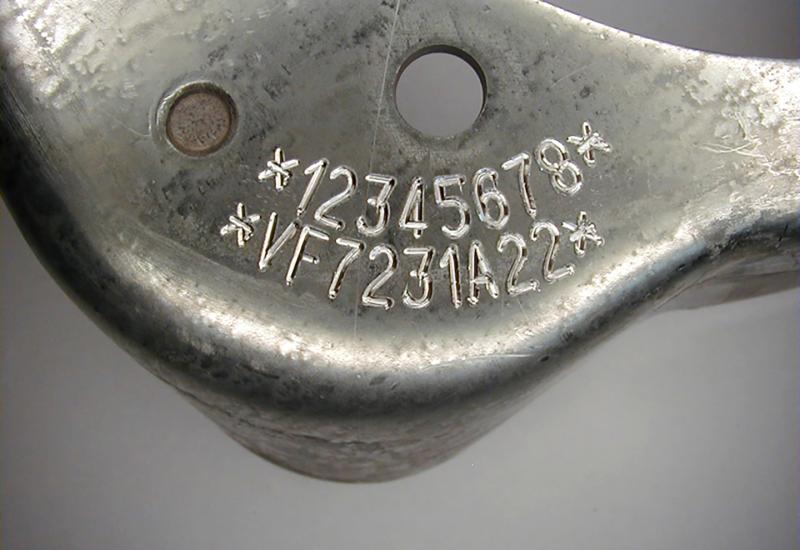
Fiber lasers can create durable identification and traceability marks on compatible industrial metal components.
Fiber lasers can also create permanent serial numbers, identification marks, logos, and decorative engraving on regulated metal products where laser marking is permitted. Businesses must follow all applicable laws, marking requirements, licensing rules, and industry regulations for the products they process.
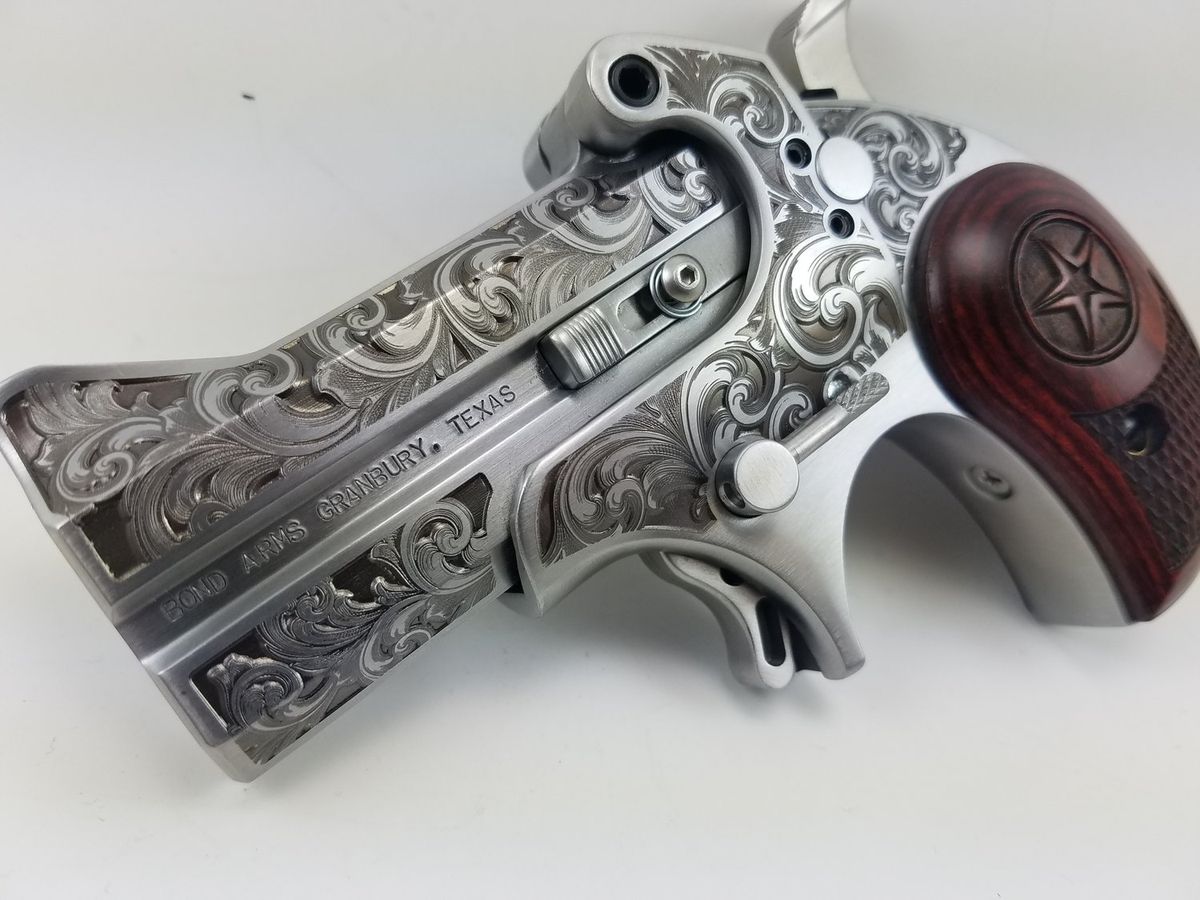
Permanent laser marking can support compliant identification workflows on regulated metal products where legally permitted.
Metal cards, tumblers, pens, watches, tags, keychains, jewelry, and other compatible products can be personalized with names, logos, artwork, and custom graphics. This makes fiber laser engraving useful for small businesses that combine short-run customization with repeatable digital production.
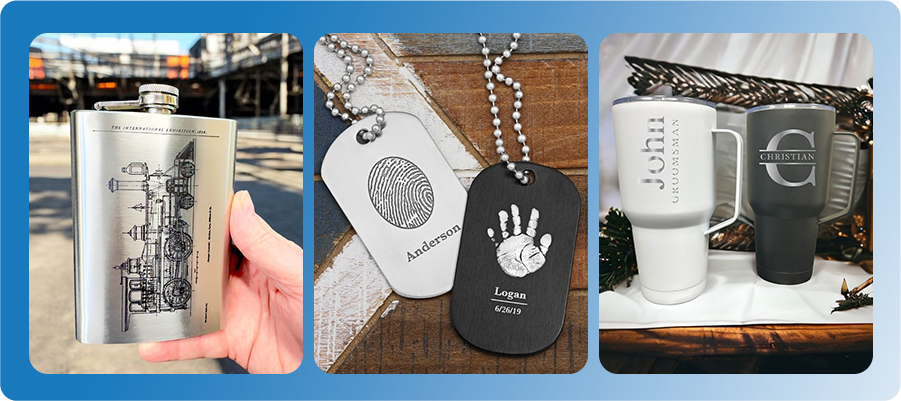
Fiber laser marking supports personalized metal gifts, branded products, and custom small-batch production.
The purchase price is only one part of a fiber laser investment. Comparing machines by sticker price alone can hide the real cost of putting the system into production.
The total installed cost should include the machine configuration and the accessories, software, extraction, fixtures, and support required to perform your actual work.
| Cost Category | What to Include |
|---|---|
| Machine | Laser source, power, enclosure, working area, and machine configuration |
| Field Lens | Different marking areas and detail requirements |
| Rotary | Rings, cups, cylinders, pens, tubes, and curved products |
| Fixtures | Batch positioning, repeatable placement, and product-specific jigs |
| Extraction | Control of smoke, particles, odor, and process residue |
| Software & Training | Design workflow, machine control, and operator learning time |
| Shipping, Tax & Installation | Depends on market and installation requirements |
| Maintenance & Downtime | Cleaning, optics, support, service, and potential production interruption |
Total installed cost provides a more useful investment comparison than machine price alone.
A lower-priced machine is not necessarily the lower-cost investment if it needs additional accessories, lacks suitable support, processes jobs too slowly, or cannot handle the applications that generate your highest margins. Compare total ownership cost against the productive value the machine can create.
A fiber laser becomes financially attractive when the additional value it creates exceeds the cost of owning and operating it. Instead of relying on a generic claim that a laser will “pay for itself,” calculate the result using your own order volume, contribution margins, outsourcing costs, and operating expenses.
Monthly Incremental Contribution
Jobs per Month × Contribution per Job
− Additional Monthly Operating Costs
This estimates the additional monthly value generated by bringing fiber laser work in-house.
Estimated Payback Period
Total Installed Cost
÷ Monthly Incremental Contribution
The result estimates how many months it may take for the additional contribution to recover the initial investment.
| Machine + Accessories + Setup Cost | ________ |
| Expected Additional Jobs per Month | ________ |
| Average Contribution per Job | ________ |
| Additional Monthly Operating Costs | ________ |
| Estimated Monthly Incremental Contribution | ________ |
| Estimated Payback Period | ________ months |
Use your actual order volume, margins, outsourcing costs, and operating expenses instead of assuming a fixed fiber laser payback period.
A fiber laser engraver is worth the investment when it solves a recurring production problem and creates enough additional value to justify its total cost. That value may come from bringing outsourced metal engraving in-house, processing more jobs per day, adding profitable personalization services, improving repeatability, or expanding into new metal products.
It may not be worth buying when metal work is only occasional, your primary materials are better suited to another laser source, or expected monthly contribution is too low to recover the investment within an acceptable period.
| Your Main Situation | Better Starting Point |
|---|---|
| Mostly wood, acrylic, leather, paper, or fabric | Consider a CO₂ laser |
| Only occasional metal engraving orders | Compare outsourcing cost before buying |
| Very large engraving or cutting areas | Evaluate field size and machine architecture carefully |
| Glass, ceramics, or heat-sensitive materials are the main workload | Consider UV where material testing confirms compatibility |
| Advanced stainless color or greater pulse control is required | Consider MOPA instead of standard Q-switched fiber |
| Expected monthly contribution is too low | Delay the purchase or continue outsourcing until demand increases |
A profitable laser investment depends on your real workload, margins, production needs, and expected payback period.
A fiber laser is more likely to be a good investment if you can answer “yes” to several of the following questions:
Bottom Line
A fiber laser is worth investing in when you have recurring metal-processing demand and the additional profit, productivity, or outsourcing savings justify the total installed cost. If the machine would spend most of its time idle, the investment is much harder to justify.
After deciding that laser ownership makes financial sense, the next question is which laser technology best matches your work. Start with your materials and required results before comparing individual machine specifications.
Fiber and CO₂ lasers are not direct replacements for one another. They use different wavelengths and are optimized for different material groups, so the better investment depends primarily on what you plan to process.
| Comparison | Fiber Laser | CO₂ Laser |
|---|---|---|
| Best For | Direct metal marking and engraving | Non-metal cutting and engraving |
| Typical Materials | Stainless steel, aluminum, brass, titanium, gold, silver, selected plastics | Wood, acrylic, leather, paper, fabric, rubber, selected plastics |
| Untreated Bare Metal | Strong choice on compatible metals | Generally not the primary direct-marking method |
| Coated or Anodized Metal | Suitable for many applications | Can remove or modify compatible coatings and anodized layers |
| Deep Metal Engraving | Suitable | Not the primary application |
| Large Non-Metal Cutting | Not the primary application | Strong choice |
| Typical Motion System | Galvo marking system | Gantry system |
| Typical Working Area | Smaller marking field | Larger processing bed |
Fiber and CO₂ lasers solve different production problems; compare them by material and workflow rather than by a single specification.
If your business works heavily with both metal and non-metal products, owning both systems can be practical. An Aurora fiber laser can handle metal marking while a Thunder Laser Bolt can cover many wood, acrylic, leather, paper, and other CO₂ applications.
Standard Q-switched fiber and MOPA fiber lasers both process metals, but they offer different levels of pulse control. A standard Q-switched source is usually a practical choice for general-purpose metal marking, while MOPA provides a wider parameter range for more advanced effects.
| Comparison | Q-Switched Fiber | MOPA Fiber |
|---|---|---|
| Best For | General metal marking | Advanced metal marking and greater process control |
| Logos, Serial Numbers & QR Codes | Strong choice | Strong choice |
| Deep Engraving | Suitable | Suitable with greater parameter flexibility |
| Pulse Width Control | More limited | Adjustable over a wider range |
| Stainless Steel Color Effects | Limited | Better control on compatible stainless steel |
| Advanced Black Marking | Material dependent | Greater flexibility on compatible materials |
| Best Buyer | General production and cost-conscious metal marking | Advanced production, premium effects, and wider process control |
MOPA is still a fiber laser technology; its primary advantage is greater control over pulse parameters and marking effects.
For a deeper comparison, see Fiber vs. MOPA Laser Marking.
Choosing fiber laser power is not simply a matter of buying the highest wattage available. The right power depends on what you need to mark, how deep you need to engrave, how quickly you need to process each part, and how much production volume you expect.
For many metal-marking businesses, 20W is enough for basic surface marking, 50W provides a stronger balance of speed and engraving capability, and 100W is better suited to higher-throughput, deeper, and more demanding production. Laser source type also matters: a 100W MOPA laser offers wider pulse control than a standard Q-switched fiber laser, so wattage should never be evaluated alone.
| Power | Best For | Typical Applications | Business Value | Main Limitation |
|---|---|---|---|---|
| 20W Fiber | Surface marking and light engraving | Logos, serial numbers, QR codes, jewelry personalization, metal cards, tags, light decorative engraving | Lower entry cost for businesses focused mainly on identification and customization | Slower for deep engraving and high-volume material removal |
| 50W Fiber | General professional metal marking and engraving | Industrial marking, jewelry, tools, hardware, product branding, moderate-depth engraving, batch production | Better balance of speed, engraving capability, flexibility, and production throughput | May still require multiple passes for demanding deep-engraving jobs |
| 100W MOPA Fiber | Higher-throughput, deeper, and advanced metal processing | Deep engraving, faster material removal, production batches, advanced black marking, selected stainless steel color effects, demanding industrial applications | Higher productivity plus wider pulse control for businesses with demanding or high-value applications | Higher investment is difficult to justify when most jobs are simple surface marking |
Power alone does not determine processing quality. Laser source type, pulse characteristics, frequency, field lens, spot size, material, engraving depth, and production target also affect the final result.
A 20W fiber laser is most valuable when your business mainly needs to change the appearance of a metal surface rather than remove significant amounts of material. It can handle many common marking jobs without requiring the additional investment of a higher-power system.
Typical 20W applications include:
Best Value for:
Small businesses, jewelry workshops, personalization businesses, and users whose primary goal is surface marking rather than deep metal removal.
The tradeoff is production time. A 20W system may achieve the same basic surface mark as a higher-power fiber laser, but deeper engraving usually requires more passes and longer cycle times. If deep engraving or high-volume production becomes a regular part of your workload, moving to 50W can provide more practical value.
For many professional users, 50W is the most balanced fiber laser power. It retains the fine-detail capability needed for surface marking while providing more energy for faster engraving, moderate material removal, and repeated production.
Typical 50W applications include:
Best Value for:
Businesses that expect the laser to become a regular production tool rather than an occasional personalization machine. A 50W system is particularly attractive when both marking speed and engraving capability affect profitability.
Thunder Laser currently uses 50W Q-switched fiber as the standard configuration for Aurora Fiber and Aurora Lite. This makes 50W a relevant comparison point for businesses considering a professional Thunder fiber system.
A 100W fiber laser becomes valuable when production efficiency and material removal matter more than simply achieving a visible mark. Higher average power provides more processing capability for demanding engraving jobs and can reduce the time required for applications that otherwise need many passes.
Typical 100W applications include:
Best Value for:
Production businesses where engraving time, depth, batch throughput, and advanced marking effects have measurable financial value. The higher investment is easiest to justify when reducing cycle time increases the number of sellable parts produced each day.
Thunder Laser's current 100W Aurora configuration uses MOPA fiber technology. That distinction matters because MOPA provides wider frequency and pulse-width control, giving operators more flexibility over how laser energy interacts with the material.
Therefore, the value of a 100W MOPA system is not simply that it has twice the rated power of a 50W laser. It combines higher power with greater pulse flexibility, which can expand the range of production effects available to the business.
Not necessarily. Doubling the rated laser power does not automatically cut every engraving time in half. Processing speed also depends on the material, engraving depth, pulse energy, frequency, pulse width, hatch spacing, lens, spot size, scanning strategy, and number of passes.
Higher power is most valuable when the process can use that additional energy effectively. For simple surface marking, a 50W system may already complete the job quickly enough that moving to 100W produces little business benefit. For deep engraving or heavy batch production, the additional capability can have much greater value.
The best ROI usually comes from the lowest-power system that can comfortably meet your required engraving depth, cycle time, and production volume while leaving reasonable room for growth.
| If Your Business Mainly Does... | Start With | Why |
|---|---|---|
| Jewelry names, logos, QR codes, serial numbers, light marking | 20W | Lower entry cost can make sense when deep engraving and throughput are not priorities |
| Regular professional metal marking plus moderate engraving | 50W | Strong balance of speed, depth, versatility, and investment |
| Deep engraving, high-volume batches, faster material removal | 100W | Higher throughput can reduce processing time and cost per part |
| Stainless color, advanced black marking, wider parameter control | MOPA | Pulse control matters more than wattage alone for these applications |
These recommendations are application-based starting points rather than universal rules. Material, laser source, field lens, required depth, cycle time, and marking effect should all be tested before final machine selection.
Simple Buying Rule
Choose 20W if your priority is affordable surface marking and light customization.
Choose 50W if you want the best all-around balance for professional metal marking and engraving.
Choose 100W MOPA if deep engraving, production speed, advanced marking effects, and higher throughput create enough business value to justify the additional investment.
If you are still unsure which power level fits your application, send your actual material and project requirements through Thunder Laser Material Testing. Testing the real material is more reliable than choosing a fiber laser based on wattage alone.
The Thunder Laser Aurora Series includes Q-switched fiber, MOPA fiber, and UV configurations for different marking requirements. UV belongs to the Aurora family but uses a different laser wavelength and should not be treated as a fiber laser.
| Model | Laser Source | Standard Power | Best For |
|---|---|---|---|
| Aurora Lite | Q-Switched Fiber | 50W | Entry-level professional metal marking and cost-conscious production |
| Aurora Fiber | Q-Switched Fiber | 50W | General production marking, serial numbers, logos, barcodes, and everyday metal engraving |
| Aurora MOPA | MOPA Fiber | 100W | Advanced pulse control, high-contrast marking, selected stainless color effects, and demanding metal applications |
| Aurora UV | UV | 5W | Fine, low-heat marking on selected plastics, glass, ceramics, PCBs, and heat-sensitive materials |
Current Aurora configurations serve different materials and marking goals; choose by application rather than treating every Aurora model as a fiber laser.
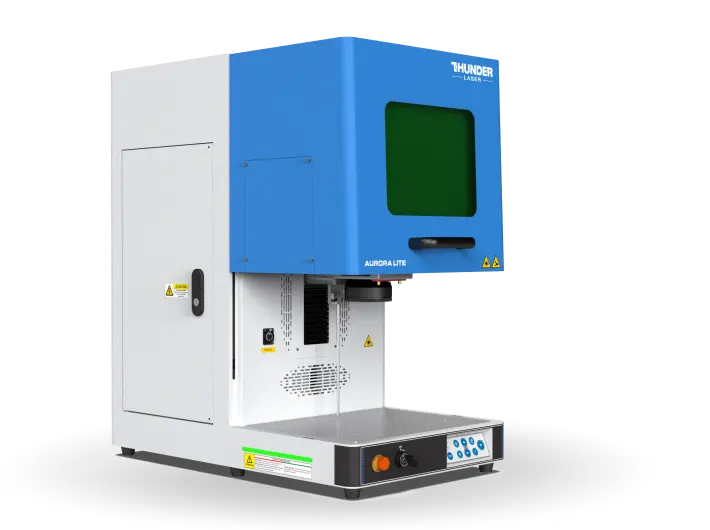
Thunder Laser Aurora laser machines.
Before choosing a model, compare the actual material, product dimensions, required engraving depth, production volume, desired marking effect, and expected return on investment.
You can also use Thunder Laser Material Testing and the Laser Settings Library to evaluate your application before selecting a machine.
A fiber laser engraver is worth the investment when it solves a real and recurring metal-processing need and produces enough financial or operational value to justify ownership. Businesses that regularly produce metal personalization, industrial identification, jewelry, branded products, traceability marks, or deep engraving can benefit from bringing those workflows in-house.
The best buying decision is not simply the machine with the highest wattage or the lowest purchase price. Start with your materials and applications, calculate the total installed cost, estimate the monthly value the laser can create, and determine a realistic payback period. Then choose the laser source and power that can meet those production targets without paying for capability your business does not need.
Talk To Our Experts Now!
Please leave your contact information so that we can serve you better.
FIBER LASER INVESTMENT FAQS
TAKE THE NEXT STEP WITH THUNDER LASER


 Stable & Consistent MachinesUnlimited ApplicationsRobust After-sales SupportFactory Direct Supply


