


LASER CUTTING MACHINES
& LASER CUTTERS
Explore Thunder Laser cutting machines for wood, acrylic, and metal. Compare CO₂ and fiber laser cutters to find the right fit for your materials, sheet sizes, and production needs.


Bolt Series
Professional High-Precision Laser Engraving Machine

Nova Series
Large Format Glass Tube Laser Cutting Machine

Nova Plus Series
Business-grade RF CO₂ Laser Cutter

Nova Pro Series
Professional Laser Cutting & Engraving System

Titan Series
Industrial-grade Laser System

Titan Pro Series
Industrial-grade Dual-laser System


WHAT ARE YOU LOOKING FOR?
Search Across Products, Blog Posts, Support Content, And Resources.

LASER CUTTING MACHINES
& LASER CUTTERS
Explore Thunder Laser cutting machines for wood, acrylic, and metal. Compare CO₂ and fiber laser cutters to find the right fit for your materials, sheet sizes, and production needs.


What Is Laser Cutting?
Laser cutting uses a focused laser beam to cut through material along a digital design. The beam follows vector paths to produce shapes, openings, and individual parts from sheet materials.
 Intricate Shapes
Complex outlines, small holes, and fine internal patterns, all cut in one pass.
Non-Contact Processing
The beam does the work, so no blade touches the material and no clamping marks are left behind.
Repeatable Parts
The same file produces identical parts run after run, which makes batch production predictable.

What Materials Can Thunder Laser Cutters Cut?
Non-metals run on the CO₂ platform, metal sheet runs on the fiber platform. Pick a material to see the thickness range, the settings we test with, and finished parts.


Wood & Plywood
Solid wood, plywood, MDF, and veneer with clean, sandable edges.

Acrylic
Cast and extruded acrylic with a flame-polished cut edge.

Paper & Cardstock
Invitations, inserts, and stencils — no die, no setup cost.

Leather
Natural and faux leather cut and engraved with sealed edges.

Fabric & Textile
Cotton, felt, and denim cut with sealed edges that do not fray.

Foam & EVA
EVA, PE, and PU foam cut into inserts and protective packaging.

ABS
Rigid ABS sheet cut and engraved for enclosures and panels.

Rubber
Rubber sheet cut into gaskets, stamps, and pads without tearing.

Film & Grip Tape
Protective film, masking, and grip tape cut to shape.

Stainless Steel
Up to 5 mm on AccuMetal, with no dross on the underside.

Carbon Steel
Up to 8 mm standard, and up to 16 mm on the AccuMetal 51.

Aluminum
Up to 3 mm, with a clean, burr-free edge on 5052 and 6061 sheet.

Brass
Up to 2 mm. Reflective surface, so the machine has to be rated for brass.

Copper
Up to 2 mm. Very high reflectivity — confirm the machine is rated for copper.
Thickness, coating, and finish all change the settings. Send us your sheet and we return cut samples with the parameters we used.
Explore Thunder Laser Cutting Machines
CO₂ for non-metals, fiber for metal sheet
Two series cover cutting at Thunder Laser. Nova Series is the CO₂ platform for wood, acrylic, paper, and leather. AccuMetal Series is the fiber platform for stainless and carbon steel sheet. Pick the series first, then the working area.
CO₂ Laser Cutters
Wood, acrylic, MDF, paper, leather, and other non-metals
Nova Series
Four formats from 600 × 400 mm to 1,600 × 1,000 mm
CO₂ only. Nova Series can only cut non-metals, does not cut bare metal sheet.
Fiber Laser Cutters
Stainless steel, carbon steel, aluminium, brass
AccuMetal Series
Two formats: 610 × 610 mm and 1,300 × 1,300 mm
AccuMetal cuts metal sheet; it does not replace a CO₂ cutter for acrylic or wood.
Why Choose Thunder Laser for Laser Cutting?
Four things decide whether a cutter fits your workshop: the quality of the cut, the size of the work it accepts, how long setup takes, and who supports you after delivery.

CO₂ and fiber laser options match different materials, with adjustable processing settings to help achieve clean edges and intricate cuts.

Choose from multiple working areas for individual projects and batch production, with pass-through access on supported models for longer workpieces.

Autofocus and configurable air assist on equipped models reduce manual preparation, helping you move from material setup to cutting more efficiently.
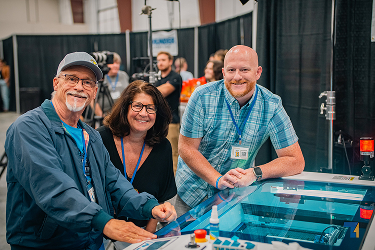
From material testing and machine selection to training and technical support, get practical help before and after your laser cutter arrives.
How to Use a Thunder Laser Cutter
From File to Finished Part in 3 Steps.

Prepare Your Design
Create or import a vector cutting file. Keep outlines, holes, and score lines on separate layers, and size the artwork to the sheet you are cutting.

Set Up Your Material
Place the sheet, focus the laser, and set the parameters for that material and thickness, including air assist, cut passes, and piercing where needed.

Preview and Start Cutting
Check the job position and nesting with framing or preview, then start the cut and watch the first parts for kerf and edge quality.
See What You Can Make with a Thunder Laser Cutter
Six groups of work that customers cut every day. For each one we list the material, the machine, the power, and the detail that decides whether the job is realistic: kerf, edge finish, and how the parts assemble.

Acrylic Signs & Display Stands
Cast acrylic with flame-polished edges, cut and engraved in the same job for shop signs and counter displays.

Wooden Assemblies & Models
Plywood and MDF parts designed to press-fit, from architectural models to flat-pack furniture components.

Paper Packaging & Cut-Outs
Invitations, gift boxes, and packaging inserts where the pattern, not the speed, is the hard part.

Metal Parts
Brackets, perforated discs, and small mechanical parts cut on the fiber platform, with the cut-through range verified in our own tests.

Perforated Panels & Vent Grilles
Vent covers, speaker grilles, and filter plates, where hundreds of holes have to come out identical across the whole sheet.

Metal Signage & Lettering
House signs, brand plaques, and openwork lettering, where thin strokes have to survive the cut and still line up with the backing plate.
Thickness and cycle time depend on your exact material, so we measure rather than estimate. Send us your sheet and we will return cut samples with the settings and timing we used.
Laser Cutting Machine FAQs
The questions buyers ask before choosing a cutter: what it can cut, how thick, which source, and what it takes to install.
Find the Right Laser Cutter for Your Work
Tell us your material, thickness, sheet size, and production requirements. Our team can help you compare suitable machines and arrange a material test.
STEP INTO THE FUTURE OF
LASER TECHNOLOGY
With Thunder Laser's Rf Solutions, You Don't Have To Compromise On Speed, Quality, Or Reliability
 Stable & Consistent MachinesUnlimited ApplicationsRobust After-sales SupportFactory Direct Supply


