


UV Printer vs UV Laser: Differences, Uses & Which to Choose
 2026-08-11
WHAT ARE YOU LOOKING FOR?
Search Across Products, Blog Posts, Support Content, And Resources.

UV Printer vs UV Laser: Differences, Uses & Which to Choose
2026-08-11

UV printers and UV lasers both use ultraviolet technology, but they use it in very different ways. A UV printer deposits UV-curable ink onto a surface and uses UV light to cure the ink almost instantly. A UV laser, typically operating at a 355 nm wavelength, uses a focused ultraviolet laser beam to directly mark, engrave, or modify the material itself.
This difference leads to very different results. UV printers are best suited for full-color graphics, photographs, white ink, varnish, and decorative surface effects, while UV lasers excel at fine marking, small text, QR codes, serial numbers, and permanent identification on materials such as glass, plastics, ceramics, and electronic components.
In this guide, we’ll compare UV printers vs UV lasers by working principle, color capability, material compatibility, operating cost, and typical applications, so you can determine which technology better fits your products and business needs.
| Factor | UV Printer | UV Laser |
|---|---|---|
| Technology | Inkjet + UV curing | UV laser marking |
| Typical wavelength role | UV LEDs cure ink | Concentrated UV laser processes material |
| Process type | Additive | Surface/material modification |
| Full color | CMYK + white + varnish | Material-dependent contrast |
| Photographs | Excellent | Grayscale/engraved representation |
| Surface effect | Printed layer / raised ink possible | Surface marking / engraving |
| Consumables | Ink, cleaning fluid, primer etc. | Relatively low routine consumables |
| Total cost | Often higher | Less |
| Maintenance | Printhead + ink system | Optics/extraction/system maintenance |
| Main business use | Decorative customization | Precision personalization/traceability |
A quick comparison of the main differences between UV printers and UV lasers.
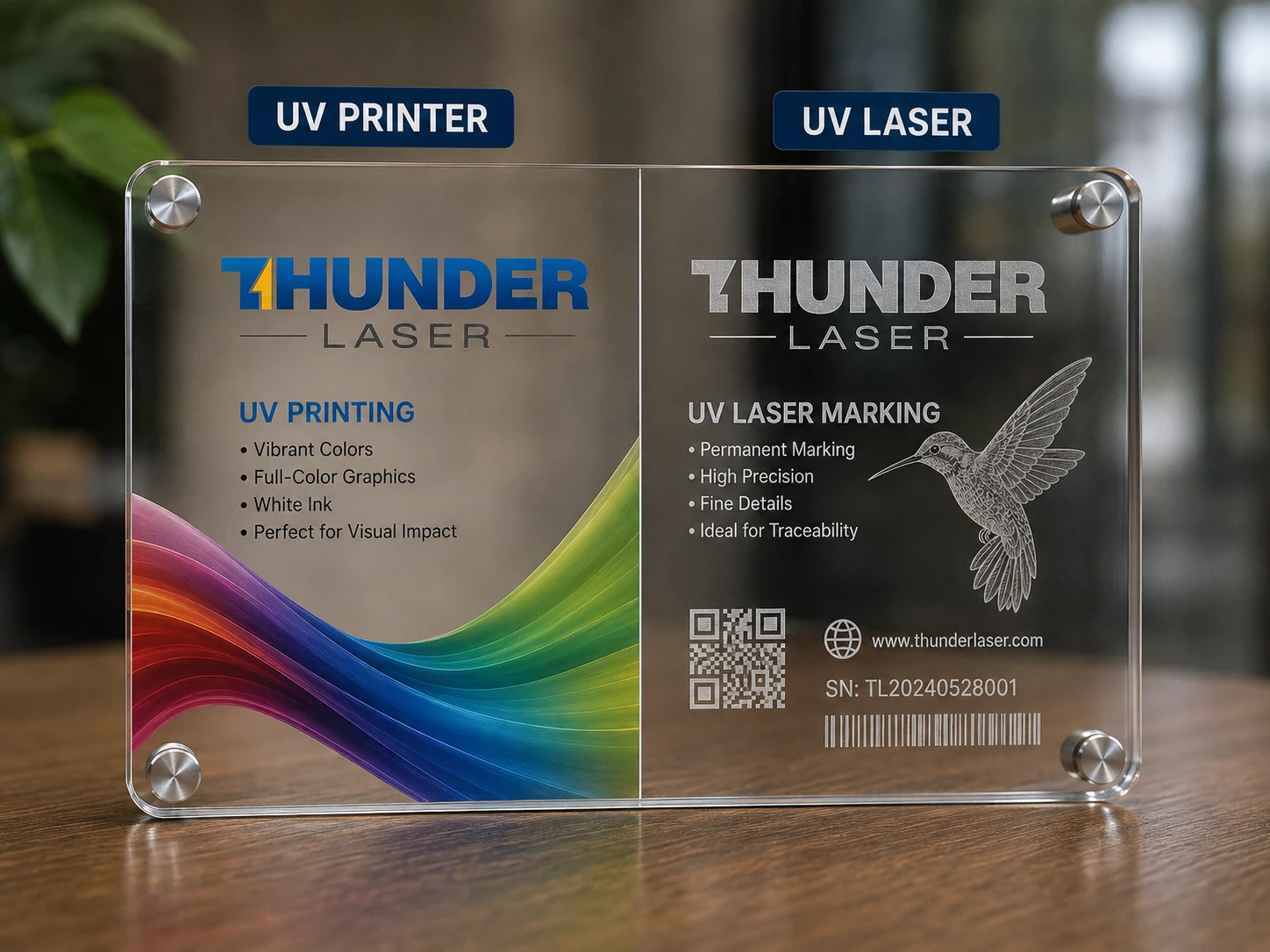
UV printing acrylic vs. UV laser marking acrylic
A UV printer is a digital inkjet printing system that uses ultraviolet light to cure specially formulated UV inks immediately after they are deposited onto a surface. Instead of waiting for the ink to dry naturally, built-in UV lamps harden the ink within seconds, allowing the printed image to remain on the surface of the material.
Most UV printers can work with CMYK inks, while many models also support white ink and clear varnish. This makes them suitable for printing photographs, logos, gradients, fine graphics, opaque white layers, glossy effects, and even raised textures.
Because UV printing places ink directly onto the surface, it can be used on a wide variety of rigid and flexible products, including acrylic, glass, coated metal, wood, plastic, ceramic, leather, signage materials, promotional products, and packaging.
The main advantage of UV printing is its ability to create colorful and decorative surface graphics.
Typical capabilities include:
For example, a UV printer can place a full-color photograph on an acrylic panel, print a white logo on transparent glass, or add a raised decorative pattern to a promotional product.
The finished design remains as a cured ink layer on the surface, which is one of the most important differences between UV printing and UV laser processing.
A UV laser is a laser marking system that uses ultraviolet laser energy to directly interact with the surface or structure of a material. Many industrial UV laser marking machines operate at a wavelength of approximately 355 nm, which is significantly shorter than the wavelengths used by common CO₂ and fiber laser systems.
The shorter wavelength allows UV laser energy to be focused into a very small spot and absorbed efficiently by many materials. This makes UV lasers especially useful for fine marking, small characters, detailed graphics, codes, and precision processing. For a deeper comparison between UV and fiber sources, see the Fiber Lasers vs. UV Lasers guide.
UV lasers are commonly used on materials such as:
Their relatively low thermal impact also makes them valuable for applications where excessive heat could deform, melt, burn, or discolor the surrounding material.
UV lasers are particularly strong in applications that require precision, permanence, and small-scale detail.
Typical applications include:
For example, a UV laser can create a small QR code on a plastic component, mark a serial number on an electronic part, or produce a fine frosted design on glass. Businesses working specifically with circuit boards can also refer to the PCB laser marking guide.
The exact result depends heavily on the substrate. Different plastics, glass compositions, coatings, ceramics, and other materials respond differently to UV laser energy, so material testing and parameter optimization are important when developing a production process. Thunder Laser also provides a material testing service for evaluating specific materials and target effects.
UV printers and UV lasers are easy to confuse because both use ultraviolet light and can process many of the same materials, including glass, acrylic, plastics, ceramics, and coated products. Their actual working methods and final results are very different.
The key is understanding what the UV light does in each machine.
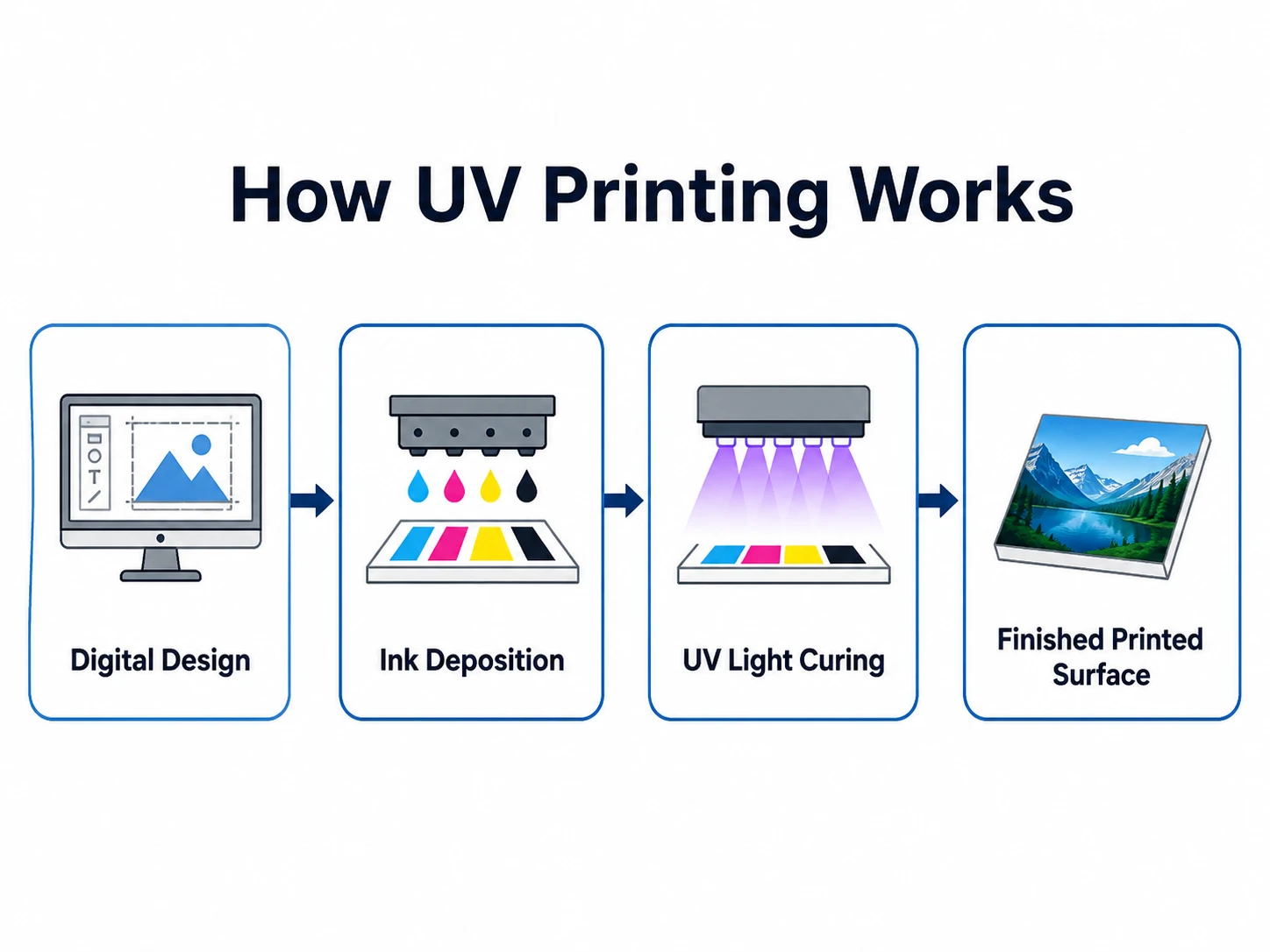
In a UV printer, ultraviolet light cures specially formulated ink after the printhead deposits it onto the material. The UV light helps harden the ink quickly and create a printed layer on the surface.
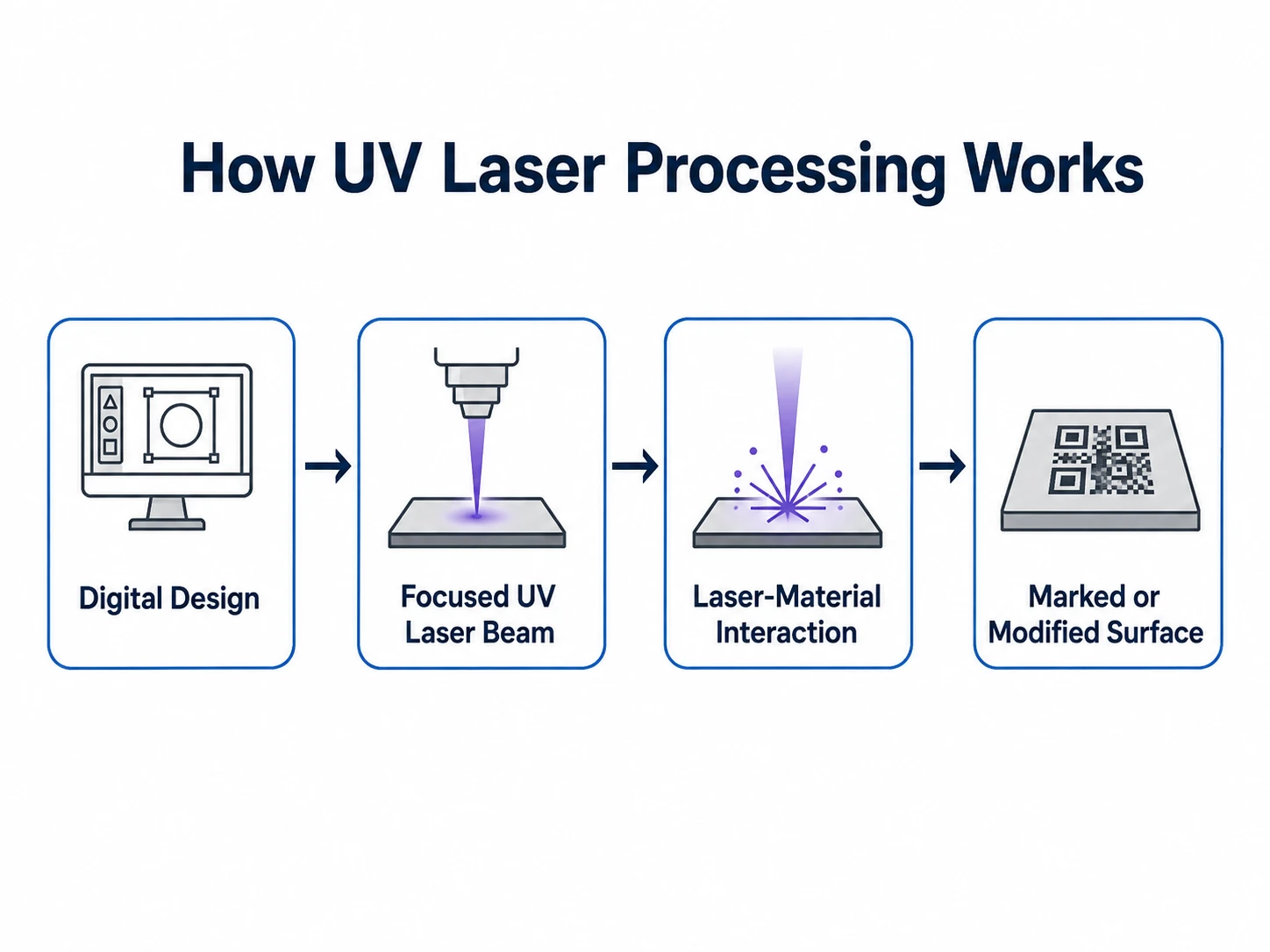
In a UV laser, the ultraviolet laser beam is the processing tool itself. The focused beam interacts directly with the material to create a mark, engraving, frosted effect, or other surface change.
The biggest difference between a UV printer and a UV laser is how each technology creates the final image or mark. A UV printer adds and cures ink on the surface, while a UV laser uses focused ultraviolet energy to change the material itself.
That fundamental difference affects color capability, precision, durability, surface appearance, consumables, and the types of applications each machine handles best.
A UV printer is an additive process. The printhead deposits UV-curable ink onto the surface of a product, and UV lamps cure the ink almost immediately. The finished design remains as a printed layer attached to the substrate.
A UV laser works through direct laser-material interaction. A focused ultraviolet beam strikes selected areas of the material and creates a visible result through processes such as surface modification, material removal, frosting, or contrast change.
| Factor | UV Printer | UV Laser |
|---|---|---|
| Processing method | Deposits ink | Uses laser energy |
| Interaction | Ink sits on the substrate | Beam interacts directly with substrate |
| Finished result | Cured printed layer | Marked or modified material |
| Main purpose | Decoration and full-color printing | Precision marking and identification |
A table showing how UV printers and UV lasers create their final results.
This working-principle difference influences almost every other comparison between the two technologies.
Color is one of the clearest differences between UV printing and UV laser processing. UV printers are designed for full-color graphics, photographs, white ink, varnish, and decorative effects. UV lasers create color or contrast through the way the material reacts to laser energy, so the final appearance depends heavily on the substrate and processing parameters.
UV printing is the stronger choice for applications where color reproduction is the priority. UV laser processing is more suitable for fine contrast, frosted effects, and permanent marking.
| Color / Visual Capability | UV Printer | UV Laser |
|---|---|---|
| Full-color CMYK | Yes | No |
| White ink | Yes | No |
| Clear varnish | Yes | No |
| Gradients | Excellent | Limited |
| Photographic images | Excellent | Grayscale-style effects possible |
| Spot colors | Yes | Material-dependent |
| Raised color effects | Yes | No |
| Frosted effects | No | Yes, on suitable materials |
| Light / dark contrast | Limited role | Yes |
| Material-dependent color change | No | Possible on certain materials |
A visual capability comparison between UV printing and UV laser processing.
Both UV printers and UV lasers can produce highly detailed results, but their precision is optimized for different types of work. UV printers excel at reproducing detailed visual graphics. UV lasers have a stronger advantage when the job requires very small, sharply defined, permanent marks directly on the substrate.
Fine marking quality also depends on the laser source, focal spot, lens, material, and processing settings. The laser parameter setting guide explains the main settings that influence cutting, engraving, and marking results.
UV printing creates a cured ink layer on the surface, so durability depends on factors such as the ink, substrate, surface preparation, curing quality, abrasion, and chemical exposure.
UV laser marking changes the material itself, making it especially suitable for long-lasting identification, serial numbers, QR codes, and traceability marks. The actual durability still depends on the material and marking method.
UV printers rely on ink to create the image, so they require more routine consumables during daily production. Ink usage also increases directly with print coverage and production volume.
UV lasers do not require ink, toner, or printing chemicals. Aside from normal machine maintenance, extraction filters, and occasional optical or service-related consumables, their routine material consumption is generally much lower.
| Operating Item | UV Printer | UV Laser |
|---|---|---|
| Ink | Required | None |
| White ink / varnish | Often used | None |
| Cleaning fluid | Regularly used | Minimal |
| Primer | May be required | None |
| Printhead-related consumables | Required over time | None |
| Extraction filters | Application dependent | Application dependent |
| Fixtures / jigs | Often used | Often used |
| Routine consumable use | Higher | Lower |
A comparison of common consumables and operating requirements for both technologies.
The most practical way to understand the difference is to look at what each technology is commonly used to produce.
The application difference can be summarized clearly:
| Application Need | UV Printer | UV Laser |
|---|---|---|
| Full-color decoration | ✓ | |
| Photographs | ✓ | |
| White ink | ✓ | |
| Clear varnish | ✓ | |
| Raised printed texture | ✓ | |
| Fine text | ✓ | ✓✓ |
| Serial numbers | ✓ | ✓✓ |
| QR codes | ✓ | ✓✓ |
| Permanent identification | ✓✓ | |
| Traceability | ✓✓ | |
| Precision glass marking | ✓✓ | |
| Decorative product customization | ✓✓ | ✓ |
A practical comparison of the applications best suited to UV printers and UV lasers.
Businesses exploring laser-marked gifts, products, and creative applications can also browse the Thunder Laser Inspiration Library for project ideas and finished samples.
Both UV printers and UV lasers can work with a wide range of materials. Material compatibility alone does not guarantee the same visual or physical result from each process.
| Material | UV Printer | UV Laser |
|---|---|---|
| Glass | ✓ | ✓ |
| Acrylic | ✓ | ✓ |
| Plastic | ✓ | ✓ |
| Ceramic | ✓ | ✓ |
| Metal | ✓ | ✓ |
| Coated Metal | ✓ | ✓ |
| Wood | ✓ | ✓ |
| Leather | ✓ | ✓ |
| Rubber | ✓ | ✓ |
| Paper / Cardboard | ✓ | ✓ |
| PET | ✓ | ✓ |
| PC (Polycarbonate) | ✓ | ✓ |
| ABS | ✓ | ✓ |
| Electronics / PCBs | △ | ✓ |
| Heat-Sensitive Materials | ✓ | ✓ |
A material compatibility overview for UV printers and UV lasers.
Material-specific behavior can vary substantially. Thunder Laser provides dedicated guides for glass laser processing, acrylic laser processing, ceramic engraving and marking, ABS laser processing, and PET and PETG laser processing.
For metal products and coated metal components, see the Thunder Laser metal material guide. These resources can help determine which laser source and processing method should be tested for a specific substrate.
UV printers generally have higher ongoing consumable costs because they continuously use ink and require regular print-system maintenance. UV lasers use no ink, so their routine operating costs are usually lower.
Typical ongoing costs include:
Ink consumption varies with the design. Large full-color areas, white underlayers, varnish, and raised effects all increase material use and cost.
Typical ongoing costs include:
A UV laser does not require ink, toner, primer, or printing chemicals during normal marking, so routine consumable use is relatively low.
The cost per finished product depends on the material, design, processing time, production volume, and labor.
| Cost Factor | UV Printer | UV Laser |
|---|---|---|
| Ink / printing consumables | High | None |
| Cleaning consumables | Regular | Low |
| Primer | Sometimes required | None |
| Electricity | Yes | Yes |
| Extraction filters | Application dependent | Application dependent |
| Routine maintenance | Ink system and printhead | Optics and laser system |
| Main variable cost | Ink coverage and print layers | Marking time and number of passes |
| Routine consumable cost | Higher | Lower |
A cost comparison covering the main recurring expenses for UV printers and UV lasers.
For UV printers, operating cost increases mainly with ink coverage and the number of printed layers. For UV lasers, cost is influenced more by processing time, laser passes, and production efficiency.
Laser users can use Thunder Laser’s laser settings library and parameter setting guide as starting references when developing and testing processing settings.
The better choice depends on the type of products you want to make and what customers value most in the finished result.
| If You Need... | Better Choice |
|---|---|
| Full-color graphics | UV Printer |
| Photographs | UV Printer |
| White ink | UV Printer |
| Clear varnish | UV Printer |
| Raised printed textures | UV Printer |
| Fine permanent marking | UV Laser |
| Small text | UV Laser |
| Serial numbers | UV Laser |
| QR / DataMatrix codes | UV Laser |
| Product traceability | UV Laser |
| Precision marking on glass, plastics, ceramics, or electronics | UV Laser |
| Decorative personalization | UV Printer |
| Industrial identification | UV Laser |
A decision table for choosing between a UV printer and a UV laser by application.
Choose a UV printer when your products rely heavily on color, images, decorative graphics, or special ink effects.
Choose a UV laser when your work requires fine detail, permanent identification, compact codes, or precise marking directly on the material.
Users comparing laser technologies, materials, work areas, and production requirements can also refer to the Thunder Laser machine selection guide.
For small businesses focused on custom gifts, promotional products, photo products, and colorful personalization, a UV printer usually offers more creative flexibility.
For businesses focused on engraved personalization, serial numbers, QR codes, product identification, glass marking, or precision plastic marking, a UV laser is usually the stronger fit.
The best choice comes down to what customers are actually paying you to produce.
If your application requires fine, permanent marking on plastics, glass, ceramics, electronics, or other precision products, a UV laser can be a strong fit.
Thunder Laser’s Aurora UV is designed for precision marking applications where fine detail and controlled material interaction matter. It supports marking areas up to 200 × 200 mm and scanning speeds up to 7,000 mm/s, making it suitable for detailed production work on plastics, glass, ceramics, PCBs, and other sensitive components. Its enclosed Class 1 design also makes it suitable for workshops and production environments that need a compact UV marking system.
Its UV laser technology is suitable for applications such as:
For businesses moving from decorative printing toward permanent product marking, traceability, or high-detail customization, Aurora UV provides a dedicated UV laser solution.
Explore Thunder Laser Aurora UV →
UV printers and UV lasers serve different production needs. UV printers are best suited to full-color graphics, photos, white ink, varnish, and decorative effects, while UV lasers are stronger for fine, permanent marking such as small text, QR codes, serial numbers, and product identification.
The right choice depends on the result you need, the materials you work with, and whether your priority is colorful surface decoration or precise, durable marking.
Talk To Our Experts Now!
Please leave your contact information so that we can serve you better.
FAQS
No. A UV printer uses ultraviolet light to cure ink after it is printed onto a surface, while a UV laser uses a focused ultraviolet laser beam to directly mark or modify the material.
UV lasers do not produce full-color CMYK prints like a UV printer. Their appearance depends on how the material reacts to the laser and may include light or dark contrast, frosted effects, grayscale-style marks, or limited material-dependent color changes.
A UV printer does not engrave the material itself. It deposits and cures ink on the surface. Some UV printers can build up multiple ink layers to create raised or textured effects, but the substrate itself is not engraved.
Both can work well on glass, but they create different results. A UV printer is better for full-color graphics, photos, white ink, and decorative printing, while a UV laser is better for fine frosted marks, text, logos, and permanent identification.
UV laser marking is generally highly durable because the mark is created directly through interaction with the material. The exact permanence depends on the substrate, marking depth, surface treatment, and processing parameters.
FIND THE RIGHT LASER FOR YOUR NEXT PROJECT
Explore Thunder Laser solutions designed for different materials, workflows, and production needs.


 Stable & Consistent MachinesUnlimited ApplicationsRobust After-sales SupportFactory Direct Supply


