


LaserGRBL vs LightBurn: Which Laser Software Is Better in 2026?
 2026-10-10
WHAT ARE YOU LOOKING FOR?
Search Across Products, Blog Posts, Support Content, And Resources.

LaserGRBL vs LightBurn: Which Laser Software Is Better in 2026?
2026-10-10

LaserGRBL vs LightBurn comes down to your laser controller, workflow, and budget. LaserGRBL is a free option for Windows users with compatible GRBL-based machines who need basic engraving and machine control. LightBurn is better suited to users who want integrated design tools, multiple processing layers, material testing, and a more flexible engraving and cutting workflow.
This LaserGRBL vs LightBurn comparison covers controller compatibility, operating systems, file formats, design tools, engraving and cutting workflows, pricing, and the needs of different users. Before choosing either program, check your machine’s controller and confirm which software and license support it.
Quick answer: Choose LaserGRBL if you have a compatible GRBL laser, use Windows, and mainly need free software for straightforward engraving tasks. Choose LightBurn if you need more design flexibility, layer-based job settings, material testing, camera alignment, or a more integrated engraving and cutting workflow. For LightBurn, select Core or Pro according to your machine’s controller.
The table below summarizes the main differences between LaserGRBL and LightBurn. The best choice depends on the controller in your laser, the complexity of your projects, and how much design and job preparation you want to do inside the laser software.
| Feature | LaserGRBL Software | LightBurn Software |
|---|---|---|
| Best For | Basic engraving and machine control on compatible GRBL lasers | Design, job preparation, machine control, and more complex production workflows |
| Controller Compatibility | Compatible GRBL-based systems | Core supports supported G-code controllers; Pro adds supported DSP and Galvo controllers |
| Operating System | Windows | Windows, macOS, and Linux |
| File Formats | G-code files and common raster images, with limited SVG workflow | Common vector, raster, and other supported artwork formats, plus G-code geometry import |
| Design Features | Basic image processing; external design software may be needed | Built-in drawing, text, node editing, offsets, alignment, and layout tools |
| Layers and Operations | Focused on a straightforward GRBL engraving workflow | Multiple color layers with separate processing modes, speed, power, and pass settings |
| Material Testing | No comparable built-in test grid generator | Built-in Material Test generator for comparing supported settings |
| Camera Support | No integrated workspace camera system | Supports camera-based workspace capture and alignment with compatible setups |
| Preview and Time Estimate | Job preview, progress display, and estimated execution time | Job preview with operation order, travel moves, and estimated processing time |
| Cost | Free and open source | Paid license with a trial; check current pricing and edition requirements before purchasing |
LightBurn is laser layout, editing, and control software. It combines artwork import, vector editing, layer-based job settings, preview tools, and communication with supported laser controllers in one application.
LightBurn is used by hobbyists, makers, workshops, personalization businesses, and production teams that need to prepare engraving and cutting jobs. It is available for Windows, macOS, and Linux. The correct license depends on the controller installed in the laser machine, so compatibility should be checked before purchase.
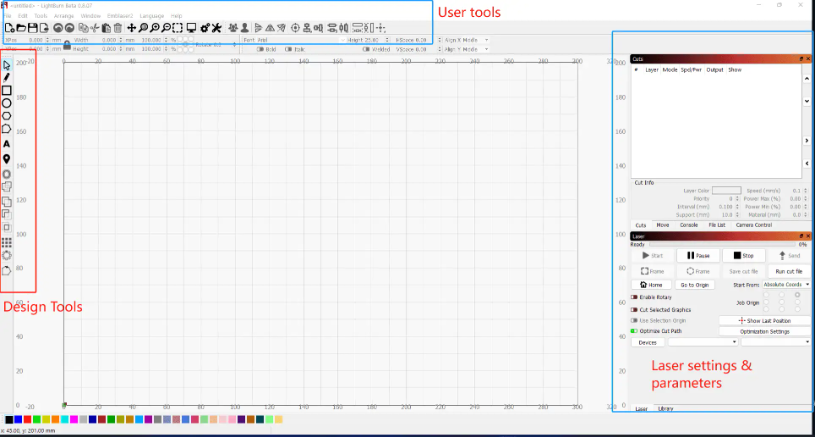
Users can import artwork, create or edit vector shapes, organize operations by color layer, assign speed and power settings, preview the processing sequence, and send jobs to compatible lasers. LightBurn can also save machine-ready files for supported controllers when users need to transfer jobs without maintaining a direct software connection.
| Feature | Details |
|---|---|
| Artwork Import and Editing | Imports common vector and raster formats and includes tools for drawing, text, node editing, offsets, alignment, and layout preparation. |
| Layer-Based Job Settings | Each color layer can use its own processing mode, speed, power, number of passes, and output order. |
| Camera Support | A calibrated camera can display the laser bed in the workspace and help position artwork on pre-cut, printed, or irregular workpieces. |
| Material Test Generator | Generates test grids for comparing supported settings, such as speed, power, passes, and other machine-dependent parameters. |
| Preview and Job Planning | Shows the planned operation order, travel moves, cut distance, and estimated processing time before the job starts. |
| Core and Pro Editions | Core supports compatible G-code controllers. Pro supports compatible G-code, DSP, and Galvo controllers. |
Thunder Laser users can follow the LightBurn installation guide and review the LightBurn Material Test guide for practical setup and testing instructions.
LaserGRBL is free, open-source Windows software developed for laser engravers that use compatible GRBL firmware. It can load G-code, convert common raster images for engraving, send jobs to a compatible machine, and provide basic jogging and machine-control functions.
LaserGRBL is designed around a focused engraving workflow. It can be a practical choice for hobbyists, DIY users, and occasional projects that do not require an integrated design suite, advanced layer management, camera alignment, or support for DSP and Galvo controllers.
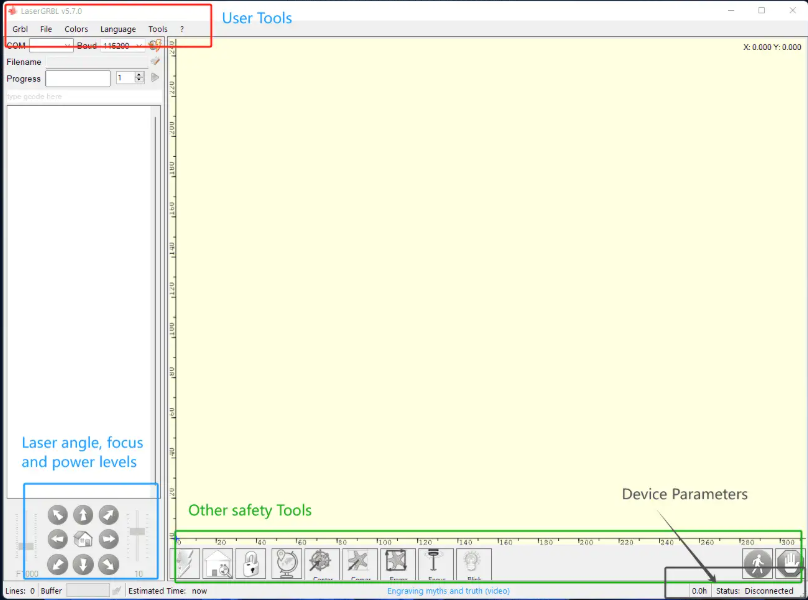
The LaserGRBL workspace includes file loading, engraving preview, connection controls, manual commands, jogging, homing, feed hold, resume, reset, job progress, time estimation, and real-time speed or power overrides when supported by the connected GRBL version.
| Feature | Details |
|---|---|
| Free and Open Source | LaserGRBL can be downloaded and used without purchasing a software license. |
| Raster Image Conversion | Opens common raster images and provides grayscale conversion, dithering, and vectorization options for engraving. |
| G-code Loading and Preview | Loads supported G-code files, displays the job path, and estimates execution time. |
| GRBL Machine Control | Includes jogging, homing, reset, unlock, feed hold, resume, manual commands, and GRBL configuration tools. |
| Real-Time Overrides | Compatible GRBL v1.1 systems can support real-time speed and laser power overrides during operation. |
| Limited SVG Workflow | SVG support is available but more limited than LightBurn's vector workflow. Depending on the file, text, fills, sizing, or layer-based operations may need preparation in an external editor. |
The better software depends first on the machine controller, followed by the operating system, file workflow, project complexity, and budget. A laser source alone does not determine software compatibility; the installed controller and supported connection method are the key factors.
LaserGRBL is designed for Windows and works with compatible GRBL-based laser engravers. It is a common option for entry-level diode systems and DIY machines that use supported GRBL firmware.
LightBurn works on Windows, macOS, and Linux. LightBurn Core supports compatible G-code controllers, while LightBurn Pro adds supported DSP and Galvo controllers. Compatibility depends on the specific controller, firmware, connection method, and software version.
| Controller Type | LaserGRBL | LightBurn Core | LightBurn Pro |
|---|---|---|---|
| GRBL v0.9 / v1.1 | Supported compatible systems | Supported compatible systems | Supported compatible systems |
| Smoothieware, Marlin, Grbl-LPC | Not the intended workflow | Supported controller types; verify the specific device | Supported controller types; verify the specific device |
| Ruida, Trocen, TopWisdom DSP | Not supported | Not supported by Core | Supported models included |
| BSL and EZCad2 Galvo | Not supported | Not supported by Core | Supported models included |
Check the official LightBurn controller and laser type guide before purchasing. Controller families can include different models, and support for one model does not automatically mean every machine in the same family is compatible.
LaserGRBL can load G-code and process common raster images for engraving. Its image conversion tools are useful for preparing grayscale and dithered engraving jobs, but more involved vector design work may need to be completed in a separate application.
According to the official LightBurn file import guide, LightBurn imports common vector and mixed formats, including AI, SVG, DXF, PDF, and PLT/HPGL, as well as PNG, JPG, BMP, GIF, and TIFF images. It can also import G-code geometry, although original speed, power, and fill-shape settings are not preserved as editable LightBurn job settings.
LightBurn also provides built-in tools for creating and editing text, shapes, nodes, offsets, and layouts. These tools can reduce the need to switch between applications for routine laser design tasks. However, complex illustration and specialized graphic design may still require an external editor.
One of the most practical differences between LaserGRBL and LightBurn is how users prepare and organize jobs. LaserGRBL focuses on loading images or G-code and controlling a compatible GRBL machine. LightBurn combines design preparation, operation settings, preview, and machine control in a more integrated workspace.
Consider a wooden sign that needs engraved lettering and a cut outline. The lettering may require raster engraving or a vector operation, while the outline needs a cutting setting. The software must let the user prepare the required operations and send them in the correct order.
| Workflow Need | LaserGRBL | LightBurn |
|---|---|---|
| Load a prepared G-code file and run a basic GRBL job | Suitable for compatible GRBL machines | Also supports compatible G-code machines |
| Create and edit vector artwork in the laser software | May require an external design application | Built-in drawing, text, node, offset, alignment, and layout tools |
| Combine engraving, scoring, and cutting in one design | Workflow depends on the prepared files and machine setup | Different operations can be organized into layers with separate settings and output order |
| Compare speed and power settings on a new material | Settings can be tested using a prepared job | The Material Test generator can create repeatable setting grids for supported parameters |
| Align artwork on irregular or pre-positioned parts | No integrated workspace camera system | A compatible calibrated camera can support visual placement and alignment |
LightBurn's layer-based workflow is especially useful when one design contains multiple operations. Users can assign different processing modes, speeds, power settings, passes, and output order to different layers, then preview the job before sending it to a compatible machine.
This does not mean every job is automatically faster in LightBurn. Results depend on the machine, artwork, settings, and operator. The main advantage is having more tools for organizing and reviewing complex jobs within one workspace.
Both programs provide useful tools for preparing and monitoring jobs, but their workflows differ. LaserGRBL includes job preview, progress monitoring, time estimation, and machine-control features. These are sufficient for many straightforward engraving tasks.
LightBurn provides a more integrated preview and job-planning environment. Its Material Test generator helps users compare settings systematically, while a compatible calibrated camera can help position artwork on workpieces that are already placed on the bed.
These tools are most useful when users frequently test unfamiliar materials, prepare repeatable jobs, or position designs on pre-cut and irregular objects. Camera alignment requires a suitable camera setup and calibration, and material test results still need to be checked against the capabilities and safe operating limits of the machine.
LaserGRBL is free and open source, so users can start with it without purchasing a software license. This makes it attractive for basic projects, occasional use, and budget-sensitive GRBL setups.
LightBurn offers a trial period and paid licenses. The article's previous pricing reference was verified in July 2026: LightBurn Core was listed at $99 and LightBurn Pro at $199. These figures should be checked against the official pricing information before publication or purchase, as software prices and licensing terms can change.
| Software | Price Reference | License and Updates | Intended Controller Group |
|---|---|---|---|
| LaserGRBL | Free | Open-source software | Compatible GRBL systems |
| LightBurn Core | $99 as of July 2026; verify current pricing | Paid license with an included update period | Supported G-code controllers |
| LightBurn Pro | $199 as of July 2026; verify current pricing | Paid license with an included update period | Supported G-code, DSP, and Galvo controllers |
LightBurn licenses are not a conventional subscription: the purchased software version remains usable after the included update period, while continued access to newer releases requires renewing the update period. Review the official LightBurn edition comparison and current licensing terms before purchasing.
The more useful question is not simply which program costs less, but whether the additional tools solve problems you regularly encounter. A free program may be sufficient for occasional simple jobs. A paid program may be worth considering if its design, layer, testing, and preview tools fit your workflow.
For beginners, the better choice depends on the machine they own and the type of project they want to make. A simpler interface can make it easier to start, but software that supports more of a user's workflow may become useful as project requirements grow.
| Beginner Scenario | Recommended Starting Point | Why |
|---|---|---|
| You have a compatible GRBL laser and want to engrave simple images | LaserGRBL | It is free and provides the essential image-processing and machine-control tools for compatible systems. |
| You want to create text, shapes, and vector designs inside the laser software | LightBurn | Its built-in design tools reduce the need to prepare every element in a separate application. |
| You plan to combine engraving, scoring, and cutting | LightBurn, if compatible | Layer-based settings make it easier to organize different operations in one design. |
| You use macOS or Linux | LightBurn, if compatible | LightBurn has native versions for these operating systems, while LaserGRBL is designed for Windows. |
| You are not sure which software your machine supports | Check the controller first | Compatibility matters more than the software's feature list. |
Beginners do not need to choose the software with the largest feature list. Start with the machine's compatibility and the jobs you actually plan to make. If a free workflow covers your current needs, there may be no reason to upgrade immediately. If you regularly need more design control or a more organized multi-operation workflow, LightBurn may be a better long-term fit.
LightBurn can be worth the cost when its additional tools address specific limitations in your current workflow. Its value depends on how often you use the laser, how complex your designs are, and whether integrated design and job preparation would make your work easier.
In these situations, LaserGRBL may provide everything you need without a software purchase. Paying for more features is not automatically worthwhile if you rarely use them.
LightBurn's value is easier to justify when these features solve recurring problems. For example, organizing different operations by layer can make a complex design easier to prepare and review. A material test grid can help compare settings systematically, although the final results still depend on the machine and material.
LightBurn Core is intended for supported G-code controllers. LightBurn Pro supports compatible G-code controllers as well as supported DSP and Galvo systems. The correct license is determined by the controller and device support, not simply by the laser source or machine brand.
Before paying, identify your controller, review the official supported-device information, and test the software with your machine during the available trial period. You can find further details in the LightBurn edition comparison.
Before installing or purchasing laser software, check the machine's controller and connection method. A diode laser, CO2 laser, or fiber laser does not automatically determine software compatibility. Machines that use different controllers may require different software editions or setup procedures.
If you cannot identify the controller, consult the machine manufacturer or review the LightBurn guide to identifying your laser. Checking compatibility before purchase can prevent problems that cannot be solved simply by changing software settings.
Many Thunder Laser CO2 machines use DSP controllers and can be operated with compatible software such as LightBurn Pro or RDWorks. The correct choice still depends on the specific machine series, installed controller, connection method, and functions required.
Before purchasing LightBurn, confirm the controller installed in your machine and review the applicable Thunder Laser manual. Some machine-specific functions or newer dual-laser workflows may require additional setup or may not be fully configurable inside every LightBurn version.
Users who need a free DSP software option can download RDWorks from Thunder Laser. For setup guidance, training resources, and machine-specific compatibility questions, review the Thunder Laser installation and training FAQ or contact the Thunder Laser support team.
Thunder Laser recommendation: Identify the controller first, then select the software that supports it. For supported DSP-based workflows, LightBurn Pro can provide an integrated design and production environment, while RDWorks remains an option for compatible machines. Check the machine-specific documentation before deciding.
LaserGRBL is a useful free option for Windows users with compatible GRBL-based machines. It provides image engraving, G-code loading, preview, jogging, job monitoring, and supported override functions without requiring a paid license.
LightBurn is the more complete choice for users who need integrated design tools, multiple processing layers, material testing, camera alignment, and a more flexible job-preparation workflow. LightBurn Core supports compatible G-code controllers, while LightBurn Pro adds supported DSP and Galvo controllers.
Choose LaserGRBL when a free and straightforward GRBL workflow meets your needs. Choose LightBurn when its additional tools address recurring design or production challenges. In either case, confirm controller compatibility before installing or purchasing software.
Talk To Our Experts Now!
Please leave your contact information so that we can serve you better.
LASERGRBL AND LIGHTBURN FAQS
FIND THE RIGHT LASER FOR YOUR NEXT PROJECT
Explore Thunder Laser solutions designed for different materials, workflows, and production needs.


 Stable & Consistent MachinesUnlimited ApplicationsRobust After-sales SupportFactory Direct Supply


