


Marble Laser Engraving & Marking A Compelete Guide
 2026-06-01
WHAT ARE YOU LOOKING FOR?
Search Across Products, Blog Posts, Support Content, And Resources.

Marble Laser Engraving & Marking A Compelete Guide
2026-06-01

Laser engraving marble can create beautiful, meaningful, and high-value products, from marble headstones and memorial plaques to pet memorial stones, photo plates, nameplates, and custom decorative pieces. However, getting a clean and professional result is not always as simple as importing a design file and pressing start.
Many users run into similar problems:
In many cases, the problem is not only the laser setting. It is the engraving strategy.
In this article, we will explain why marble engraving results vary, and how to improve the final quality.

Real Project Example
See the exact Titan Pro settings, image preparation process, project file, and final result used in our Photo on Black Marble Memorial project.
Marble is not a single, perfectly consistent material. Different stones can respond differently to the same laser machine, setting, and artwork.
Several factors can change the final result:
A better marble engraving result starts with understanding these variables before adjusting power, speed, or frequency.
Different types of marble can produce very different engraving results. Even when the artwork looks the same, the final effect may change because of the stone’s color, surface finish, mineral composition, natural veining, and density.
Some marble surfaces are more uniform, making the engraving result easier to control. Others have strong veins, mixed tones, or uneven mineral patterns, which may interfere with photo details, small text, or fine decorative lines.
For applications such as portraits, memorial plaques, and headstones, the most suitable marble is usually the one with a stable background and fewer distracting patterns in the main engraving area. This helps the image, text, and decorative details remain clearer after processing.
In short, better marble engraving starts with choosing and evaluating the stone itself. Before adjusting machine settings or selecting a processing method, it is important to understand how the marble type may affect contrast, detail, and overall visual quality.
Shallow engraving and deep engraving should not be treated as the same process.
Shallow engraving focuses more on surface appearance, contrast, grayscale, and visual clarity. It is often used for photos, portraits, light decorative marks, and memorial images.
Deep engraving focuses more on material removal, physical texture, edge definition, and relief effect. It is more common in bold text, decorative carving, relief patterns, and 3D-style engraving.
A high-quality marble engraving should not only be visible. It should match the purpose of the design.
For a photo, the result should look natural and recognizable. For text, it should be readable. For relief patterns, it should have depth and definition. For memorial products, the full layout should look balanced and professional.
| Quality Factor | What It Means |
| Visual contrast | The engraving should stand out clearly against the marble surface. |
| Image clarity | Photos and portraits should keep recognizable details and smooth tones. |
| Engraving depth | Deeper engraving should create clean definition without excessive roughness. |
| Surface quality | The result should avoid unwanted crystallization, broken details, or uneven texture. |
| Layout accuracy | Photos, text, borders, and patterns should align correctly. |
| Application value | The finished piece should be suitable for memorial, display, or commercial use. |
Comparison table: key quality factors for marble laser engraving results.
Once you understand the marble type, engraving depth, and desired result, the next question is which laser is better for the job. The answer is not always CO₂ or Fiber alone. Both laser sources can engrave marble, but they create different effects and are better suited to different applications.
For shallow engraving, CO₂ lasers are often the preferred choice. They work well on a wide range of marble types and typically produce brighter, cleaner, and higher-contrast results.
This makes CO₂ especially suitable for:
For photos and portraits, smooth tonal transitions and visual clarity are important. CO₂ engraving is often better suited for this type of shallow visual effect, especially when the goal is to avoid an overly dark result.

Tip: CO₂ is usually better for shallow marble engraving, but it is not ideal for deep engraving. During deep engraving, CO₂ can create excessive heat on the marble surface, which may lead to crystallization, rougher texture, and reduced detail quality. For relief carving, bold text, or deep decorative patterns, Fiber is usually the better option to test.

Fiber lasers can also engrave marble, but their visual effect is usually different from CO₂. Compared with CO₂, Fiber engraving often appears darker and may not deliver the same bright, clean visual contrast that is useful for photo-style engraving. For image-based applications where natural grayscale, tonal transitions, and visual clarity are important, Fiber is usually less favored.
However, Fiber lasers become more valuable when the goal shifts from shallow visual engraving to deeper engraving. They can remove material more effectively and create more defined features.
Fiber is often better suited for:
Darker marble applications that require stronger marking or deeper effects

| Engraving Goal | More Suitable Laser | Why |
| Shallow engraving | CO₂ | Cleaner and brighter surface effect |
| Photo or portrait engraving | CO₂ | Better grayscale and tonal transition |
| Light-colored marble photo | CO₂ | Helps avoid overly dark results |
| Dark marble marking | Fiber | Can create stronger marking or deeper effects |
| Deep text engraving | Fiber | Better depth and definition |
| Relief carving | Fiber | More suitable for deeper material removal |
| Decorative deep patterns | Fiber | Better for texture and physical depth |
| Mixed-effect memorial products | CO₂ + Fiber | Allows different effects in one workflow |
Comparison table: CO₂ vs Fiber laser performance for different marble engraving goals.
In general, CO₂ lasers are often preferred for shallow engraving and photo reproduction, while Fiber lasers can be advantageous for deep engraving, relief carving, and applications that require greater engraving depth.
CO₂ is often a better choice when:
CO₂ is especially useful when the project focuses more on visual detail than physical depth.
Fiber is often a better choice when:
Fiber is especially useful when the project requires depth, texture, or more defined carved features.
A marble headstone or memorial plaque may include:
In this case, one laser source may not be ideal for every part of the design. A dual-laser workflow allows different areas to be processed with different laser strategies.
Better marble engraving starts before the laser begins processing. The most important step is to define the material, the artwork, and the desired engraving effect.
The marble itself has a direct impact on the final engraving result. Before preparing the file or adjusting laser settings, start by choosing a suitable stone.
For better control, consider these factors:
For photo engraving or memorial applications, choose marble with a stable background color, especially in the area where the portrait or important text will be engraved.
Before choosing the laser source, define what each part of the design needs.
Ask whether each area requires:
This step helps you avoid choosing a laser source based only on the design category. For example, text may only need shallow marking in one project, but deeper engraving in another.
A good engraving result also depends on artwork quality.
For photos and portraits:
Test the photo on a sample piece before final engraving.
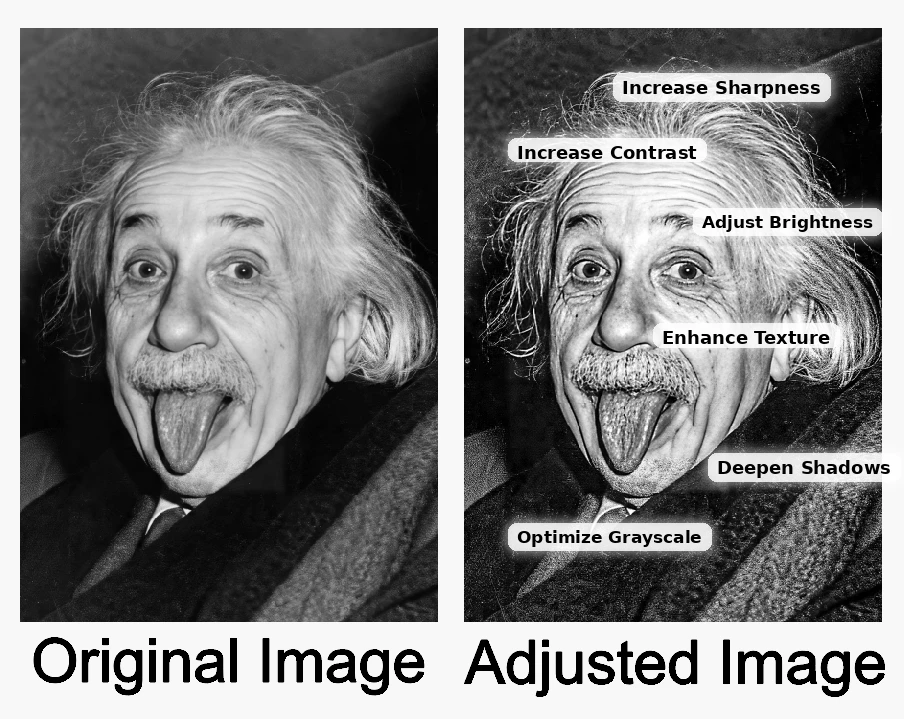
For text and dates:
The goal is to make the artwork easier for the laser to reproduce. A poorly prepared image or overly delicate text can limit the final result, even when the machine and settings are correct.
Instead of separating the design only by content type, separate it by the result you want.
A practical layer structure may include:
This gives you more control over how each part is processed. It also helps you decide whether CO₂, Fiber, or both should be tested for each layer.
Testing is especially important for marble because different colors, veins, and finishes can react differently.
A practical testing strategy could include:
| Test Area | What to Compare |
| Shallow CO₂ engraving | Image clarity, grayscale, brightness, surface cleanliness |
| Fiber marking | Darkness, contrast, edge definition |
| Deeper CO₂ engraving | Whether crystallization or roughness appears |
| Deeper Fiber engraving | Depth, definition, and surface texture |
| Text and border test | Readability, edge quality, and consistency |
Comparison table: practical testing strategy for marble laser engraving.
When possible, test on the same marble batch that will be used for the final product. Record the result so future jobs can be produced more consistently.
Tip: If you only have one laser machine, you can still improve your marble engraving results by testing different settings. For starting references, you can also check our CO₂ laser material settings page.
After engraving, quality inspection is essential.
Use this checklist:
This step is especially important for memorial products, where the final appearance carries both emotional and commercial value. For small text, portraits, and fine lines, accurate focus is also important. See How to Focus Your Laser Machine for setup guidance.
For simple marble engraving, a single laser source may be enough. But for complex and high-value marble applications, especially projects that combine shallow image engraving, deeper decorative effects, text, borders, and custom layouts, Thunder Laser Titan Pro offers a more complete workflow.

Titan Pro is built for professional marble engraving workflows that require both quality and production flexibility. By integrating RF CO₂ and Fiber laser sources in one industrial-grade system, it allows users to handle mixed-content marble designs without moving the stone between separate machines.
For marble engraving businesses, this is especially useful when working with headstones, memorial plaques, portrait stones, and custom stone products. These projects often require detailed image engraving, readable lettering, accurate borders, and consistent layout alignment on the same piece of marble.
Titan Pro is designed to support this type of work with:
Titan Pro offers a more complete workflow solution for complex marble engraving. It helps businesses reduce repositioning, improve consistency, and process higher-value marble applications more efficiently.
This makes Titan Pro suitable for applications such as:
Titan Pro is most worth considering when your marble engraving work is not limited to simple text or occasional small pieces.
It is a better fit if your business needs:
For businesses that want to expand into marble headstones, gravestones, memorial plaques, pet memorial stones, and custom stone products, Titan Pro can provide a stronger long-term workflow.
Titan Pro is a better fit for businesses that see marble engraving as a professional service.
If your work mainly involves simple text, small decorative marks, or one-off marble pieces, a single laser machine may be enough after proper testing.
But if your business regularly handles memorial products, portrait stones, custom plaques, or mixed-content marble designs, the requirements are different.
In that case, the real value of Titan Pro is workflow confidence. It helps you manage image quality, text clarity, layout accuracy, and production consistency within one system, instead of adjusting every project around the limits of a single laser source or moving heavy stone pieces between separate machines.
For marble engraving businesses that want to improve finished quality, reduce setup risk, and expand into higher-value custom work, Titan Pro is a strong long-term solution. If you are still comparing machines, see How to Choose Thunder Laser Machines.
Better marble engraving is not only about adjusting power and speed. It starts with understanding the material, the artwork, and the purpose of each design element.
For complex marble engraving applications, Titan Pro provides a professional dual-source solution with CO₂ RF and Fiber laser technology. It helps users process photos and text more effectively, reduce alignment risk, and create more consistent results for headstones, memorial plaques, pet memorial stones, and custom marble products.
If you want to improve marble engraving results and build a more flexible workflow for high-value stone products, Thunder Laser Titan Pro is a solution worth exploring.
Need Better Marble Engraving Results?
Contact Thunder Laser to learn more about Titan Pro for marble headstones, memorial plaques, pet memorial stones, and custom stone engraving applications.
Contact UsTalk To Our Experts Now!
Please leave your contact information so that we can serve you better.
FAQS
Both CO₂ and Fiber lasers can engrave marble well. CO₂ is usually better for shallow engraving and photo-style effects, while Fiber is better for deeper engraving, relief patterns, and stronger physical definition.
Yes, in many cases. CO₂ is often preferred for shallow photo engraving because it can produce brighter, cleaner, and more natural grayscale effects, especially on lighter marble.
Yes. Fiber is often better for deeper engraving, relief carving, decorative patterns, bold text, and 3D-style effects. It can create deeper and more defined results than CO₂ in these applications.
When CO₂ is pushed too deep, heat can build up in the stone. This may cause surface crystallization, rougher texture, and reduced detail quality, making it harder to achieve clean relief structures.
Yes. Light and dark marble can produce different contrast effects. Light marble often works well with shallow CO₂ engraving, while darker marble may benefit from Fiber depending on the desired result.
Yes. Titan Pro is useful when a headstone or memorial product requires different effects in one job, such as shallow portrait engraving, deeper text, decorative borders, or relief-style patterns. Its RF CO₂ and Fiber laser sources allow users to choose the better laser for each part of the design.
Not always. If you only do simple shallow engraving on one type of marble, a single laser may be enough after proper testing. Dual-laser systems become more valuable when you need different depths, different effects, or production flexibility.
NEED HELP FINDING THE RIGHT SOLUTION?
Talk to our team for machine recommendations, application advice, and support based on your needs.


 Stable & Consistent MachinesUnlimited ApplicationsRobust After-sales SupportFactory Direct Supply


