Complete Guide to Laser Marking Machines: How They Work, Applications, Cost, and Buying Tips
 2022-09-12
WHAT ARE YOU LOOKING FOR?
Search Across Products, Blog Posts, Support Content, And Resources.

Complete Guide to Laser Marking Machines: How They Work, Applications, Cost, and Buying Tips
2022-09-12

Looking to understand laser marking machines before making a purchase? This complete guide explains what laser marking machines are, how they work, what materials they can mark, how much they may cost, and how to choose the right model for your application.
Laser marking is widely used in manufacturing, medical devices, electronics, automotive parts, custom branding, packaging, jewelry, and product traceability. Because the process is non-contact, precise, and permanent, it is an efficient way to add logos, serial numbers, QR codes, barcodes, text, graphics, and identification marks to many types of materials.
The right laser marking machine depends on the material you need to mark, the required mark quality, marking speed, working area, laser type, software compatibility, budget, and long-term support from the supplier.
A laser marking machine uses a focused laser beam to create a permanent mark on the surface of a material. The laser energy interacts with the material surface and can vaporize, melt, discolor, or modify a thin layer to form text, graphics, logos, codes, or identification marks.
Unlike mechanical engraving, laser marking does not require physical contact between the tool and the workpiece. This helps reduce mechanical damage, surface contamination, and tool wear. The laser beam can also be controlled precisely, making it suitable for detailed patterns, small text, high-contrast codes, and repeatable industrial marking.
Although different laser marking systems use different laser sources, the basic process is similar. A laser source generates the beam, optical components direct and focus it, and the focused energy interacts with the material surface to create the mark.
The laser type determines the wavelength, and the wavelength affects how the beam interacts with different materials. Common laser sources for marking include CO2, fiber, UV, and YAG systems. In many modern production environments, fiber and UV laser marking machines are especially common for metals, plastics, electronics, and precision components.
| Laser Type | Common Use Cases | Typical Strength |
|---|---|---|
| Fiber Laser | Metals, tools, machinery parts, electronics, serial numbers, QR codes | High-contrast metal marking and industrial traceability |
| UV Laser | Plastics, sensitive materials, electronics, packaging, precision marks | Fine marking with reduced heat impact |
| CO2 Laser | Wood, leather, paper, coated materials, rubber, selected plastics | Organic material marking and engraving |
| YAG Laser | Industrial marking applications depending on configuration | Durable marking on selected hard materials |
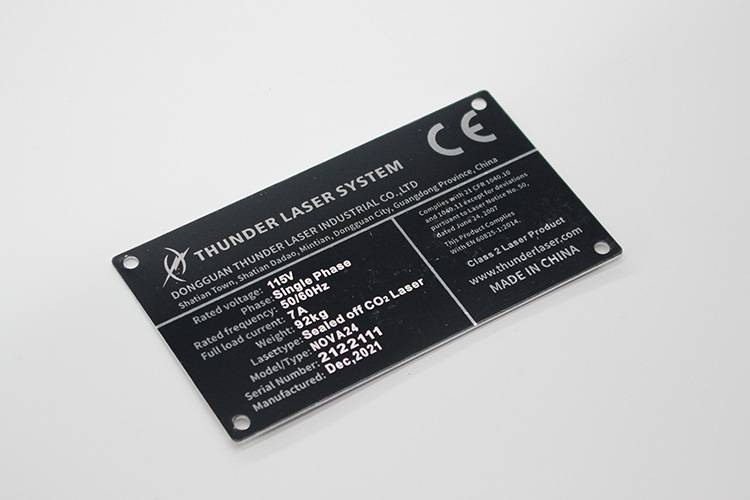
Laser marking machines can be used for both industrial identification and creative customization. The same machine may be used to mark serial numbers during production, add QR codes for traceability, engrave brand logos, or personalize finished products.
The cost of a laser marking machine depends on the laser type, power, marking area, machine structure, software, automation features, accessories, and supplier support. In general, laser marking machines may range from about $5,000 to $50,000 depending on configuration and application needs.
Leasing may also be available in some situations. The source material mentions a reference cost of around $500 per month for leasing, but actual leasing cost can vary by machine configuration, region, supplier, and financing terms. The best way to determine the exact cost is to request a quote based on your material, marking size, required speed, and production volume.
The best laser marking machine should be selected according to your material, marking purpose, production environment, and budget. A machine that works well for metal serial numbers may not be the best choice for plastic packaging, and a machine designed for small desktop parts may not suit large industrial components.
Start by identifying the material you need to mark. Fiber lasers are commonly used for metals and many industrial marking tasks. UV lasers are often selected for plastics and heat-sensitive materials. CO2 lasers are commonly used for organic materials such as wood, leather, paper, rubber, and selected coated materials.
Laser power is measured in watts. The required power depends on the material, desired mark speed, depth, and contrast. For many marking applications, a 30W laser may be sufficient, but harder materials, deeper marking, or faster production may require higher power.
Wavelength is measured in nanometers and determines how the laser interacts with the material. Many laser marking machines use a wavelength around 1064 nm, which is widely used for many marking applications. However, the ideal wavelength depends on the material and the marking effect you need.
Pulse duration affects how quickly energy is delivered to the surface. Shorter pulses can support finer marks and reduce heat impact in some applications. This can be useful when marking detailed graphics, delicate parts, or heat-sensitive materials.
Spot size affects the precision of the mark. A smaller spot size can create finer details, smaller text, and sharper graphics. When evaluating a machine, consider whether you need simple identification marks or high-resolution decorative engraving.
The marking area determines the maximum size that can be marked in one setup. Industrial laser marking machines may offer larger marking fields, while compact systems are better for small parts. A marking area of 300 mm × 300 mm is common in some industrial setups, but actual requirements depend on your products.
Desktop laser marking machines are usually smaller and more affordable, making them suitable for small items, prototyping, personalization, and light production. Industrial machines are larger, more powerful, and better suited for larger parts, higher production volume, and more demanding workflows.
Important features may include a rotary device for cylindrical objects, an XY table for larger parts, software that supports vector files, focus assistance, enclosure safety design, and fume extraction compatibility. These features can make the machine easier to use and more adaptable to different products.
Price is important, but it should not be the only deciding factor. A reliable supplier, clear warranty, practical training, accessible technical support, and a reasonable return policy can be just as important as the machine itself. Before purchasing, research the supplier, read reviews, confirm warranty details, and ask how support is handled after installation.
If you need a versatile, professional laser marking solution, a fiber, UV, or MOPA laser marking machine is often a strong choice depending on your materials. For users who need to mark metals, plastics, electronics, tools, labels, and industrial components, the Aurora Series is a relevant option to explore.
Compared with choosing a machine only by price, it is better to select a system based on the material, marking effect, production volume, and future application range. A good laser marking machine should support stable marking quality, user-friendly workflow, reliable hardware, and long-term technical support.
| User Need | Machine Direction |
|---|---|
| Metal serial numbers, logos, and industrial part marking | Fiber laser marking machine |
| Plastic marking with reduced heat impact | UV laser marking machine |
| Color marking or flexible pulse control on selected materials | MOPA laser marking machine |
| Cylindrical products such as tumblers, rings, or tubes | Machine with rotary accessory |
| Large or repeated production parts | Industrial marking system with suitable working area |
Laser marking machines are practical tools for permanent product identification, branding, traceability, personalization, and industrial marking. They can mark metals, plastics, glass, rubber, coatings, and many other materials depending on the laser type and configuration.
To choose the right laser marking machine, start with your material and marking goal. Then evaluate the laser type, power, wavelength, spot size, marking area, software, accessories, budget, warranty, and supplier support. A machine that matches your workflow will deliver better quality, lower operating risk, and stronger long-term value.
Need Help Choosing a Laser Marking Machine?
Contact Thunder Laser experts to match the right marking system to your materials, products, and production goals.
Contact UsTalk To Our Experts Now!
Please leave your contact information so that we can serve you better.
LASER MARKING MACHINE FAQS
FIND THE RIGHT LASER FOR YOUR NEXT PROJECT
Explore Thunder Laser solutions designed for different materials, workflows, and production needs.


 Stable & Consistent MachinesUnlimited ApplicationsRobust After-sales SupportFactory Direct Supply