How to Prevent Fires in Laser Machines
 2024-06-14
WHAT ARE YOU LOOKING FOR?
Search Across Products, Blog Posts, Support Content, And Resources.

How to Prevent Fires in Laser Machines
2024-06-14

Laser machines can potentially cause fires if materials are handled improperly or if processing parameters are not set correctly. Fires can damage the material, optical components, and other machine parts, so fire prevention should always be part of daily laser operation.
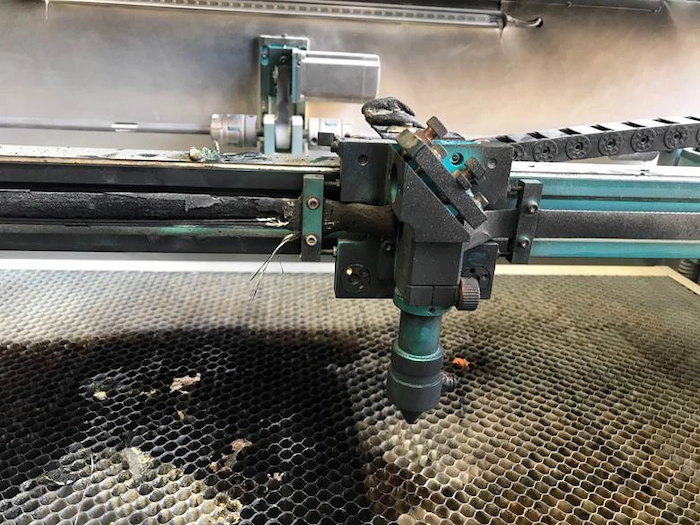
Before flame detectors were installed, a fire lasting six minutes caused significant damage to the machines. Now, flame detectors are standard on all Thunder Laser machines. These heat sensors stop operation when they detect a fire, but operators should still take precautions to prevent fires before they happen.
A laser beam delivers concentrated energy to the material surface. When the material is flammable, or when the laser stays in one area too long, the material temperature may rise to the ignition point.
Common fire-related causes include flammable materials, excessive laser power, slow cutting speed, insufficient air assist, and unattended operation. Good fire prevention depends on controlling these factors together.
Important: Flame detectors help reduce risk by stopping operation when a fire is detected, but they do not replace proper supervision, safe parameter settings, and correct material handling.
Many materials used in laser processing are flammable, including plywood, solid wood boards, acrylic, ABS plastics, foam, paper, fabrics, and leather. When processing these materials, closely monitor the machine and do not leave it unattended.
Before starting a job, confirm that the material is suitable for laser processing and that the work area is clear of unnecessary scraps, dust, paper pieces, or other combustible items.
Setting the power too high can cause materials to catch fire. Higher power delivers more energy in the same amount of time, which can raise the material temperature to the ignition point.
To achieve good cutting results while reducing fire risk, choose the lowest power setting that can still produce the desired cut quality.
Setting the speed too low can also cause materials to catch fire. Lower speeds increase the laser exposure time, which leads to localized energy build-up and higher material temperatures.
A good set of cutting parameters should balance power and speed. The power should not be too high, and the speed should not be too low, while still achieving smooth and sharp material edges.
Some very thick or special materials may require unique speeds. For example, cutting wood close to 20 mm thick may require single-digit speeds. However, setting the speed to 1 mm/s is not recommended because the extended laser exposure time can cause materials to catch fire rather than cut through cleanly.
During a fire, the material can become strongly carbonized. The carbon black produced by burning absorbs laser energy, which may prevent the laser from cutting through the material at very low speeds.
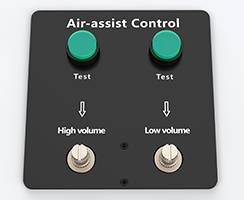
Setting the air assist too low can increase the risk of fire. Air assist helps cool the material, clear smoke and debris, and reduce combustion during laser cutting.
In general, strong air assist is recommended for cutting. In some special cases, users may reduce or turn off air assist to achieve specific effects. When doing so, monitor the material closely and respond immediately if flames appear.
When cutting thick materials, the laser head’s air assist alone may not cool the cut line effectively. One feasible method is to elevate the thick material and continuously blow air at the bottom of the material with an air gun during cutting until the process is complete.
If flames are observed while operating the laser machine, immediately press the emergency stop button to halt processing. Do not continue the job while flames are present.
If the flames persist after the machine stops, promptly use a fire extinguisher and spray at the base of the flames. After the fire is extinguished, inspect the machine carefully and replace any damaged parts before using it again.
Safety reminder: Always keep a suitable fire extinguisher nearby, monitor flammable materials during processing, and never leave the laser machine unattended while it is running.
Before processing flammable materials, use the following checklist to reduce fire risk.
Laser machine fire prevention depends on careful material selection, proper parameter settings, sufficient air assist, and constant supervision. Flammable materials such as wood, acrylic, foam, paper, fabric, and leather require extra attention during cutting and engraving.
Flame detectors add an important layer of protection by stopping operation when a fire is detected, but operators should still prevent fires through safe daily habits. If flames appear, stop the machine immediately, extinguish the fire if needed, and inspect the machine before continuing work.
Need Help Improving Laser Safety?
Contact Thunder Laser for guidance on safer laser operation, air assist setup, material processing, fire prevention, and machine maintenance.
Contact UsTalk To Our Experts Now!
Please leave your contact information so that we can serve you better.
LASER MACHINE FIRE PREVENTION FAQS
FIND THE RIGHT LASER FOR YOUR NEXT PROJECT
Explore Thunder Laser solutions designed for different materials, workflows, and production needs.


 Stable & Consistent MachinesUnlimited ApplicationsRobust After-sales SupportFactory Direct Supply