


Aluminium-Lasergravur – Materialien, Einstellungen, Tipps & Maschinenratgeber
 2026-09-16

Bolt-Serie
Professionelle Lasergraviermaschine für hochpräzise Ergebnisse

Nova-Serie
Großformat-CO₂-Laserschneider mit Glasröhre

Nova Plus-Serie
Professionelle RF-CO₂-Laserschneidmaschine

Titan-Serie
Industrielles RF-CO₂-Lasersystem

Titan Pro-Serie
Industrielles Lasersystem mit RF-CO₂- und MOPA-Faserlaser


WAS SUCHEN SIE FÜR?
Suche über Produkte, Blog-Beiträge, Support-Inhalte und Ressourcen.

Aluminium-Lasergravur – Materialien, Einstellungen, Tipps & Maschinenratgeber
2026-09-16

Aluminium wird häufig für Industriebauteile, Elektronik, Schilder, Werkzeuge, Werbeartikel, Typenschilder, Geschenke und personalisierte Accessoires verwendet. Sein geringes Gewicht, seine Langlebigkeit, Korrosionsbeständigkeit und die hochwertige metallische Oberfläche machen es außerdem zu einem der am häufigsten verwendeten Metalle für die Laserbeschriftung und Lasergravur.
Allerdings reagieren nicht alle Aluminiumoberflächen gleich auf Laserstrahlung. Blankes Aluminium, eloxiertes Aluminium, lackiertes Aluminium und pulverbeschichtetes Aluminium erfordern unterschiedliche Laserquellen und Strategien zur Parametereinstellung. Ein Faserlaser kann blankes Aluminium direkt markieren oder gravieren, während CO₂-Laser im Allgemeinen besser für eloxierte oder beschichtete Aluminiumoberflächen geeignet sind.
Kurzantwort: Ja, Aluminium kann mit einem Laser graviert und markiert werden. Für blankes Aluminium ist ein Faserlaser oder MOPA-Faserlaser in der Regel die bevorzugte Wahl. Eloxiertes Aluminium kann je nach gewünschtem Ergebnis mit Faserlasern, MOPA-Faserlasern oder kompatiblen CO₂-Lasersystemen bearbeitet werden. CO₂-Laser sind besonders dann sinnvoll, wenn eine eloxierte, lackierte oder beschichtete Oberfläche entfernt oder verändert werden soll, anstatt das blanke Aluminium direkt zu gravieren.
Dieser Leitfaden erklärt, wie unterschiedliche Aluminiumoberflächen auf Laserenergie reagieren, welche Lasermaschinen geeignet sind, welche Einstellungen als Ausgangswerte verwendet werden können und wie sich Kontrast, Detailgenauigkeit, Gleichmäßigkeit und Gravurtiefe verbessern lassen. Einen umfassenderen Überblick über die Metallbearbeitung finden Sie im Leitfaden zum Lasergravieren und Laserschneiden von Metall sowie im Anwendungsleitfaden zur Lasergravur & Laserbeschriftung von Metall.
Ja. Aluminium kann mit einem Laser markiert, oberflächlich bearbeitet oder graviert werden. Das Ergebnis hängt jedoch stark von der Oberflächenbeschaffenheit und der verwendeten Laserquelle ab. Bevor Sie Einstellungen oder eine Maschine auswählen, sollten Sie zunächst feststellen, ob es sich um blankes, eloxiertes, lackiertes oder anderweitig beschichtetes Aluminium handelt.
Blankes Aluminium lässt sich am besten mit einem Faserlaser bearbeiten, da dessen Wellenlänge gut für die direkte Wechselwirkung mit Metalloberflächen geeignet ist. Abhängig von Leistung, Frequenz, Scangeschwindigkeit, Linienabstand, Fokus und Anzahl der Durchgänge kann ein Faserlaser weiße oder helle Markierungen, Identifikationscodes, Logos, feine Grafiken und Gravuren durch Materialabtrag erzeugen.
Für Anwendungen wie Seriennummern, Barcodes, QR-Codes, Produktkennzeichnung, Werkzeuge, Industriekomponenten und individuell gefertigte Metallprodukte ist ein Faserlaser im Allgemeinen die praktischste Ausgangslösung.
Wenn eine präzisere Steuerung des Pulsverhaltens, des Kontrasts, des Oberflächenerscheinungsbildes oder des Materialabtrags erforderlich ist, bietet ein MOPA-Faserlaser einen größeren Bearbeitungsbereich. Weitere Informationen zu den Unterschieden finden Sie unter Faserlaser vs. MOPA-Laserbeschriftung.
Eloxiertes Aluminium besitzt eine kontrolliert erzeugte Oxidschicht auf seiner Oberfläche. Abhängig vom Eloxalverfahren, Farbstoff, Farbton, der Schichtdicke und der Laserquelle kann die Laserenergie einen Teil dieser Oberflächenschicht verändern oder entfernen und so einen sichtbaren Kontrast erzeugen.
Deshalb wird eloxiertes Aluminium häufig für lasergravierte Anhänger, Geräteetiketten, Bedienfelder, Visitenkarten, Produktplaketten, personalisierte Accessoires und Fototafeln verwendet. Dunkle Eloxalfarben erzeugen oft einen besonders deutlichen Kontrast, wenn der Laser die darunterliegende hellere Oberfläche freilegt oder verändert.
Faserlaser und MOPA-Faserlaser eignen sich gut für eloxiertes Aluminium. Kompatible CO₂-Systeme können ebenfalls saubere Oberflächengravuren erzeugen, indem sie mit der Eloxalschicht interagieren. Dadurch gehört eloxiertes Aluminium zu den vielseitigsten Aluminiummaterialien für die Personalisierung mit dem Laser.
Lackiertes und pulverbeschichtetes Aluminium wird in der Regel bearbeitet, indem die Beschichtung entfernt oder verändert wird, anstatt das darunterliegende Aluminium selbst tief zu gravieren. Dadurch kann das darunterliegende Metall sichtbar werden und ein starker visueller Kontrast entstehen.
CO₂-Laser können für solche Verfahren zur Beschichtungsentfernung effektiv sein. Je nach Zusammensetzung und Dicke der Beschichtung, dem erforderlichen Kontrast und dem gewünschten Oberflächeneffekt können auch Faserlaser eingesetzt werden.
Da sich handelsübliche Beschichtungen erheblich unterscheiden, sollten Sie die Beschichtung immer identifizieren und vor Produktionsbeginn überprüfen, ob eine sichere Laserbearbeitung möglich ist.
| Aluminiumoberfläche | Empfohlener Laser | Typisches Verfahren | Übliche Ergebnisse |
|---|---|---|---|
| Blankes Aluminium | Faserlaser / MOPA-Faserlaser | Direktes Markieren oder Gravieren | Weiße Markierungen, Kennzeichnungen, Logos, feine Gravuren, tieferer Materialabtrag |
| Eloxiertes Aluminium | Faserlaser / MOPA / CO₂ | Oberflächenveränderung oder Entfernung der Eloxalschicht | Kontrastreiche Texte, Logos, Fotos, Seriennummern, dekorative Motive |
| Lackiertes Aluminium | CO₂ / Faserlaser je nach Beschichtung | Beschichtungsentfernung oder Oberflächenmarkierung | Kontrastreiche Grafiken, Etiketten, Schilder, Kennzeichnungen |
| Pulverbeschichtetes Aluminium | CO₂ / Faserlaser je nach Beschichtung | Beschichtungsentfernung | Logos, Texte, Bedienfelder, Markenprodukte |
Unterschiedliche Aluminiumoberflächen erfordern verschiedene Laserquellen und Bearbeitungsstrategien.
Demonstration der Lasergravur und Laserbeschriftung auf Aluminium.
Aluminium wird bereits in zahlreichen gewerblichen und industriellen Produkten eingesetzt. Durch die Laserbearbeitung lassen sich Kennzeichnungen, Markenelemente, Personalisierungen oder dekorative Details hinzufügen, ohne dass mechanische Werkzeuge erforderlich sind.
Die Faserlaserbeschriftung eignet sich besonders für feine Grafiken, kleine Schrift, Seriennummern, Barcodes, QR-Codes und andere detaillierte Kennzeichnungselemente. Da der Prozess digital gesteuert wird, können Motive schnell geändert werden, ohne neue physische Prägestempel oder Schneidwerkzeuge herstellen zu müssen.
Dies ist besonders nützlich für die industrielle Rückverfolgbarkeit, Elektronik, individuell angepasste Werkzeuge, personalisierte Produkte und die Beschriftung mit variablen Daten.
Wenn der Laser die Metalloberfläche verändert oder einen Teil einer Eloxal- oder Beschichtungsschicht entfernt, wird das Motiv Bestandteil der bearbeiteten Oberfläche, anstatt als Aufkleber oder gedruckte Schicht aufgebracht zu werden.
Dadurch eignet sich laserbeschriftetes Aluminium für Bauteile und Produkte, die eine langfristig beständige Kennzeichnung benötigen. Die tatsächliche Haltbarkeit hängt jedoch weiterhin vom Gravurverfahren, der Beschichtung, der Witterungseinwirkung, dem Abrieb, chemischen Einflüssen und der Einsatzumgebung ab.
Die Lasergravur ist ein berührungsloses Verfahren. Der Laserstrahl bearbeitet die Oberfläche, ohne dass ein Schneidwerkzeug mechanischen Druck auf das Aluminium ausübt.
Dadurch werden die mechanischen Belastungen dünner Bauteile reduziert und der Verschleiß von Schneidwerkzeugen während der Gravur vermieden. Eine geeignete Fixierung ist dennoch wichtig, damit das Werkstück stabil bleibt und eine gleichmäßige Fokussierung gewährleistet ist.
Der gleiche Arbeitsablauf kann sowohl für ein einzelnes personalisiertes Typenschild als auch für eine Serie von Fertigungsteilen mit individuellen Seriennummern verwendet werden. Namen, Nummern, QR-Codes, Logos, Grafiken und Identifikationsinformationen können zwischen den Aufträgen digital geändert werden.
Ein praktisches Beispiel finden Sie in der Anleitung zur Laserbeschriftung eines Aluminiumkugelschreibers.
Welche Maschine am besten geeignet ist, hängt in erster Linie von der Aluminiumoberfläche und dem gewünschten Ergebnis ab. Für das Markieren und Gravieren von blankem Metall wird eine andere Laserquelle benötigt als für viele Anwendungen zur Beschichtungsentfernung. Deshalb sollte sich die Maschinenauswahl zunächst nach dem Bearbeitungsverfahren richten und nicht allein nach der Laserleistung.
Eine umfassendere Orientierung zur Produktauswahl finden Sie unter So wählen Sie die beste Thunder Laser Maschine aus.
Die Thunder Laser Aurora Series ist die erste Wahl für die direkte Beschriftung und Gravur von Aluminium. Faserlaser und MOPA-Faserlaser können direkt mit Metall interagieren. Dadurch eignet sich die Serie für Aluminiumanhänger, Bauteile, Logos, Seriennummern, Barcodes, QR-Codes, Markenprodukte, Werkzeuge, Accessoires und industrielle Kennzeichnungen.
Innerhalb der Aurora Series hängt die richtige Wahl vom gewünschten Ergebnis und Arbeitsablauf ab:
Gehen Sie nicht davon aus, dass MOPA automatisch für jede Aluminiumaufgabe besser geeignet ist. Wählen Sie MOPA dann, wenn die zusätzliche Impulssteuerung oder Bearbeitungsfähigkeit tatsächlich benötigt wird. Ein Standard-Faserlaser bleibt für zahlreiche routinemäßige Aluminiumkennzeichnungen eine praktische Lösung.
| Anwendungsanforderung | Empfohlene Lösung | Begründung |
|---|---|---|
| Logos, Texte, Seriennummern, QR-Codes | Aurora Lite / Fiber | Geeignet für unkomplizierte direkte Metallbeschriftungen |
| Häufiges Positionieren und wiederholte Produktion | Aurora Fiber | Umfassenderer Arbeitsablauf mit Kamera, Autofokus und Positionierung |
| Anspruchsvolle schwarze Markierungen auf eloxiertem Aluminium | Aurora MOPA | Flexiblere Steuerung von Pulsbreite und Frequenz |
| Tiefere Aluminiumgravuren | Aurora MOPA | Besser geeignet für anspruchsvolle Verfahren mit Materialabtrag |
Die Auswahl eines Aurora Modells sollte sich nach dem gewünschten Markierungseffekt, dem Arbeitsablauf und der Bearbeitungstiefe richten.
Wenn Ihre Werkstatt hauptsächlich nichtmetallische Materialien bearbeitet, aber auch eloxiertes Aluminium oder Aluminium mit kompatiblen Beschichtungen gravieren muss, bietet die Bolt Series einen RF-CO₂-Laser-Arbeitsablauf, mit dem diese behandelten Aluminiumoberflächen bearbeitet werden können.
Wichtig ist die Unterscheidung, dass ein Standard-CO₂-Laser nicht das primäre Werkzeug für die direkte Gravur von blankem Aluminium ist. Seine Einsatzmöglichkeiten bei Aluminium beziehen sich hauptsächlich auf eloxierte, lackierte, beschichtete oder anderweitig behandelte Oberflächen, bei denen der Laser die Oberflächenschicht verändert oder entfernt.
Damit eignet sich Bolt für personalisierte Plaketten, beschichtete Anhänger, eloxierte Schilder, Bedienfelder, Fotoplatten und Werkstätten mit unterschiedlichen Materialien, die auch Holz, Acryl, Leder, Papier und andere CO₂-kompatible Materialien bearbeiten.
Die aktuellen Ausgangsparameter für die CO₂-Gravur von eloxiertem Aluminium finden Sie in der Thunder Laser CO₂-Laser-Einstellungsbibliothek.
Welches Aluminium am besten geeignet ist, hängt davon ab, ob die direkte Metallbeschriftung, ein hoher visueller Kontrast, die dekorative Personalisierung oder eine tiefere Gravur im Vordergrund steht. Die Oberflächenbehandlung kann das endgültige Erscheinungsbild ebenso stark beeinflussen wie die zugrunde liegende Aluminiumlegierung.
Blankes Aluminium ist die naheliegende Wahl, wenn Sie das Metall selbst markieren möchten, anstatt eine Beschichtung zu entfernen. Es wird häufig für Bauteile, bearbeitete Werkstücke, Produktkennzeichnungen, Industrieanhänger, Werkzeuge, Beschläge, Elektronik und technische Anwendungen verwendet.
Verwenden Sie für die direkte Bearbeitung einen Faserlaser oder MOPA-Faserlaser. Da sich Aluminiumlegierungen und Oberflächenbeschaffenheiten unterscheiden, können poliertes, gebürstetes, gegossenes, spanend bearbeitetes und strukturiertes Aluminium jeweils unterschiedliche Einstellungen erfordern.
Eloxiertes Aluminium gehört zu den am einfachsten zu bearbeitenden Aluminiumprodukten, wenn ein starker visueller Kontrast im Vordergrund steht. Eloxierte Oberflächen sind in zahlreichen Farben erhältlich und können mit Logos, Fotografien, Namen, Mustern, Serieninformationen und Grafiken versehen werden.
Besonders beliebt ist es für:
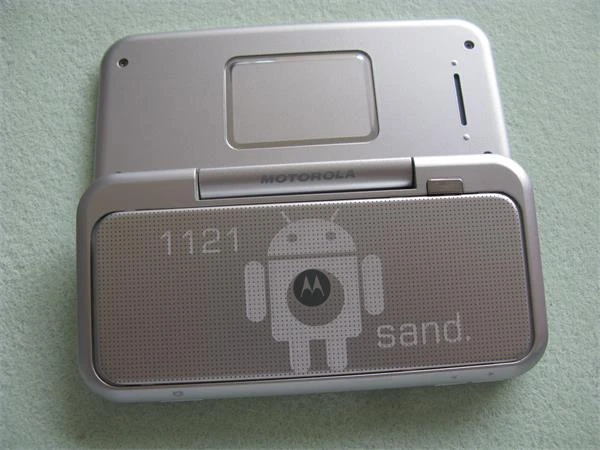
Lasergravierte Produkte aus eloxiertem Aluminium mit kontrastreichen Oberflächenmarkierungen.
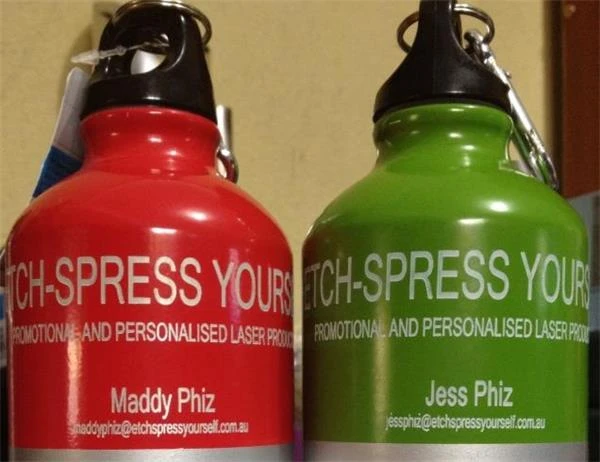
Lasergravierte Flasche aus eloxiertem Aluminium mit personalisierten Oberflächengrafiken.
Sowohl Faserlaser als auch geeignete CO₂-Laser können eloxiertes Aluminium bearbeiten. Sie interagieren jedoch auf unterschiedliche Weise mit der Oberfläche. Testen Sie immer die genaue Eloxalfarbe und Oberflächenbeschaffenheit, anstatt davon auszugehen, dass eine einzige Einstellung bei allen eloxierten Produkten funktioniert.
Lackiertes und pulverbeschichtetes Aluminium eignet sich besonders, wenn das darunterliegende Metall freigelegt und ein hoher Kontrast erzeugt werden soll. Zu den Anwendungen gehören Geräteverkleidungen, Etiketten, Schilder, Gehäuse, Markenprodukte, Bedienfelder und Werbeartikel.
Die Zusammensetzung der Beschichtung ist entscheidend. Unbekannte Beschichtungen sollten vor der Laserbearbeitung identifiziert werden. Wenn bei der Bearbeitung Dämpfe oder Partikelrückstände entstehen, muss eine geeignete Absaugung verwendet werden.
Viele handelsübliche Aluminiumprodukte werden bereits mit einer Oberflächenveredelung geliefert. Dazu gehören Kugelschreiber, Flaschen, Karten, Elektronikgehäuse, Taschenlampen, Werkzeuge, Anhänger und Werbeartikel.
Gehen Sie nicht davon aus, dass jede schwarze, farbige oder metallisch wirkende Oberfläche eloxiert ist. Einige Produkte sind lackiert, pulverbeschichtet, galvanisch beschichtet, mit Klarlack versehen oder mit einer anderen dekorativen Oberflächenveredelung versehen. Wenn Sie die Oberfläche zunächst identifizieren, können Sie erheblich Zeit bei den Tests sparen.
Aluminium vereint geringes Gewicht, Langlebigkeit und ein professionelles metallisches Erscheinungsbild. Dadurch eignet es sich sowohl für die industrielle Kennzeichnung als auch für hochwertige personalisierte Produkte.
Faserlaser können Seriennummern, Teilenummern, QR-Codes, Barcodes, Data-Matrix-Codes, Geräteinformationen und Rückverfolgbarkeitskennzeichnungen auf Aluminiumbauteilen erzeugen.
Diese Anwendungen sind in der Fertigung, Elektronik, Werkzeugherstellung, im Maschinenbau, bei Automobilkomponenten, Vorrichtungen und Verfahren zur Produktkennzeichnung weit verbreitet.
Eloxiertes oder beschichtetes Aluminium wird häufig für Bedienfelder, Maschinenetiketten, Warnschilder, elektrische Kennzeichnungen, Raumschilder, Geräteanhänger und Typenschilder mit Markenkennzeichnung verwendet.
Die Laserbearbeitung ermöglicht eine flexible Herstellung sowohl feststehender Grafiken als auch variabler Informationen, ohne dass zwischen unterschiedlichen Designs physische Werkzeuge ausgetauscht werden müssen.
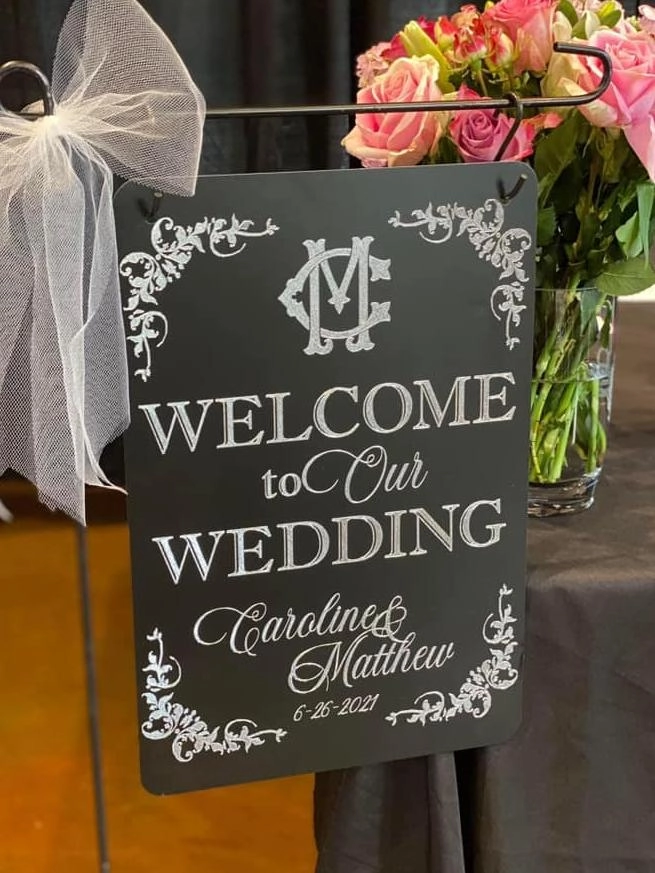
Lasergravierte Werbetafel aus Aluminium für Beschilderungen und Markenpräsentationen.
Aluminiumkugelschreiber, Schlüsselanhänger, Flaschenöffner, Visitenkarten, Anhänger, Geldbörsen, Taschenlampen, Trinkgefäße, Accessoires und Werbeartikel können mit Namen, Daten, Botschaften, Logos und Grafiken personalisiert werden.
Dies ist besonders für Personalisierungsbetriebe von Vorteil, da einzelne Designs schnell angepasst werden können, während der grundlegende Markierungsablauf unverändert bleibt.
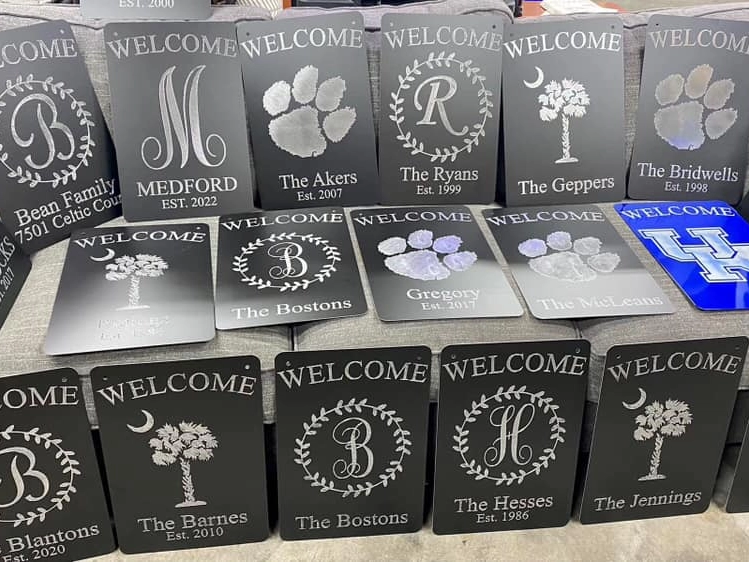
Lasergravierte Einladungen aus Aluminium für personalisierte Veranstaltungen und hochwertige Papeterie.
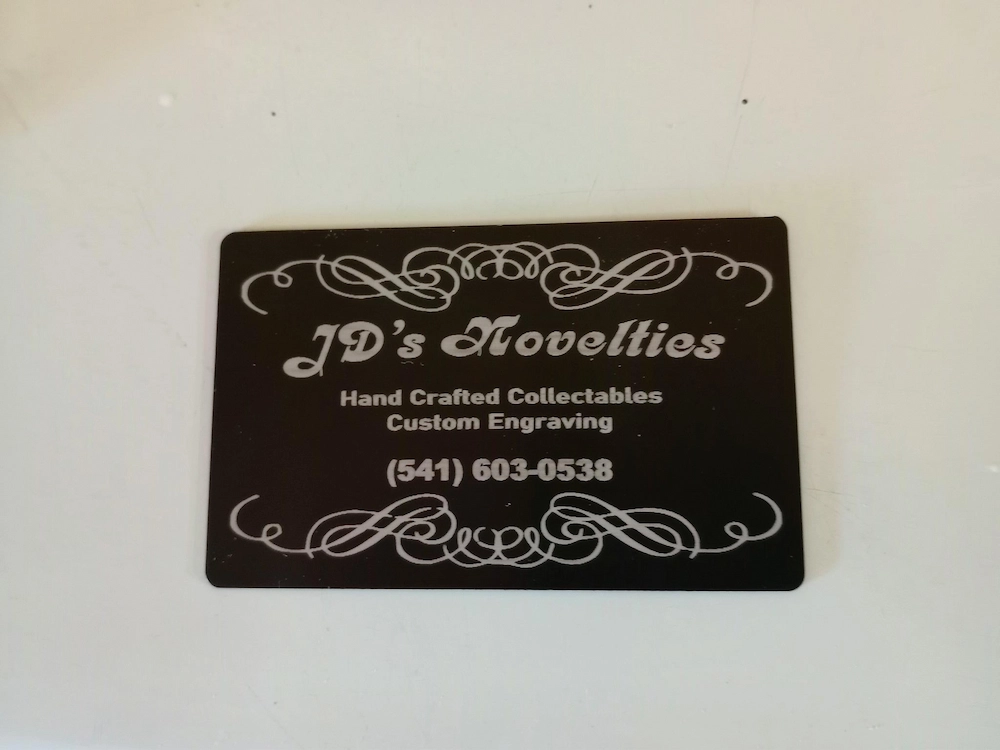
Lasergravierte Visitenkarte aus Aluminium mit kontrastreichen personalisierten Grafiken.
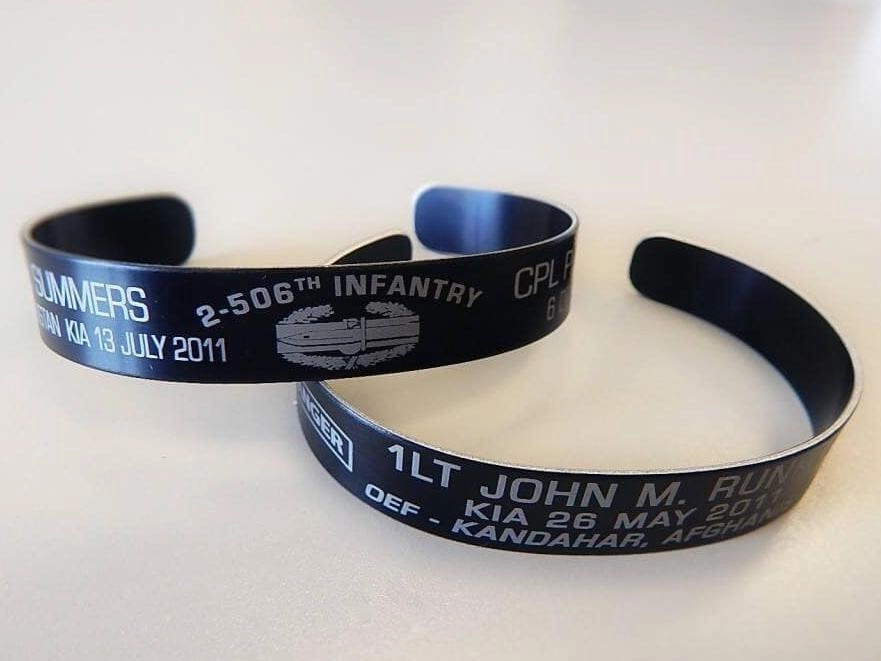
Lasergraviertes Armband aus Aluminium für personalisierte Geschenke und Accessoires.
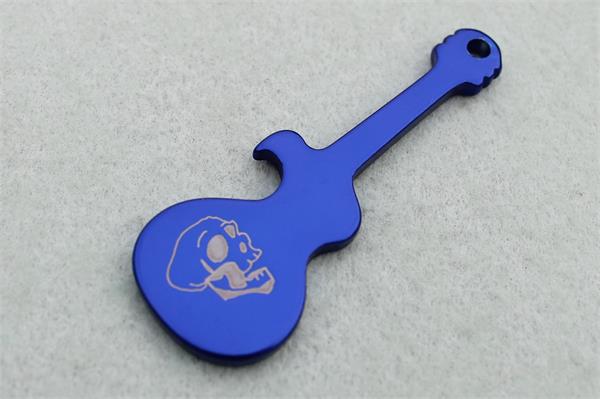
Lasergraviertes Aluminium für personalisierte Schlüsselanhänger und Werbeartikel.
Auf eloxiertem Aluminium lassen sich detailreiche fotografische und grafische Effekte erzeugen, wenn das Bild richtig vorbereitet wird und der Kontrast zwischen bearbeiteten und unbearbeiteten Bereichen ausreichend hoch ist.
Die Fotogravur erfordert in der Regel mehr Tests der Parameter und der Bildvorbereitung als einfache Texte oder Logos. Auflösung, Rasterung, Linienabstand, Oberflächenfarbe, Fokus und Gravurstrategie beeinflussen das endgültige Bild.
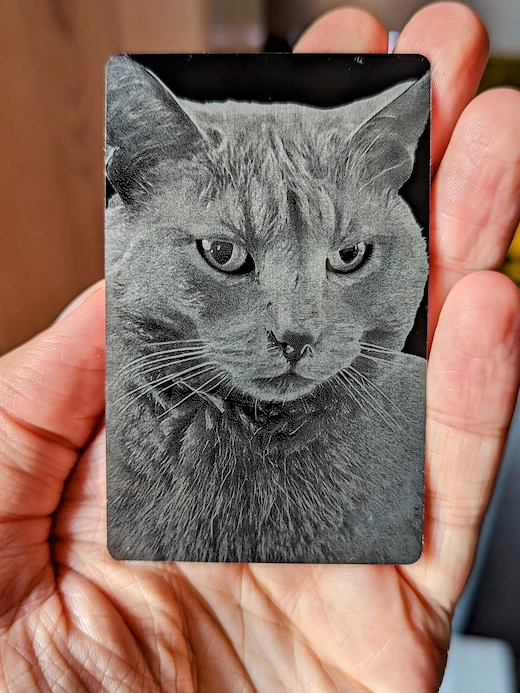
Lasergraviertes Foto auf Aluminium mit detaillierter Wiedergabe von Graustufen und dekorativen Bildmotiven.
Aluminium wird häufig für Elektronikgehäuse, Steuerkästen, Laptop- und Gerätegehäuse, Instrumententafeln, Schalterplatten und Industriegehäuse verwendet. Durch die Laserbeschriftung können Logos, Modellinformationen, Anschlusskennzeichnungen, Seriennummern, Konformitätsinformationen und Bedienungsanweisungen hinzugefügt werden.
Es gibt keine universelle Lasereinstellung für Aluminium. Die Zusammensetzung der Legierung, Eloxierung, Beschichtung, Oberflächenbeschaffenheit, Farbe, Laserquelle, Linse, Fokusposition, der gewünschte Kontrast, die Gravurtiefe, Füllstrategie und Maschinenkonfiguration können die erforderlichen Parameter beeinflussen.
Die folgenden Einstellungen sind aktuelle Ausgangsreferenzen von Thunder Laser. Sie sollten als Grundlage für Tests verwendet werden und nicht als garantierte endgültige Produktionseinstellungen.
| Material | Ergebnis | Geschwindigkeit | Leistung | Frequenz | Füllmodus | Linienabstand | Durchgänge |
|---|---|---|---|---|---|---|---|
| Aluminium | Weiße Markierung | 3500 mm/s | 80% | 50 kHz | Bidirektional | 0.02 mm | 1 |
Ausgangsreferenz für eine weiße Markierung auf Aluminium mit dem Aurora Lite 50W Faserlaser.
| Material | Verfahren | Geschwindigkeit | Leistung | Luftunterstützung | DPI | Linse |
|---|---|---|---|---|---|---|
| Eloxiertes Aluminium | Gravur | 1000 mm/s | 50% | Niedrig | 350 | 2" |
Ausgangsreferenz für die Gravur von eloxiertem Aluminium mit dem Bolt 30W RF CO₂.
MOPA-Faserlaser bieten zusätzliche Möglichkeiten zur Steuerung von Pulsbreite und Frequenz. Deshalb kann ein einziger allgemeiner Parametersatz nicht die gesamte Bandbreite möglicher Ergebnisse abdecken. Schwarze Markierungen, Oberflächenkontraste, flache Gravuren, tieferer Materialabtrag und unterschiedliche Eloxaloberflächen können erheblich voneinander abweichende Parameterkombinationen erfordern.
Beginnen Sie mit einem kontrollierten Materialtest und ändern Sie die Parameter systematisch. Grundlagen zu den Zusammenhängen zwischen den Parametern finden Sie im Leitfaden zur Einstellung von Laserparametern, im Leitfaden zur Laserleistung und im Leitfaden zur Laserbearbeitungsgeschwindigkeit.
Fragen Sie nicht nur danach, welche Laserleistung für Aluminium benötigt wird. Stellen Sie zunächst fest, ob Sie blankes, eloxiertes, lackiertes oder anderweitig beschichtetes Aluminium bearbeiten möchten.
Diese Entscheidung bestimmt die richtige Laserquelle und macht Parametertests wesentlich effizienter.
Fingerabdrücke, Schneidöl, Staub, Poliermittel, Klebstoffreste und andere Oberflächenverunreinigungen können zu ungleichmäßigen Markierungen führen.
Reinigen Sie den Gravurbereich mit einer materialverträglichen Methode und lassen Sie ihn vor der Bearbeitung vollständig trocknen. Vermeiden Sie Reinigungsmittel, die einen öligen oder schützenden Film hinterlassen.
Die richtige Fokussierung ist besonders wichtig für feine Texte, QR-Codes, Fotos und detaillierte Grafiken. Wenn das Werkstück geneigt, gekrümmt oder auf unterschiedlichen Höhen positioniert ist, können Linienqualität und Kontrast innerhalb des Motivs variieren.
Verwenden Sie bei der Bearbeitung wiederkehrender Teile eine Spannvorrichtung. Eine stabile Positionierung verbessert die Wiederholgenauigkeit und reduziert die Rüstzeit bei der Serienfertigung.
Zwei Werkstücke, die beide wie „schwarz eloxiertes Aluminium“ aussehen, können aus unterschiedlichen Legierungen bestehen oder verschiedene Eloxalschichtdicken, Farbstoffe oder Beschichtungen aufweisen. Eine Einstellung, die bei einem Lieferantenmaterial perfekt funktioniert, kann bei einem anderen ein schwächeres Ergebnis erzeugen.
Führen Sie vor der Fertigung einer größeren Serie ein Testraster auf dem tatsächlich verwendeten Produktionsmaterial durch. Beginnen Sie mit validierten Referenzeinstellungen und variieren Sie je nach Laserquelle Geschwindigkeit, Leistung, Frequenz, Linienabstand, Pulsbreite oder Anzahl der Durchgänge.
Eine höhere Leistung ist nicht immer die beste Lösung für eine kontrastarme Aluminiummarkierung. Die Geschwindigkeit bestimmt die Einwirkdauer, die Frequenz beeinflusst das Pulsverhalten, der Linienabstand verändert die Energieüberlappung und mehrere Durchgänge können den Materialabtrag erhöhen, ohne auf einen einzigen besonders intensiven Durchgang angewiesen zu sein.
Bei MOPA-Systemen ist die Pulsbreite eine weitere wichtige Variable. Für anspruchsvolle Effekte auf Aluminium ist das richtige Zusammenspiel der Parameter wichtiger als eine möglichst hohe Leistung.
Wenn eine tiefere Gravur erforderlich ist, können mehrere kontrollierte Durchgänge bessere Ergebnisse liefern als der Versuch, in einem einzigen Durchgang möglichst viel Material abzutragen.
Überwachen Sie zwischen den Durchgängen die Wärmeentwicklung, Rückstände, Fokussierung und Oberflächenqualität. Anforderungen an tiefe Gravuren sollten vor Produktionsbeginn an der tatsächlich verwendeten Aluminiumlegierung getestet werden.
Lacke, Pulverbeschichtungen, Eloxalfarbstoffe, Markierungsmittel und andere Oberflächenbehandlungen können während der Bearbeitung Dämpfe oder Rückstände erzeugen.
Überprüfen Sie die Zusammensetzung der Beschichtung und verwenden Sie eine geeignete Absaugung. Vermeiden Sie die Bearbeitung von Materialien mit unbekannten oder unsicheren Oberflächenbehandlungen, bis deren Zusammensetzung überprüft wurde.
Wenn Sie eine zuverlässige Einstellung gefunden haben, dokumentieren Sie mehr als nur „Aluminium“. Erfassen Sie die Legierung oder das Produkt, den Lieferanten, die Oberflächenbeschaffenheit, die Eloxalfarbe, die Laserquelle, die Linse, den Fokus, die Geschwindigkeit, die Leistung, die Frequenz, gegebenenfalls die Pulsbreite, den Linienabstand, die Anzahl der Durchgänge und das endgültige Ergebnis.
Der Aufbau einer materialspezifischen Parameterbibliothek verbessert die Wiederholgenauigkeit und reduziert unnötige Tests bei wiederkehrenden Bestellungen.
Wenn Sie unsicher sind, wie Ihr Aluminiumprodukt auf den Laser reagiert, bietet Thunder Laser außerdem einen Materialtest-Service an, mit dem die Materialverträglichkeit, Bearbeitungsergebnisse, Maschinenauswahl und empfohlene Ausgangseinstellungen bewertet werden können.
Aluminium eignet sich hervorragend für die Laserbeschriftung und Lasergravur. Eine erfolgreiche Bearbeitung beginnt jedoch mit dem Verständnis der jeweiligen Oberfläche. Blankes Aluminium lässt sich am besten mit Faserlaser- oder MOPA-Faserlasertechnologie bearbeiten. Eloxiertes, lackiertes und beschichtetes Aluminium bietet zusätzliche Möglichkeiten, darunter kompatible CO₂-Laserverfahren.
Für routinemäßige Aluminiumkennzeichnungen wie Logos, Seriennummern, QR-Codes und industrielle Identifikationen bietet die Aurora Series eine direkte Faserlaserlösung. Wenn eine erweiterte Impulssteuerung, schwarze Markierungen auf eloxiertem Aluminium oder tiefere Gravuren erforderlich sind, bietet Aurora MOPA einen größeren Bearbeitungsbereich. Für Werkstätten, die bereits CO₂-Technologie einsetzen, kann Bolt kompatible eloxierte und beschichtete Aluminiumoberflächen bearbeiten, ohne den CO₂-Laser als Lösung für die direkte Gravur von blankem Aluminium darzustellen.
Unabhängig davon, welche Maschine Sie verwenden, sollten Sie mit überprüften Referenzeinstellungen beginnen, die tatsächliche Aluminiumoberfläche testen und die Parameter entsprechend dem gewünschten Kontrast, der Gravurtiefe und den Produktionsanforderungen anpassen. Dieser Ansatz liefert zuverlässigere Ergebnisse, als sich auf eine einzige universelle „Aluminiumeinstellung“ zu verlassen.
Sprechen Sie jetzt mit unseren Experten!
Bitte hinterlassen Sie Ihre Kontakt informationen, damit wir Ihnen besser dienen können.
WOOD LASER ENGRAVING
& CUTTING FAQS
The new Bolt Series has been upgraded with faster engraving speeds (up to 2000 mm/s), higher RF power options (up to 80W), larger working areas, improved Z-axis height, and Standard dual-air assist. We also added a recessed tray design for larger rotary objects and included new accessories such as a conical nozzle.
The new Bolt Series has been upgraded with faster engraving speeds (up to 2000 mm/s), higher RF power options (up to 80W), larger working areas, improved Z-axis height, and Standard dual-air assist. We also added a recessed tray design for larger rotary objects and included new accessories such as a conical nozzle.
The new Bolt Series has been upgraded with faster engraving speeds (up to 2000 mm/s), higher RF power options (up to 80W), larger working areas, improved Z-axis height, and Standard dual-air assist. We also added a recessed tray design for larger rotary objects and included new accessories such as a conical nozzle.
The new Bolt Series has been upgraded with faster engraving speeds (up to 2000 mm/s), higher RF power options (up to 80W), larger working areas, improved Z-axis height, and Standard dual-air assist. We also added a recessed tray design for larger rotary objects and included new accessories such as a conical nozzle.
The new Bolt Series has been upgraded with faster engraving speeds (up to 2000 mm/s), higher RF power options (up to 80W), larger working areas, improved Z-axis height, and Standard dual-air assist. We also added a recessed tray design for larger rotary objects and included new accessories such as a conical nozzle.
BRAUCHEN SIE HILFE BEI DER WAHL DER RICHTIGEN LÖSUNG?
Unser Team berät Sie bei der Auswahl der passenden Maschine, zu Ihren Anwendungen und mit Support, der auf Ihre Anforderungen abgestimmt ist.

 Stable & Consistent MachinesUnlimited ApplicationRobust After-sales SupportFactory Direct Supply


