Home>Blog>Understanding Laser Engraving on Mirrors
Understanding Laser Engraving on Mirrors
01/04/2025
Share:
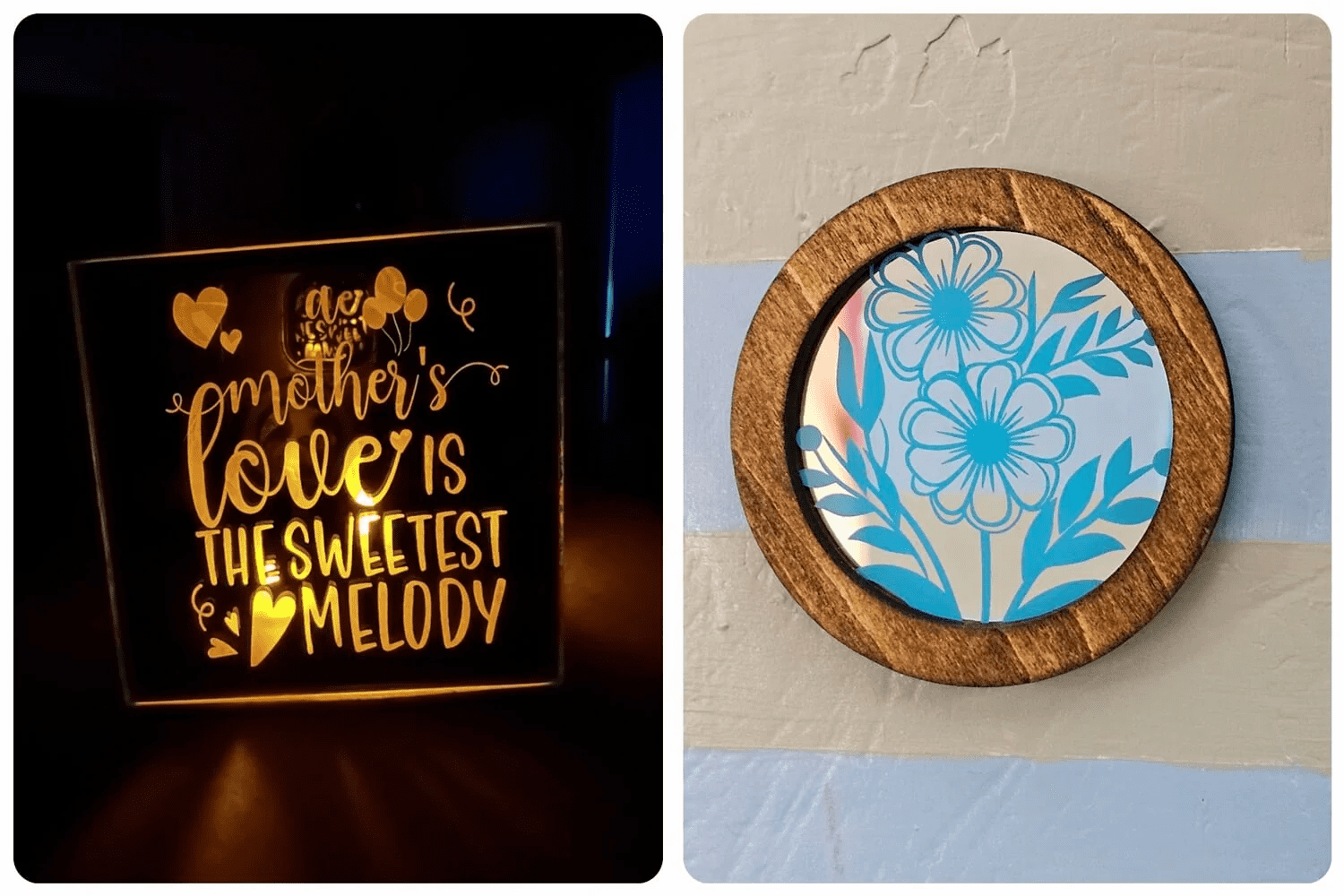
Laser engraving involves directing a concentrated laser beam onto a material’s surface to remove layers and create a predetermined design. When applied to mirrors, the laser typically targets the reflective coating on the back, vaporizing specific areas to reveal the transparent glass beneath. This process results in a design that is visible from the front, offering a striking contrast between the reflective and engraved sections.
It’s crucial to note that engraving directly on the mirror’s front surface can be hazardous, especially with diode lasers, as the reflective nature of the mirror can redirect the laser beam, potentially damaging the equipment or causing injury. Therefore, the standard practice is to engrave the mirror from the back, ensuring both safety and optimal design clarity.
Advantages of Laser-Engraved Mirrors
Precision and Detail
Laser engraving offers unparalleled precision, allowing for the reproduction of intricate designs and fine details that might be challenging with traditional etching methods. This high level of accuracy makes it ideal for creating complex patterns, detailed images, and crisp text.
Durability
Engraving on the back of mirrors, known as reverse engraving, protects the design from external wear and tear, ensuring longevity. Additionally, such engravings are more resistant to fingerprints and smudges, maintaining their aesthetic appeal over time.
Versatility
Laser-engraved mirrors are versatile in application, suitable for personalized gifts, decorative home accents, corporate branding, and commemorative items. Their customizable nature allows for a wide range of creative expressions tailored to individual preferences.
Selecting the Appropriate Mirror for Engraving
The choice of mirror significantly influences the engraving outcome. Consider the following factors:
Thickness
Thinner mirrors are generally preferred for engraving as they require less laser power and reduce the risk of heat damage. Thicker mirrors may necessitate multiple passes, increasing processing time and potential thermal stress.
Coating Type
Mirrors come with various backing materials, such as paint, plastic, or specialized coatings. Understanding the composition of this reflective layer is crucial, as it affects how the laser interacts with the mirror and the quality of the engraving.
Base Material
The mirror’s base, typically glass, should be free from imperfections like bubbles or scratches, which can compromise the engraving quality. A smooth, flawless surface ensures a clean and precise design.
Preparing for Laser Engraving
Safety Precautions
Prioritizing safety is essential when laser engraving mirrors:
Ventilation
Engraving can produce smoke and potentially toxic fumes, especially from certain coatings. Ensure adequate ventilation or use an exhaust system to maintain air quality.
Protective Equipment
Wear appropriate safety gear, including laser safety glasses to protect your eyes and gloves to handle materials safely. Laser Engraving Tips
Secure Positioning
Firmly secure the mirror to prevent movement during engraving, which could lead to misalignment or accidents.
Mirror Preparation
Cleaning
Thoroughly clean the mirror’s surface to remove dust, oils, or residues that could interfere with the engraving process. Use a lint-free cloth and appropriate glass cleaner.
Masking
Apply masking tape to areas not intended for engraving to protect them from accidental laser exposure. This step is particularly useful when working with complex designs requiring precise delineation.
Engraving Process
Design Preparation
Using graphic design software, create or import the desired image or text. Since the engraving occurs on the mirror’s back, remember to horizontally flip (mirror) the design to ensure correct orientation when viewed from the front.
Laser Settings
Adjust the laser engraver’s settings based on the mirror’s characteristics and desired engraving depth. Key parameters include:
Power
Higher power settings remove more material but increase the risk of damaging the mirror. Start with a moderate setting and adjust as needed.
Speed
Faster speeds result in shallower engravings, while slower speeds allow for deeper cuts.
Resolution (DPI)
Higher dots per inch yield finer details but may require longer processing times.
Conducting test engravings on a sample piece can help determine optimal settings.
Focusing
Properly focus the laser to ensure precision. Some machines offer autofocus features to simplify this step.
Engraving
Once settings are configured, initiate the engraving process. Monitor the operation to ensure consistent quality and address any issues promptly.
Post-Engraving Finishing
After engraving:
Cleaning
Remove any residual debris from the engraved areas using a soft brush or cloth. Ensure the surface is clean before proceeding to additional finishing steps.
Painting (Optional)
To enhance the visibility and contrast of the engraved design, consider applying



.png "laser cutter Globle") International
International
 United States
 Brasil
 Canada
 Costa Rica
 Mexico
 Česká
Česká
 Romania
 Polska
 Ireland
 Italia
 Lietuva
 Россия
 Deutschland
 Britain
 Україна
 France
 Sverige
 Norway
 Denmark
 Ελλάδα
 Portugal
 한국
한국
 中国
中国
 中国香港
中国香港
 Israel
 中國臺灣
中國臺灣
 ジャパン
ジャパン India
India
 پاکستان
 پශ්රී ලංකා
 ประเทศไทย
 Australia
 New Zealand
 South Africa